Fold & Fetch — Laundry Pickup Add-Your-Stop Route Site
What is the Laundry Pickup Route Map Site? Built with ClickFunnels AI, it is a van-route laundry booking page where visitors tap their corner on a street map and book a $39 pickup.
About this template
What is Fold & Fetch — Laundry Pickup Add-Your-Stop Route Site?
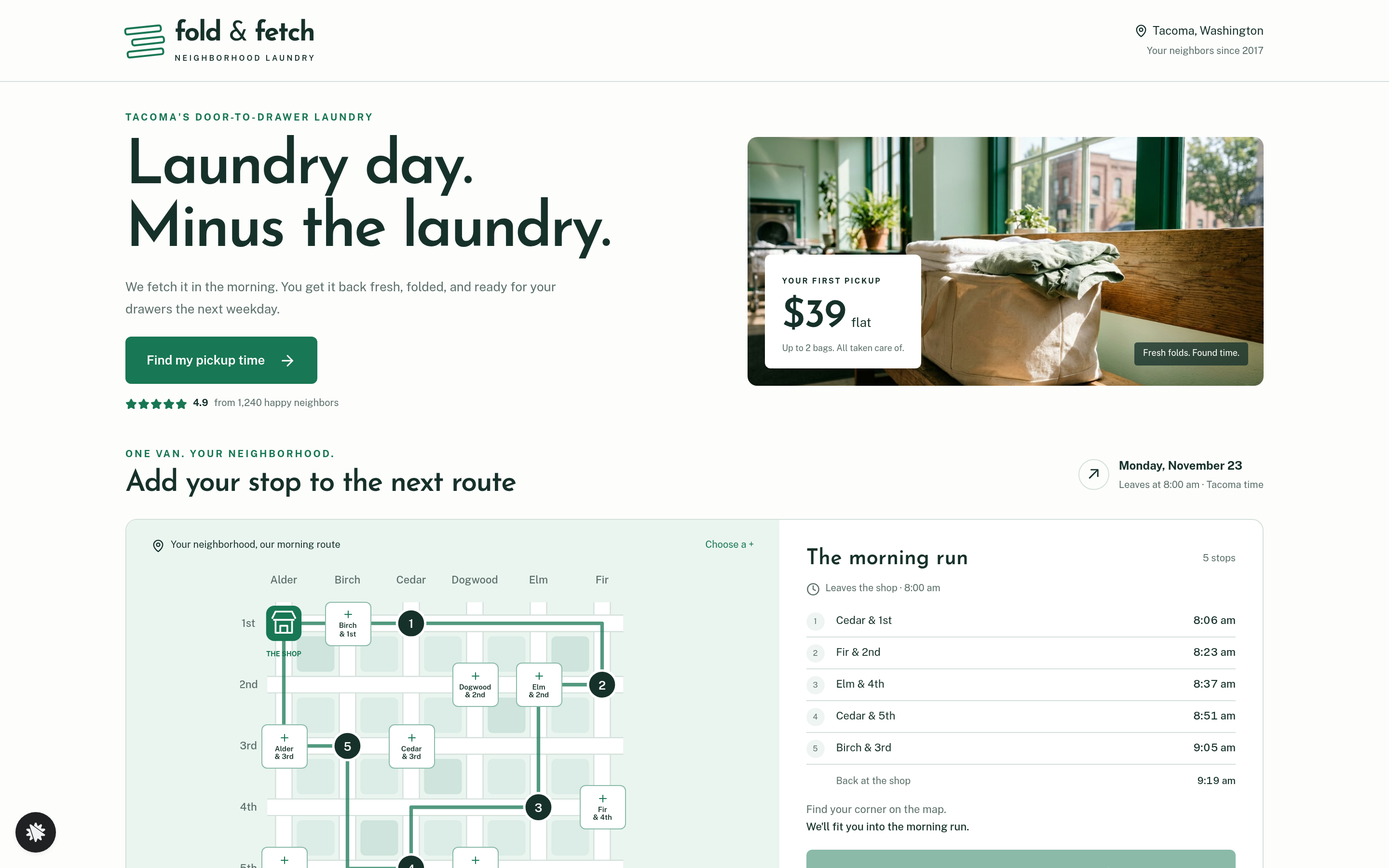
Fold & Fetch Laundry is a wash-and-fold service in Tacoma, Washington. It has folded 9,400 bags since 2017 and has 4.9 stars from 1,240 reviews. One van runs a weekday morning route, and a first pickup of up to two bags costs $39. This ClickFunnels AI template replaces a plain contact form with a street map: visitors tap their corner, see when the van arrives, and book from there.
What you get
- Home (/): the headline, the route map, a "Book this pickup" button, a three-step how-it-works section, the price card with the $12 hang-dry delicates bump, three customer quotes, a service-area panel and a FAQ. A "Not on the map?" form for addresses outside the grid is saved as a lead.
- Schedule (/schedule): the chosen corner, day and time recapped. Name, email, phone, door details and bag count (one or two) are saved as a lead.
- Pay (/pay): a card checkout for $39, with the $12 hang-dry delicates bag as an order bump.
- Booked (/booked): the pickup day and time, and the folded return on the next weekday.
Its own 404 page comes along as well.
How it works
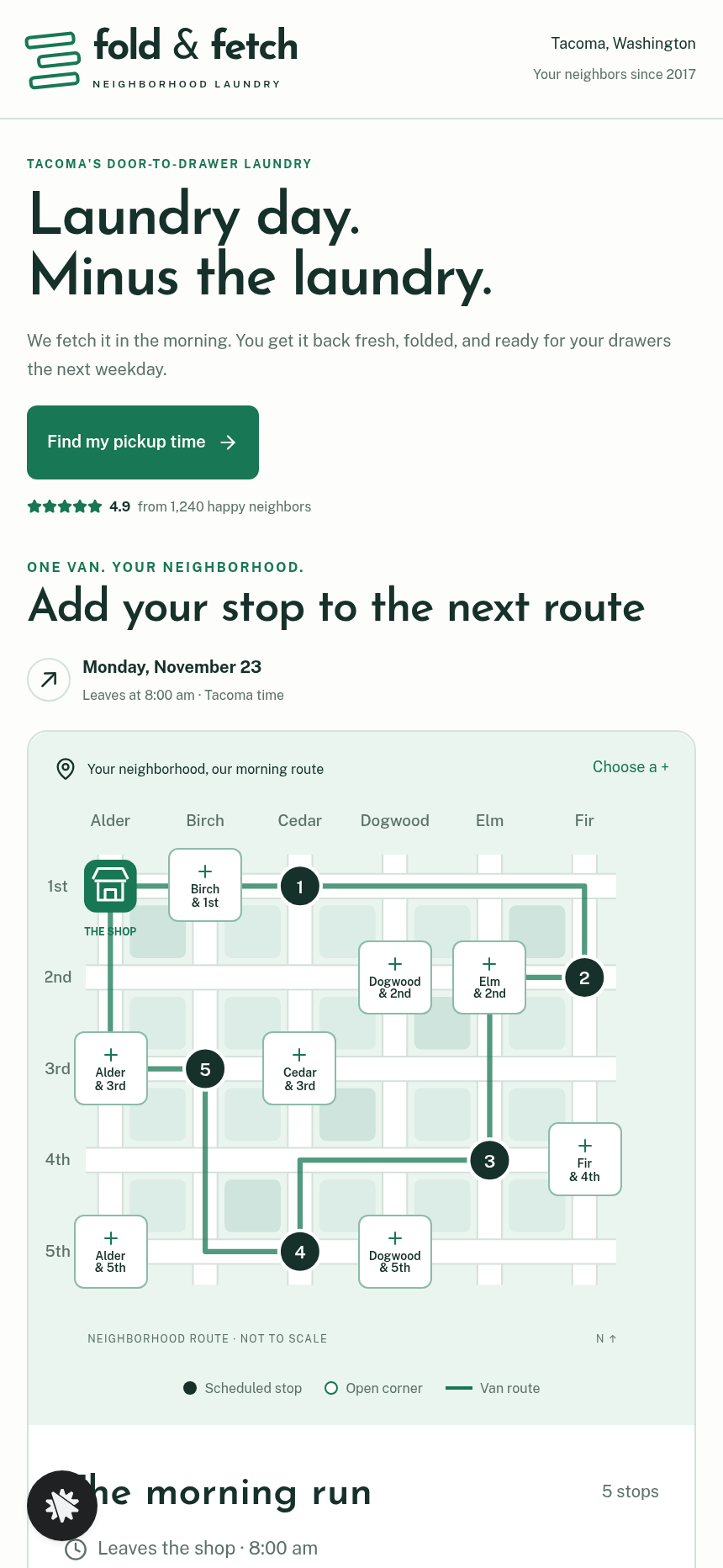
- On arrival, the home page already shows the morning route: six avenues and five streets, the shop at Alder & 1st, five booked stops and the van's line.
- Eight open corners are buttons. When the visitor taps one, such as Dogwood & 2nd, the new stop goes in where it adds the fewest blocks, and a readout gives the pickup time.
- The visitor presses "Book this pickup", which carries the corner to the schedule page. There they enter contact and door details and the bag count.
- On the pay page they pay $39 by card, with the optional $12 delicates bag.
- The booked page confirms the pickup day and time and the folded return.
The signature step
The route map on the home page is what sets this site apart. The van leaves the shop at 8:00 am. Distance is counted in blocks, the van takes 3 minutes per block, and each stop takes 5 minutes. When a visitor taps Dogwood & 2nd, the readout says about 8:17 am, stop 2 of 6, adds 0 blocks, and the van is back at 9:24 am. The chosen corner stays in the link from the home page through the schedule and pay pages, so the booking keeps the same stop.
Who it's for
- Wash-and-fold laundry pickup operators with a neighborhood van route
- Mobile groomers, meal-kit deliverers and grocery runners who book by arrival window
- Mobile car-wash and detailing services with a fixed daily circuit
- Any route-based local service where showing the arrival time helps close the booking
Design
- Type pairing
- Josefin Sans display Public Sans body
- Motion
- route line redraws with the inserted stop; times update
- Signature screen
- Add-your-stop route map: tap an open corner, it joins the van's route where it adds the fewest blocks and every stop's time updates
What can you use Fold & Fetch — Laundry Pickup Add-Your-Stop Route Site for?
- A solo laundry operator in a walkable neighborhood shows open morning slots on the route map so customers choose their corner and book without a phone call.
- A mobile dog groomer on a fixed Tuesday to Thursday circuit swaps in her own copy and uses the same corner tap to book a grooming window.
- A meal-prep delivery service on a weekly Wednesday route shows subscribers which blocks are already on the run, so they pick the stop nearest home.
- A residential window cleaner on a monthly loop fills the last open stops for the next crew and charges through the pay page.
- A dry-cleaning pickup service entering a new area uses the Not on the map form to collect demand from addresses outside the grid before adding a route.
Frequently asked questions
What is the Laundry Pickup Route Map Site?
Who is it for?
What pages are included?
How do I customize the Laundry Pickup Route Map Site in ClickFunnels AI?
Does it include a checkout or order form?
Can I use my own branding and domain?
How is this different from a classic local business booking site?
What setup is required before going live?
Related templates
 Local Business
Elm Street Garage — Slide-the-Cars Parking Site
Elm Street Garage Slide-the-Cars Parking Site is a ClickFunnels AI reservation site for a 420-space garage in downtown Portland, Maine. The home page opens with a sliding-car puzzle, then visitors pick a day and arrival time, pay $14 by card, and get a confirmation page.
 Local Business
Gull Point Putt — Putt-the-7th Mini Golf Site
Gull Point Putt — Putt-the-7th Mini Golf Site is a booking funnel built in ClickFunnels AI for an 18-hole seaside mini-golf course in Ocean Beach, San Diego. Visitors putt the 7th hole on the home page, then book a group round for a flat $48.
 Local Business
Awl & Last — Point-to-the-Repair Cobbler Site
Awl & Last Point-to-the-Repair Cobbler Site is a service-booking-and-checkout funnel built in ClickFunnels AI for shoe and boot repair shops that take work by mail. Visitors tap the parts of a drawn boot to build a priced repair quote, then pay $20 for a prepaid mail-in box — no phone call, no form-filling, no guesswork.
 Local Business
Bead & Count — Abacus Club Trial Class Site
Bead & Count — Abacus Club Trial Class Site is a local-business site, made in ClickFunnels AI, where a parent (or the child on their lap) can play with an interactive abacus before booking a $15 trial class. It moves a visitor from curiosity to a confirmed session in one path.
Make this template your starting point.
Inspect the preview, plan your changes, and test the workflow before you share it.
Use this template