SignRight — Mobile Notary Dispatch Site
Mobile Notary Dispatch Site is an on-demand service dispatch site built in ClickFunnels AI for mobile notary businesses that need to convert cold visitors into paid, tracked appointments — no phone tag required. The funnel puts a live dispatch request on the home page, collects a card hold at checkout, and shows the buyer a real-time job tracker.
About this template
What is SignRight — Mobile Notary Dispatch Site?
SignRight is a four-page dispatch funnel for mobile notaries. Every page has one job: move the visitor from "I need a notary" to a paid, tracked appointment. The home page (Index, route /) is the dispatch card itself — no separate landing page required. The checkout page (/checkout) collects the trip fee. The tracker page (/track) shows the buyer their notary and job status. The services page (/services) lists flat prices. An admin dashboard (/admin) holds contacts and funnel metrics.
What you get
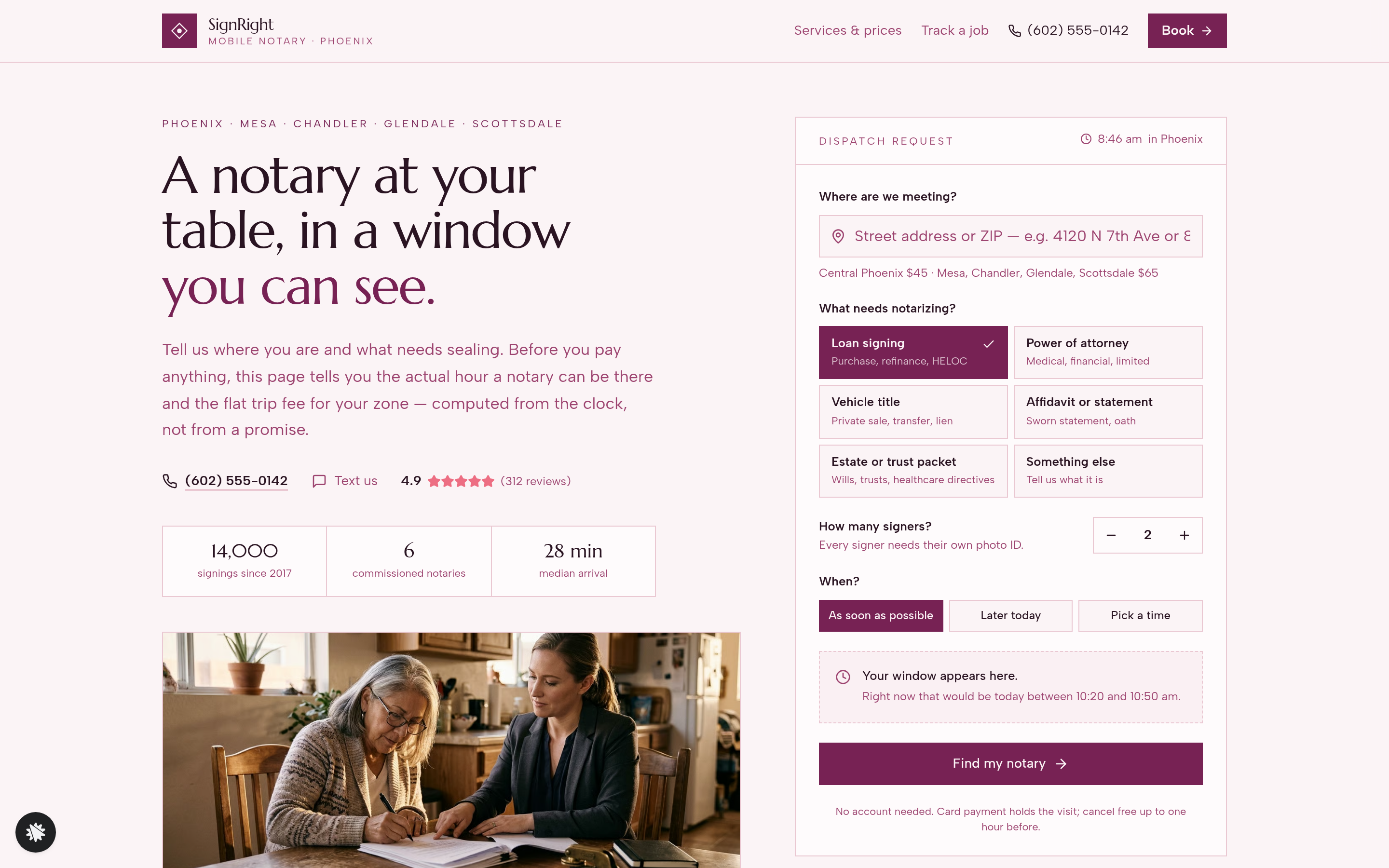
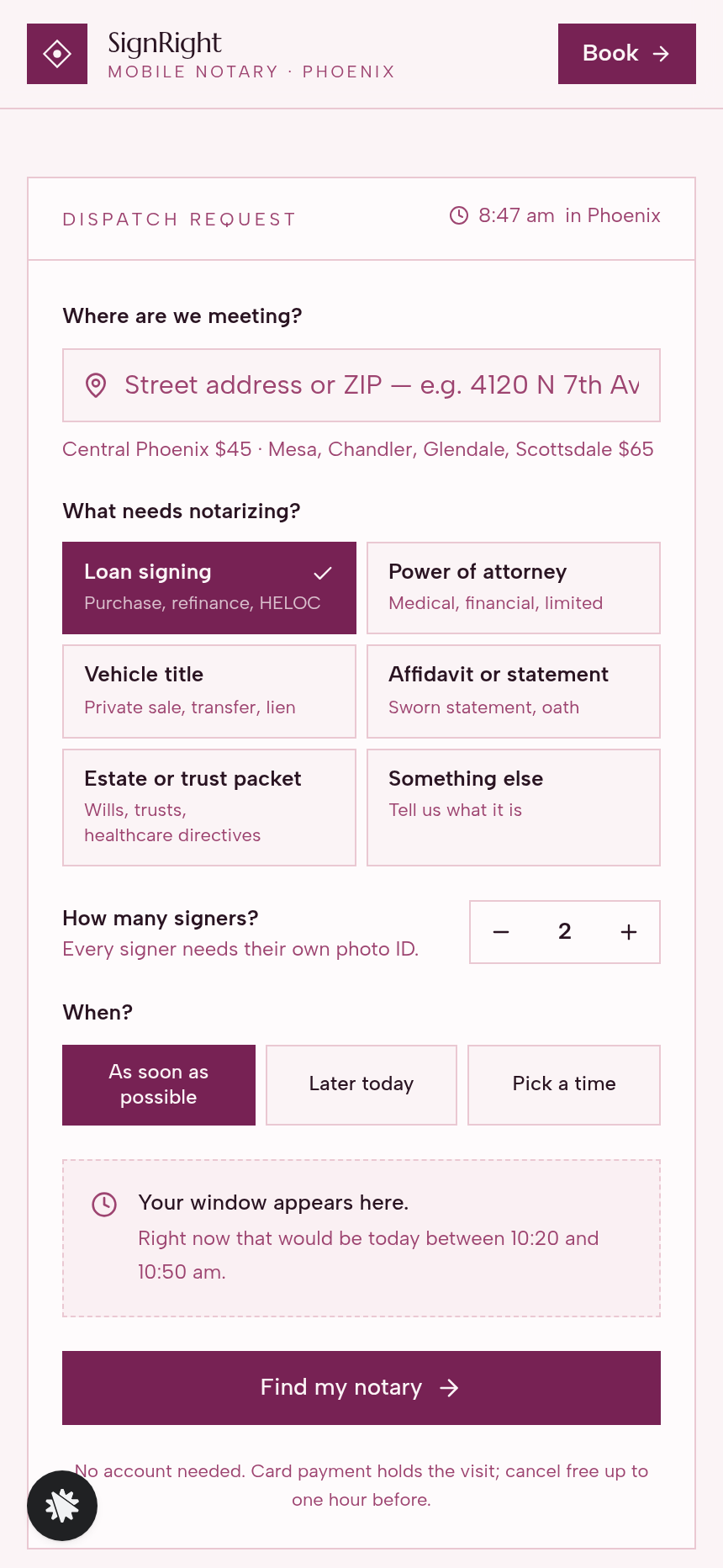
- Landing page (/) — split hero with a serif headline and stats on the left, dispatch request card on the right. The card accepts an address or ZIP, six document-type tiles (loan signing, power of attorney, vehicle title, affidavit, estate/trust packet, other), a signer stepper, and three timing options (as soon as possible, later today, pick a time). Below the fold: a two-fee breakdown, a "what happens after you book" four-step walkthrough, reviews, a service-area ZIP list, a hospital and jail visits section, an FAQ, and a sticky Call · Text · Book bar on mobile.
- Checkout (/checkout) — visit summary (arrival window, address, document type, signer count), flat trip fee ($45 central Phoenix, $65 outer cities), card fields, and a one-sentence cancellation policy. Submitting the form lands the buyer on the tracker.
- Job tracker (/track) — assigned notary card (photo, name, years commissioned, languages), four-step status timeline (Booked → Notary assigned → On the way → Signed), the arrival window, and a "have this on the table" checklist. Cold visitors see a preview state so the page is never blank.
- Services (/services) — full price table, the six document categories with their per-category checklist, hospital and jail visit notes, and a CTA back to the dispatch card.
- Dashboard (/admin) — funnel conversion rate, page list in visitor order, and a contacts table (everyone who submitted a dispatch request, newest first).
How it works
- A visitor lands on / from a search result or a referral link.
- They fill in the dispatch card: address, document type, signer count, timing.
- The card computes a live arrival window ("A notary can be there between 2:40 and 3:10 pm") and shows the flat trip fee for their zone.
- They tap Find my notary and move to /checkout.
- At checkout they review the visit summary and pay the trip fee with a card. Every booking stores the contact and visit details in the funnel's built-in database, visible in the owner dashboard at /admin without connecting an external CRM.
- After payment they land on /track with their assigned notary and a live status timeline.
- When the job closes, the operator sees the completed record in the dashboard.
Because the checkout page collects a real card hold, the money path runs: dispatch card → /checkout (trip fee) → /track (confirmation + job status) — the same order-page-to-confirmation structure the template uses to wire payment to fulfillment.
The signature step
The dispatch card on / is the funnel's signature interaction. As the visitor changes the zone (by editing the address or ZIP), the document type, or the timing, the arrival window recalculates in real time from the Phoenix clock. The visitor sees a concrete hour range before they ever reach the checkout page, so the card hold at /checkout is a confirmation of something already agreed on, not a surprise.
Who it's for
- Mobile notaries and loan-signing agents who want bookings from search traffic without a phone call.
- Notary businesses covering multiple cities (Phoenix, Mesa, Chandler, Glendale, Scottsdale) that need zone-based pricing shown automatically.
- Any on-site service that sells a time window — locksmiths, mobile mechanics, IV therapy, mobile vets — where showing the arrival window before checkout reduces drop-off.
- Solo operators who want an owner dashboard to track every lead and booking in one place without a separate CRM.
Design
- Type pairing
- Marcellus display Albert Sans body
- Motion
- none; reduced-motion: static
- Signature screen
- Dispatch request with a live arrival window
- References
-
- On-demand service dispatch with a time window
What can you use SignRight — Mobile Notary Dispatch Site for?
- A six-notary Phoenix operation replaces its phone-booking workflow with this funnel, targeting 120 visits a month from Google search traffic — visitors see a live arrival window and pay the trip fee online without calling.
- A solo loan-signing agent in Scottsdale uses the outer-city pricing zone ($65 trip fee) to cover Mesa and Chandler, with the dispatch card automatically showing the right fee based on the ZIP entered.
- A notary specializing in hospital and hospice visits highlights the bedside-visit section on the services page and in the FAQ to capture facility coordinators who search for in-facility notary services.
- A mobile locksmith adapts the template by swapping the six document-type tiles for six lock-service categories (lockout, rekey, deadbolt, safe, automotive, commercial), keeping the live arrival window and flat trip fee logic intact.
- An IV therapy clinic uses the signer stepper as a patient-count field and the two pricing zones as home-visit versus office-visit rates, collecting a card hold at checkout and showing the client a clinician card on the tracker page.
- A notary business owner monitors all dispatch submissions from the `/admin` dashboard — every lead's address, document type, and booking status stored in the built-in contact database — without connecting a separate CRM during the first month of operation.
Frequently asked questions
What is the Mobile Notary Dispatch Site template?
Who is this template for?
What pages are included?
How do I customize the Mobile Notary Dispatch Site in ClickFunnels AI?
Does it include a checkout or order form?
Can I use my own branding and domain?
How is this different from a classic ClickFunnels lead-capture funnel?
What setup is required before going live?
Related templates
 Local Business
Fold & Fetch — Laundry Pickup Add-Your-Stop Route Site
What is the Laundry Pickup Route Map Site? Built with ClickFunnels AI, it is a van-route laundry booking page where visitors tap their corner on a street map and book a $39 pickup.
 Local Business
Elm Street Garage — Slide-the-Cars Parking Site
Elm Street Garage Slide-the-Cars Parking Site is a ClickFunnels AI reservation site for a 420-space garage in downtown Portland, Maine. The home page opens with a sliding-car puzzle, then visitors pick a day and arrival time, pay $14 by card, and get a confirmation page.
 Local Business
Gull Point Putt — Putt-the-7th Mini Golf Site
Gull Point Putt — Putt-the-7th Mini Golf Site is a booking funnel built in ClickFunnels AI for an 18-hole seaside mini-golf course in Ocean Beach, San Diego. Visitors putt the 7th hole on the home page, then book a group round for a flat $48.
 Local Business
Awl & Last — Point-to-the-Repair Cobbler Site
Awl & Last Point-to-the-Repair Cobbler Site is a service-booking-and-checkout funnel built in ClickFunnels AI for shoe and boot repair shops that take work by mail. Visitors tap the parts of a drawn boot to build a priced repair quote, then pay $20 for a prepaid mail-in box — no phone call, no form-filling, no guesswork.
Make this template your starting point.
Inspect the preview, plan your changes, and test the workflow before you share it.
Use this template