Cue & Cable — Patch-the-Stage Event Sound Agency Site
Cue & Cable is a five-page agency site for an event sound company in Columbus, Ohio, built in ClickFunnels AI. Visitors patch a stage diagram, answer four questions about their event, pick a planning call, and pay a $150 site-visit deposit.
About this template
What is Cue & Cable — Patch-the-Stage Event Sound Agency Site?
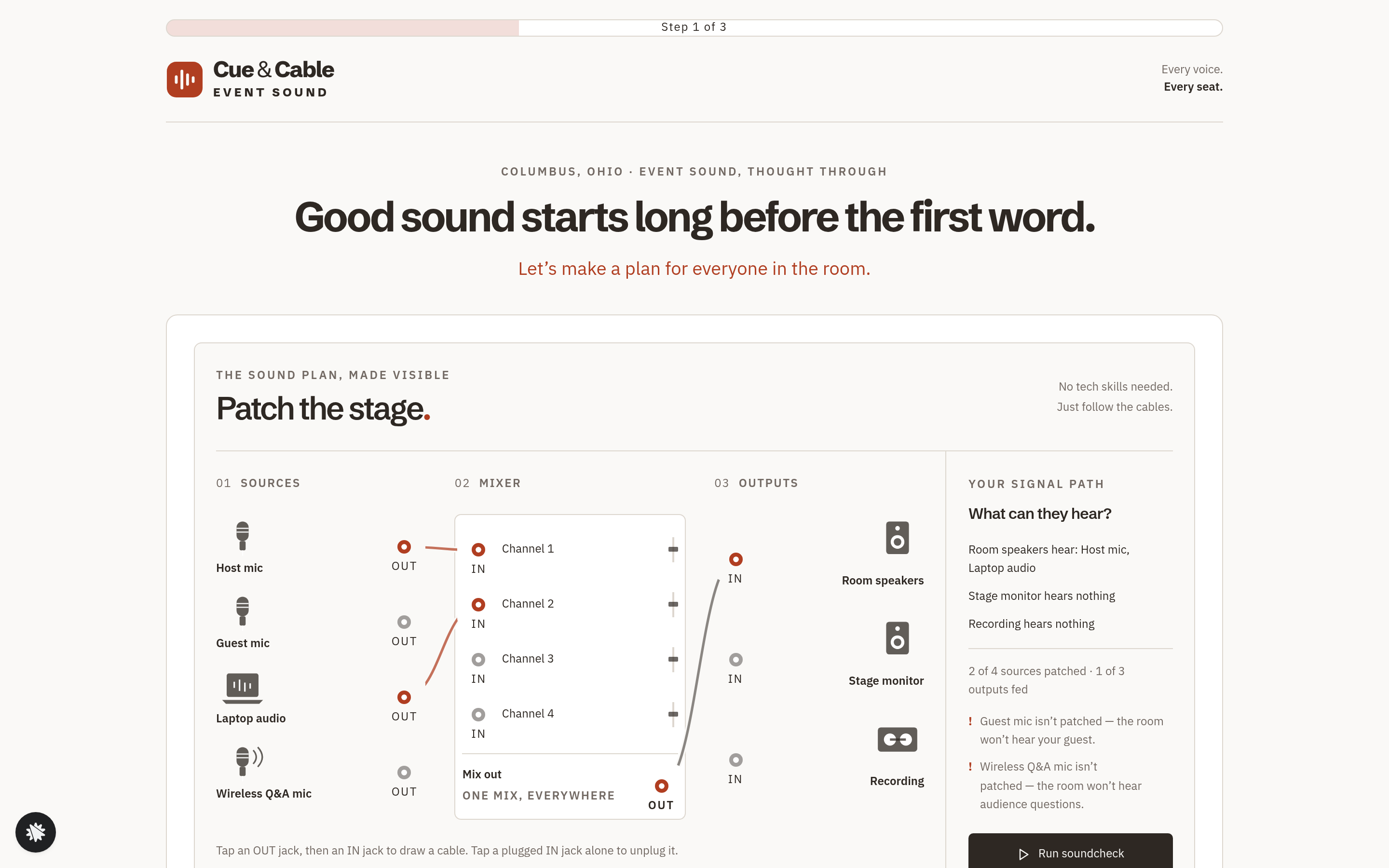
Cue & Cable is a five-page agency site for an event sound company in Columbus, Ohio. The first screen is a working stage-patch diagram: visitors route microphones through a mixer to the room speakers, stage monitor, and recording output, and see what each output hears. From there the funnel moves to a short event brief, a planning call, and a paid site-visit deposit.
What you get
- Home (/): a progress bar, the patch tool, a founder letter, three case cards with drawn stage plans, and planner quotes.
- Questions (/questions): four tile questions on event type, headcount, room, and month, followed by name, email, and company. Answers are saved as a lead together with the visitor's patch.
- Call (/call): the next five business days, with three call times on each day. Some times show as taken.
- Deposit (/deposit): a recap of the chosen call, card checkout for a flat $150 site-visit deposit that comes off the final quote, and an optional $60 bump for a printed stage plot and cable list.
- Booked (/booked): the confirmed call in plain words, and the site-visit plan.
How it works
A visitor works the patch tool on the home page, then answers the four questions on /questions. On /call they choose one of the open times, and /deposit recaps that choice and takes the deposit. The /booked page confirms the call time and what the site visit covers.
To make the site yours, replace the agency name, city, case studies, and quotes with your own details, then check the call times against your real calendar.
The signature step
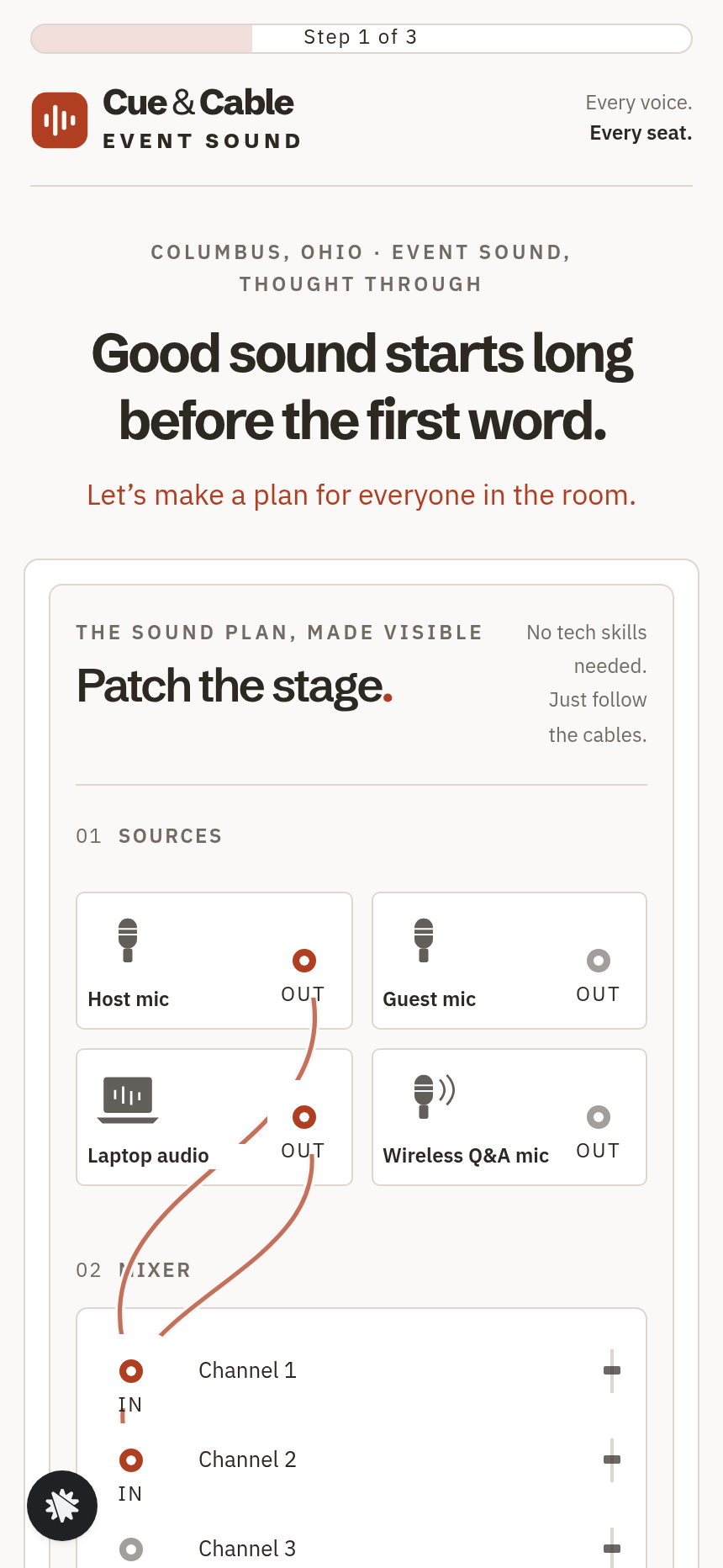
The patch tool opens with Host mic routed to Channel 1 and Laptop audio routed to Channel 2, with Mix out feeding Room speakers. Guest mic and Wireless Q&A mic start unpatched. To draw a cable, the visitor taps an output jack and then an input jack, and a panel beside the diagram updates to list what each output hears. The soundcheck button runs a signal path along the drawn cables, so the visitor can see the plan working before reading any copy.
Who it's for
- Event sound and AV agencies that want to show their planning before they sell gear.
- Conference production companies that book site visits ahead of a full quote.
- Wedding and party DJs who offer a structured sound-plan consultation.
- Church tech teams that plan sound for outside events.
- Any service business that sells a planning call and a site visit before it quotes equipment.
Design
- Type pairing
- Schibsted Grotesk display IBM Plex Sans body
- Motion
- a soundcheck dot travels along each cable
- Signature screen
- Patch-the-stage: four sources, a four-channel mixer and three outputs; the panel lists what each output hears
- References
-
- 10.4 case-study funnel second step (progress bar, one tall card with a video frame, wide button, quoted headline, long letter in short paragraphs, button again)
What can you use Cue & Cable — Patch-the-Stage Event Sound Agency Site for?
- An event AV company in a mid-size city uses the patch tool to show conference organizers how signal routing works before they book sound for the first time.
- A wedding DJ firm replaces the copy with its own name and city, then uses the call picker to fill its consultation calendar.
- A church tech team that plans sound for outside events collects headcount and room type before each planning call.
- A conference production crew reads the event brief answers before each discovery call, so the conversation starts with the basics already covered.
- A production company adds the $60 printed stage plot bump to its planning package.
- A regional AV rental business uses the Booked page to state that the $150 deposit covers the site visit and comes off the final quote.
Frequently asked questions
What is Cue & Cable?
Who is this template for?
What pages are included?
What does the patch tool show?
How does the deposit work?
What does the call step offer?
How is it different from a standard agency application funnel?
How do I customize Cue & Cable in ClickFunnels AI?
Related templates
 Agency Sites & Funnels
Second Ring — Answering Service Staffing Calculator Agency Site
Answering Service Staffing Calculator Site is an agency site built in ClickFunnels AI for a live call-answering service. Its Erlang C calculator shows how many phone agents a busiest hour needs, then visitors can start a two-week overflow trial for $149.
 Agency Sites & Funnels
Pickline — Program-the-Picker Warehouse Robotics Agency Site
Pickline Program-the-Picker Agency Site is a ClickFunnels AI template built for Pickline Automation, a Reno, Nevada robotics firm that fits picking robots into warehouses. It opens with a picking-robot tool and leads visitors to book a $450 on-site pick-path audit with a card checkout.
 Agency Sites & Funnels
Paper Compass — Custom Map Studio Pin-Your-Places Site
Custom Map Studio Pin-Your-Places Site is a studio-site-with-deposit-checkout template built in ClickFunnels AI for illustrated-map studios. Visitors pin places on a drawn town, watch the starting price update, then pay a $95 sketch deposit.
 Agency Sites & Funnels
Short Agenda — Meeting Cost Meter Agency Site
Meeting Cost Meter Agency Site is a template made in ClickFunnels AI for an agency website. It opens a live taxi-style meeting meter on the home page, prints a cost receipt when the visitor ends the meeting, and sends them to a flat-$390 audit week checkout.
Make this template your starting point.
Inspect the preview, plan your changes, and test the workflow before you share it.
Use this template