The One-Word Workshop — Word Wall Paid Workshop Funnel
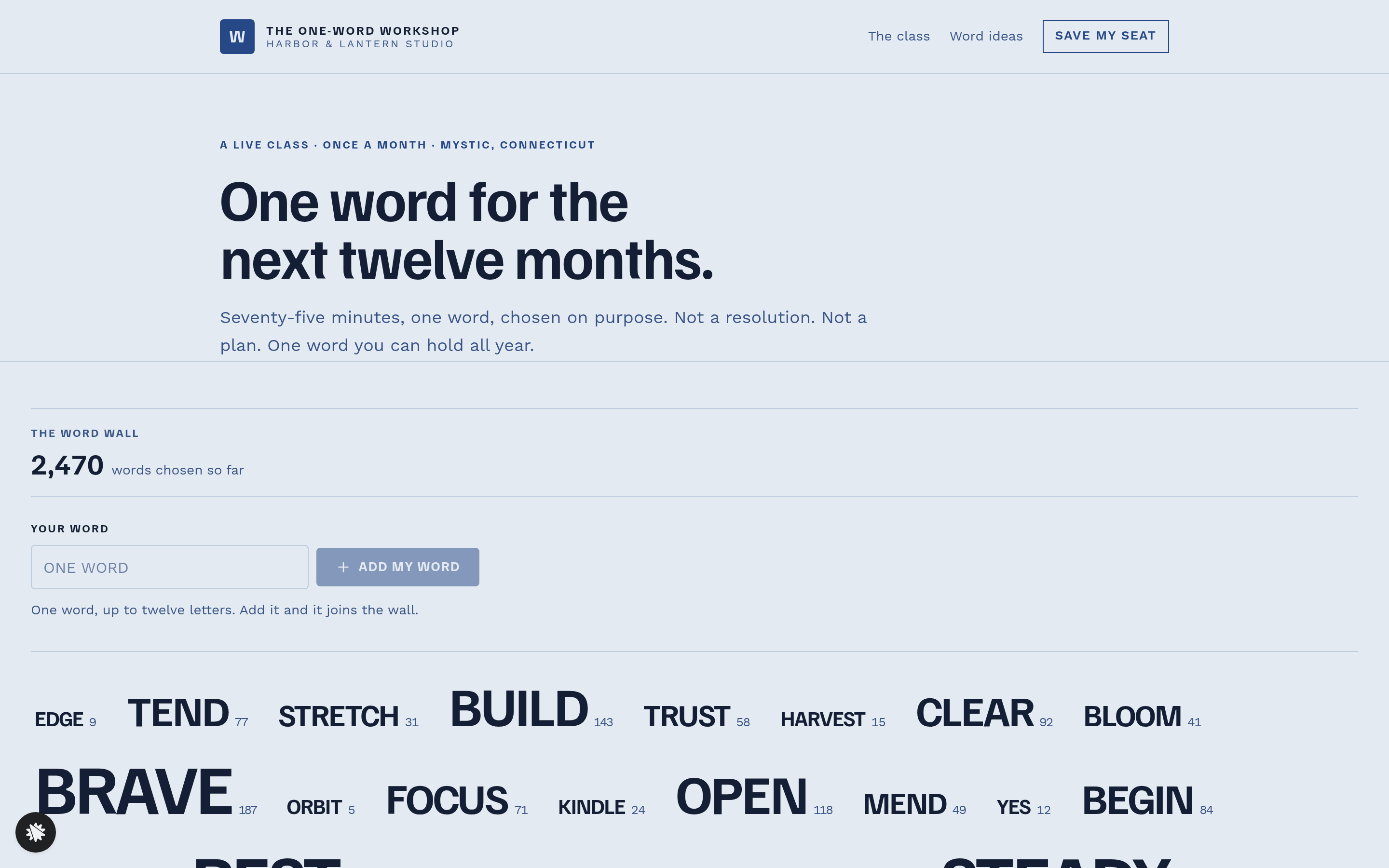
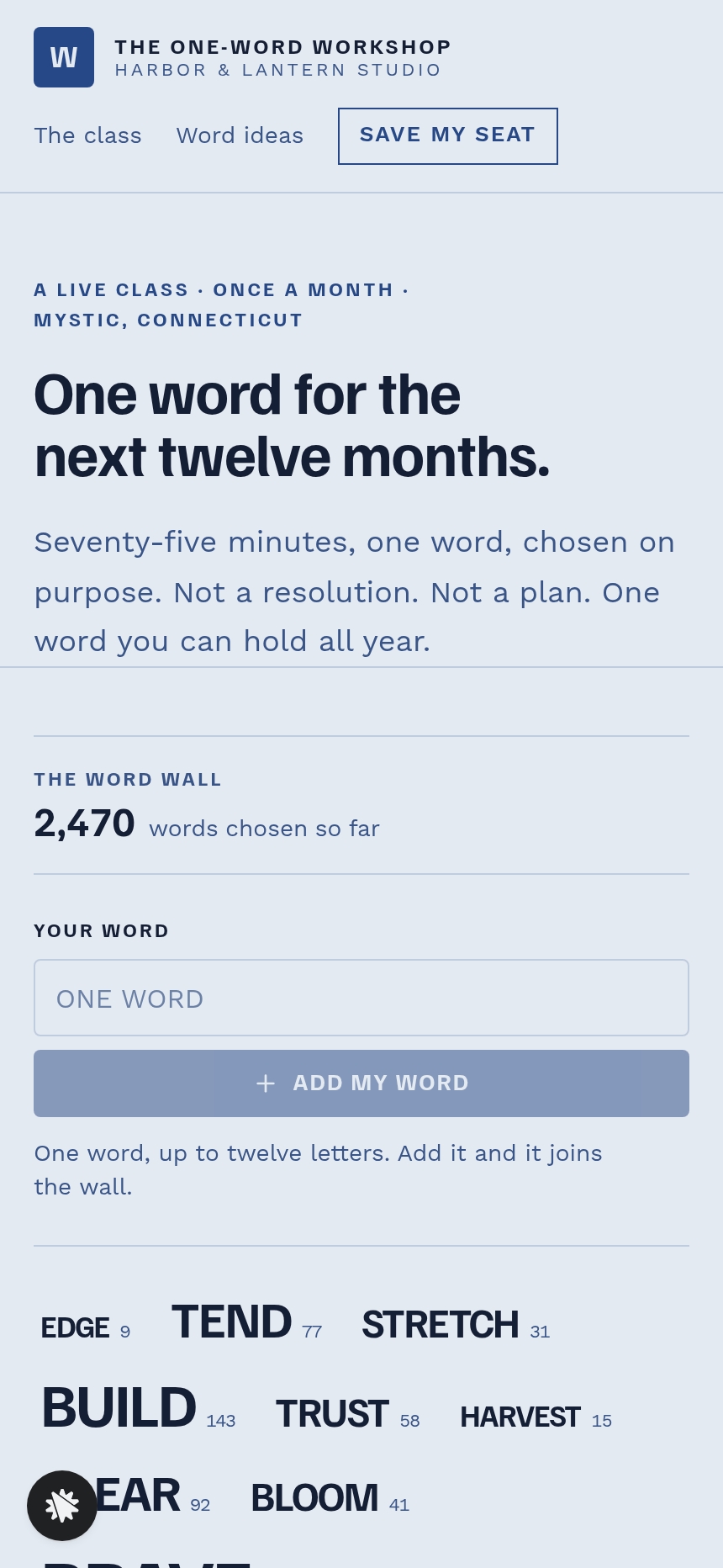
The One-Word Workshop Word Wall Funnel is a paid-workshop funnel built in ClickFunnels AI that opens on a live typographic wall of 36 words, lets each visitor claim or contribute their one word for the year, and carries it through to a $24 seat checkout.
About this template
What is The One-Word Workshop — Word Wall Paid Workshop Funnel?
Harbor & Lantern Studio runs a 75-minute live online class once a month from Mystic, Connecticut. Each attendee arrives at the year carrying one word instead of a resolution. This funnel puts that central exercise, choosing the word, on the registration page. A flat $24 buys one seat, and an optional $12 letterpress card of the chosen word can be added at checkout.
What you get
- Index (/) — the landing page: a live word wall of 36 words in five sizes, a "Your word" field, a counter of 2,470 words chosen, the next class date with a countdown in the visitor's time zone, the five-part running order, host bio, attendee quotes and a "Save my seat — $24" button.
- SeatPage (/seat) — step one of two: the chosen word carried over, plus first name and email.
- CardPage (/card) — step two of two: a secured $24 order form with a one-time $12 bump for a letterpress card, posted after the class.
- ConfirmedPage (/confirmed) — the seat, the word, the class time in plain language, calendar links and a "What to bring" section.
- WordIdeasPage (/word-ideas) — sixty words across six themes, with an email form for the list.
- Dashboard (/dashboard and /admin) — owner view of conversion, recent contacts with each chosen word as a tag, and sales.
How it works
- A visitor lands on Index (/), reads the word wall, and types a word into "Your word."
- They click "Save my seat with this word — $24," which opens SeatPage (/seat) with the word pre-filled.
- SeatPage (/seat) collects a first name and email, then the attendee moves on to CardPage (/card).
- On CardPage (/card) they pay $24 by card. The order bump, "Add the letterpress card of my word, posted" at $12, appears before payment. Each signup and chosen word is saved to the funnel's own contact store, with the word attached as a tag on that person's record, so the host can read the room before class.
- ConfirmedPage (/confirmed) confirms the seat and offers calendar links. Visitors who have not settled on a word can browse WordIdeasPage (/word-ideas) and press any of the sixty words to carry it forward to SeatPage (/seat).
Prices, copy and running-order steps change by typing a request into the ClickFunnels AI chat; the matching page updates (word counts, field labels, bump price or section order) and nothing else moves.
The signature step
The word wall on Index (/) is the funnel's defining screen. Thirty-six words, seeded with real counts (STEADY at 212, BRAVE at 187, down to ORBIT at 5), sit in wrapped typographic rows in five sizes. Pressing one opens a small card with its count and a "Make it mine" button. Typing a new word and pressing "Add my word" either raises an existing count or adds a new entry at the smallest size, and a line beneath the field confirms "Your word: STEADY · chosen by 213 people." One visitor holds one word at a time; "Change my word" removes the previous entry before the new one is counted.
Who it's for
- Workshop hosts and class teachers who sell a single-price live seat and want registration to feel like the first exercise.
- Studio owners and retreat leaders who run a recurring monthly or seasonal session and need a countdown to the next date.
- Coaches and community organisers who want each participant's stated intention before the room opens.
Design
- Type pairing
- Familjen Grotesk display Work Sans body
- Motion
- the visitor's word pulses once and takes an outline as it joins the wall, and the counter ticks up; reduced-motion: outline only
- Signature screen
- Word wall of 36 seeded words in five sizes that the visitor's own word joins
What can you use The One-Word Workshop — Word Wall Paid Workshop Funnel for?
- A writing studio running a monthly "word of the year" class uses the word wall to let registrants contribute their word before they pay, so the host knows the room's vocabulary before the session opens.
- A yoga retreat leader sells $24 seasonal intention-setting workshops and adds the $12 letterpress card bump to give attendees a physical keepsake posted after each class.
- A coach offering quarterly focus-word workshops uses WordIdeasPage (/word-ideas) as a standalone resource, collecting emails from visitors who are not yet ready to book and following up when the next class date is announced.
- A community organisation running monthly peer workshops seeds the word wall with real historical counts from past sessions, so early registrants can see what themes their cohort gravitates toward.
- A solo facilitator with no design or development background uses the template to launch a $24 monthly class in an afternoon, connecting a payment processor and customising the host bio section by describing changes in plain language.
- A studio running multiple themed workshops (one word for work, one for home) duplicates the funnel, reseeds the word wall with a different set of 36 words, and runs both under the same account with separate confirmation pages and calendar links.
Frequently asked questions
What is the One-Word Workshop Word Wall Funnel?
Who is it for?
What pages are included?
How do I customize the One-Word Workshop Word Wall Funnel in ClickFunnels AI?
Does it include a checkout or order form?
Can I use my own branding and domain?
How is it different from a classic ClickFunnels registration funnel?
What setup is required before sharing the funnel?
Related templates
 Webinars & Challenges
Evergreen Webinar Funnel
The Evergreen Webinar Funnel is a just-in-time automated webinar template in ClickFunnels AI that lets registrants pick a session starting in 15 minutes or the next day, then walks them through a real-timeline room, a scheduled pitch reveal, and a checkout — all without fake live chat or inflated attendee counts.
 Webinars & Challenges
Brightsteps — Move-the-Tower Parent Q&A Funnel
The Brightsteps Move-the-Tower Masterclass Funnel is a survey-first webinar registration funnel built in ClickFunnels AI for a kids' logic club in Ann Arbor, Michigan. It opens with a playable three-peg tower puzzle, asks each parent's own question before a free live Q&A is booked, and leads families to a $49 four-week course.
 Webinars & Challenges
Loop & Toss — Juggling Pattern Seven-Day Challenge Funnel
The Loop & Toss Juggling Pattern Seven-Day Challenge Funnel is a seven-day paid challenge template built in ClickFunnels AI for skill teachers who want to prove their method before asking for a sale. It opens on a live pattern player instead of a video, then moves a visitor into a $17 checkout and seven dated lesson pages.
 Webinars & Challenges
The 14-Day Clear-Out — Room Wheel Challenge Funnel
The 14-Day Clear-Out Challenge Funnel is a paid challenge funnel template built in ClickFunnels AI that lets visitors rate six rooms on sliders, watches a wheel redraw their personal room order, and routes them through a $27 checkout into a 14-day email challenge.
Make this template your starting point.
Inspect the preview, plan your changes, and test the workflow before you share it.
Use this template