Hollis Ink — Trace-the-Letter Brush Lettering Course Funnel
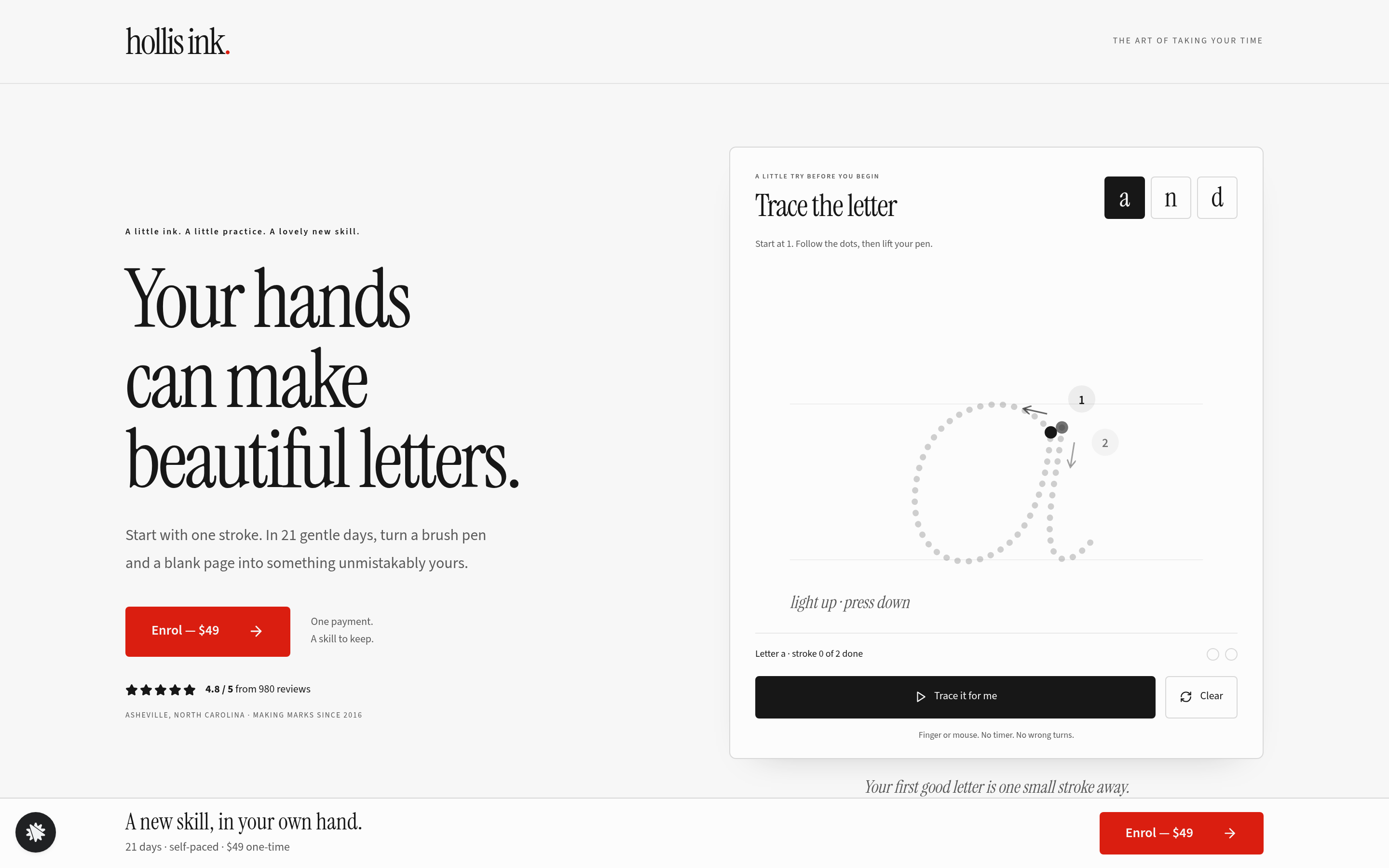
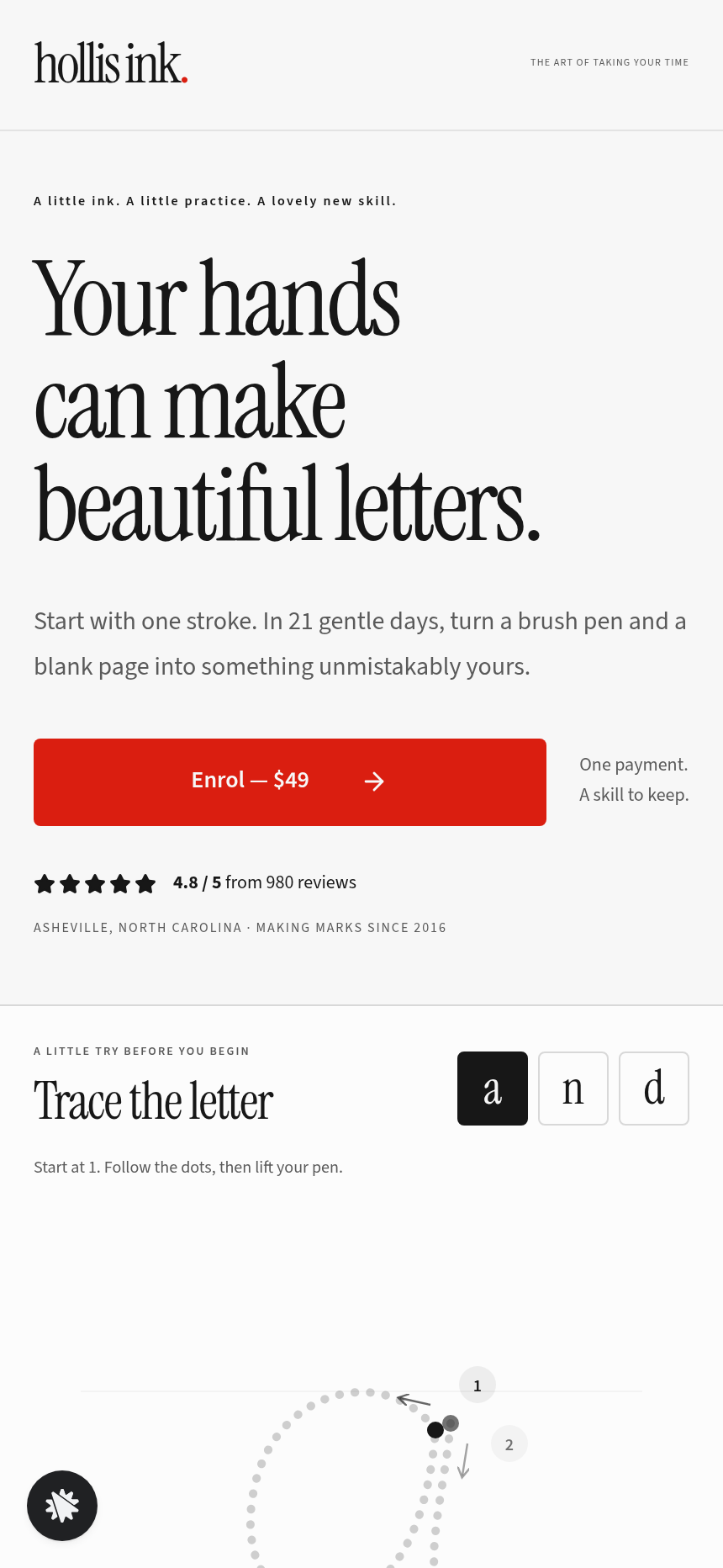
The Brush Lettering Trace-the-Letter Course Funnel is a course-sales template for Hollis Ink, an Asheville brush-lettering school, made with ClickFunnels AI. Its hero is an interactive tracing pad where visitors follow guided strokes before enrolling in a 21-day course for a flat $49.
About this template
What is Hollis Ink — Trace-the-Letter Brush Lettering Course Funnel?
Hollis Ink is a brush-lettering school in Asheville, North Carolina. It has taught since 2016, with 14,000 students and a 4.8-star rating from 980 reviews. This funnel sells one product, a 21-day self-paced course for a single $49 payment. Visitors meet a pen before any sales copy. The hero is a tracing pad, a large dotted lowercase letter with numbered strokes to follow, so the first thing a visitor does is make a mark.
What you get
- Landing page (/): a header with the Hollis Ink wordmark, the tracing pad beside a three-line serif headline, an "Enrol for $49" button, seven numbered three-day bands with "Try this letter" buttons, three student quote cards, a short FAQ, and a full-width photo with a caption card.
- Enrol page (/enrol): step one gathers first name and email and notes which letter was traced. Step two is a secured $49 card checkout with a $14 printed practice-sheet bump.
- Ink Offer page (/offer): a one-click upsell for the Hollis Ink Starter Brush Pen Set at $19, charged to the saved card, plus a "No thanks, take me to the Welcome page" link.
- Welcome page (/welcome): a course receipt, a 21-day practice calendar dated from tomorrow, and a first practice prompt.
- Admin dashboard (/admin): conversion overview, recent contacts, and recent sales.
- A custom 404 page in the Hollis Ink voice.
How it works
- A visitor lands on /, picks a letter tab (a, n, or d), and traces each numbered stroke with a finger or mouse. The ink fills in, thick on the downstroke and thin on the upstroke.
- When both strokes are done, the pad reads "Letter a: done" and the enrol button stands out. "Try this letter" buttons on each lesson band reload the pad with that letter.
- Enrol opens /enrol. Step one saves the lead. Every lead and sale lands in the built-in database and on the /admin view, so an external CRM can wait.
- Step two shows the $49 order form, with an inline bump ("Yes, add the printed pack · $14 one-time") above the pay button. Checkout then leads to the $19 pen offer, which charges the same card without asking for details again.
- After that decision, the visitor reaches /welcome, which shows the receipt and a calendar starting tomorrow.
- To change pad copy, the bump price, or a lesson-band headline, describe it in plain language. ClickFunnels AI updates that one element, whether a price, a stroke label, or the enrol button text.
The signature step
The tracing pad opens on lowercase "a" with two pale dotted guide strokes, each marked with a numbered start dot and a direction arrow. A stroke registers only when the drag starts near its start dot and passes roughly eight checkpoints in order, then fills with animated ink. Strokes must be completed in numbered order. "Trace it for me" animates the current letter for anyone who would rather watch first. The pad takes touch without scrolling the page and spans the full width on a 390 px screen. Nothing is timed or penalised: a missed stroke fades and the visitor tries again.
Who it's for
- Brush lettering, calligraphy, and handwriting teachers selling a beginner course online
- Art instructors whose skill is easier to sell once a visitor has made the first mark
- Course creators who want an interactive hero instead of a video or still image
- Anyone selling a hands-on creative skill, where trying first shortens the decision
Design
- Type pairing
- Instrument Serif display Source Sans 3 body
- Motion
- ink fills each stroke as it is traced; Trace it for me draws the strokes in order; reduced-motion: strokes fill at once
- Signature screen
- Trace-the-letter pad: numbered brush strokes on a dotted letter that count only when traced in order, by finger or mouse
What can you use Hollis Ink — Trace-the-Letter Brush Lettering Course Funnel for?
- A brush lettering teacher pre-sells her next cohort by embedding the tracing pad link in a social media story, letting followers try a letter before clicking through to enrol.
- A calligraphy supply shop owner bundles the $19 brush pen upsell with her online beginner course to raise average spend without creating a dedicated product page.
- A handwriting coach runs a free webinar and sends attendees to the funnel's landing page immediately after, using the "Try this letter" buttons in the lesson bands as a live walkthrough.
- An art school uses the `/admin` dashboard to track opt-ins from a Facebook ad campaign, comparing how many visitors who complete a full letter trace go on to purchase versus those who do not.
- A creative studio offering team workshops customises the school name, palette, and lesson bands via chat edits and publishes the funnel under its own domain for corporate bookings.
- A lettering video creator adds an affiliate partner link to their course description, directing viewers to the tracing pad landing page where the interactive pad does the selling without a sales video.
Frequently asked questions
What is the Brush Lettering Trace-the-Letter Course Funnel?
Who is this funnel for?
What pages are included?
How do I customize the Brush Lettering Trace-the-Letter Course Funnel in ClickFunnels AI?
Does it include a checkout and order form?
Can I use my own branding and domain?
How is it different from a standard course or tripwire funnel in ClickFunnels?
What setup is required before sharing the funnel?
Related templates
 Coaching & Courses
Even Keel — Debt Payoff Planner Workshop Funnel
The Debt Payoff Planner Workshop Funnel is a free workshop funnel built in ClickFunnels AI for a money coaching business. Visitors run a payoff planner on their own debts, save the plan with their email and then reach a $79 course checkout with a $19 bump.
 Coaching & Courses
Ledgerlight — Fit-the-Line Sales Forecast Course Funnel
Ledgerlight Fit-the-Line Sales Forecast Course Funnel is a course funnel for a $79 six-lesson sales forecasting class, built with ClickFunnels AI. Visitors drag a trend line through a café's twelve monthly sales, and their line carries through enrolment.
 Coaching & Courses
Plain Tags — First Web Page Playground Course Funnel
The First Web Page Playground Course Funnel is a sales sequence made in ClickFunnels AI for Plain Tags, an evening web school in Wichita, Kansas. It puts a live HTML playground on the sales page so visitors write real code before they ever see a price.
 Coaching & Courses
Slow Shutter School — Photo Exposure Simulator Course Funnel
The Photo Exposure Simulator Course Funnel is a course-sales funnel built in ClickFunnels AI for a photography school that sells a beginner exposure course for a single payment of $69. It leads with a working in-browser simulator — aperture, shutter and ISO dials on a drawn lakeshore scene — before the visitor reaches the enrol page, order bump and one-click portfolio-review offer.
Make this template your starting point.
Inspect the preview, plan your changes, and test the workflow before you share it.
Use this template