Ember & Vine — Gift-a-Friend Taster Box Funnel
The Gift-a-Friend Box Funnel is a tripwire funnel template in ClickFunnels AI that turns a free recipe-video opt-in into a $34 Taster Box sale, then offers a $24 box shipped to a friend with a gift tag that previews live. Four pages: opt-in, offer, gift one-time offer and thank-you.
About this template
What is Ember & Vine — Gift-a-Friend Taster Box Funnel?
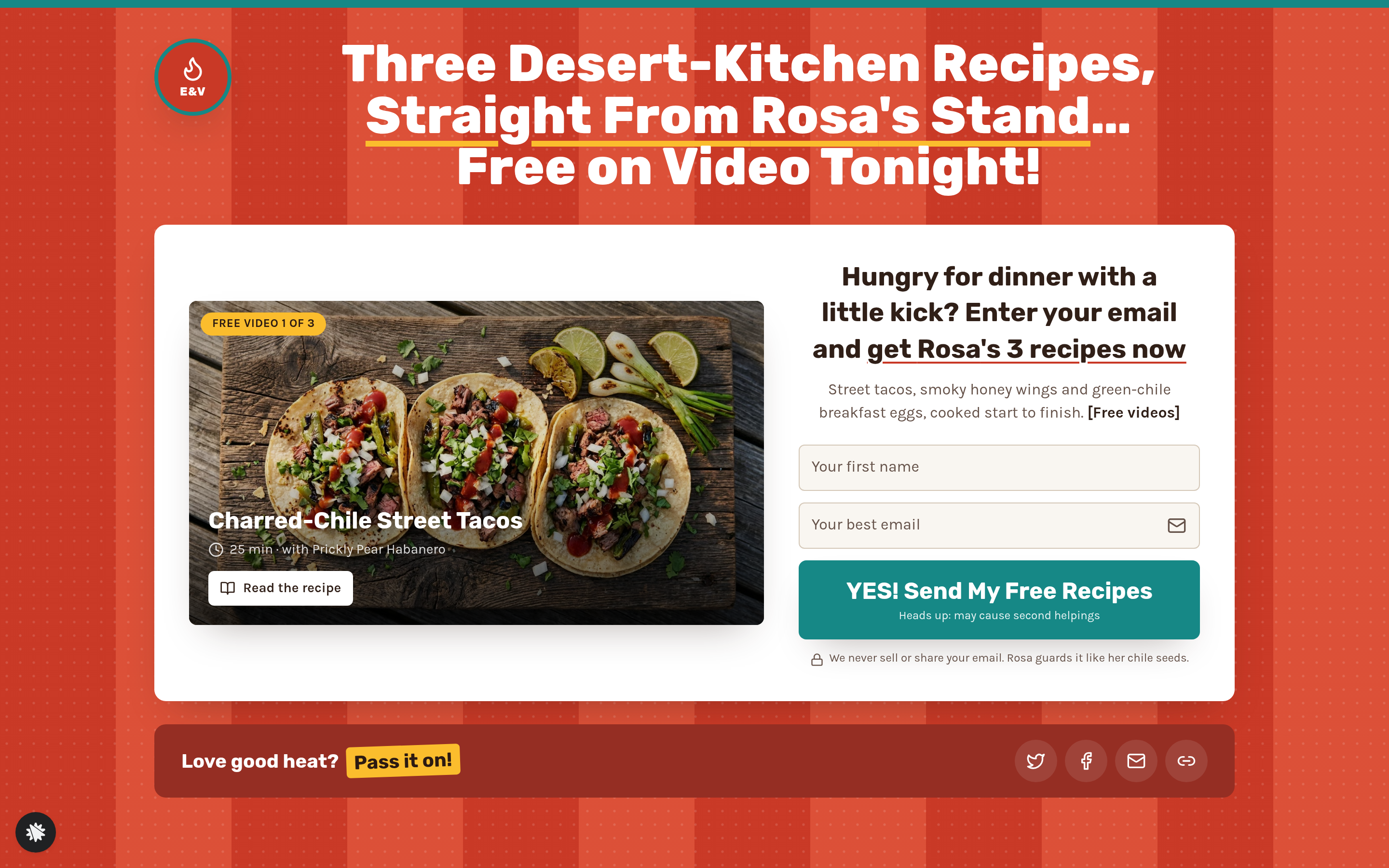
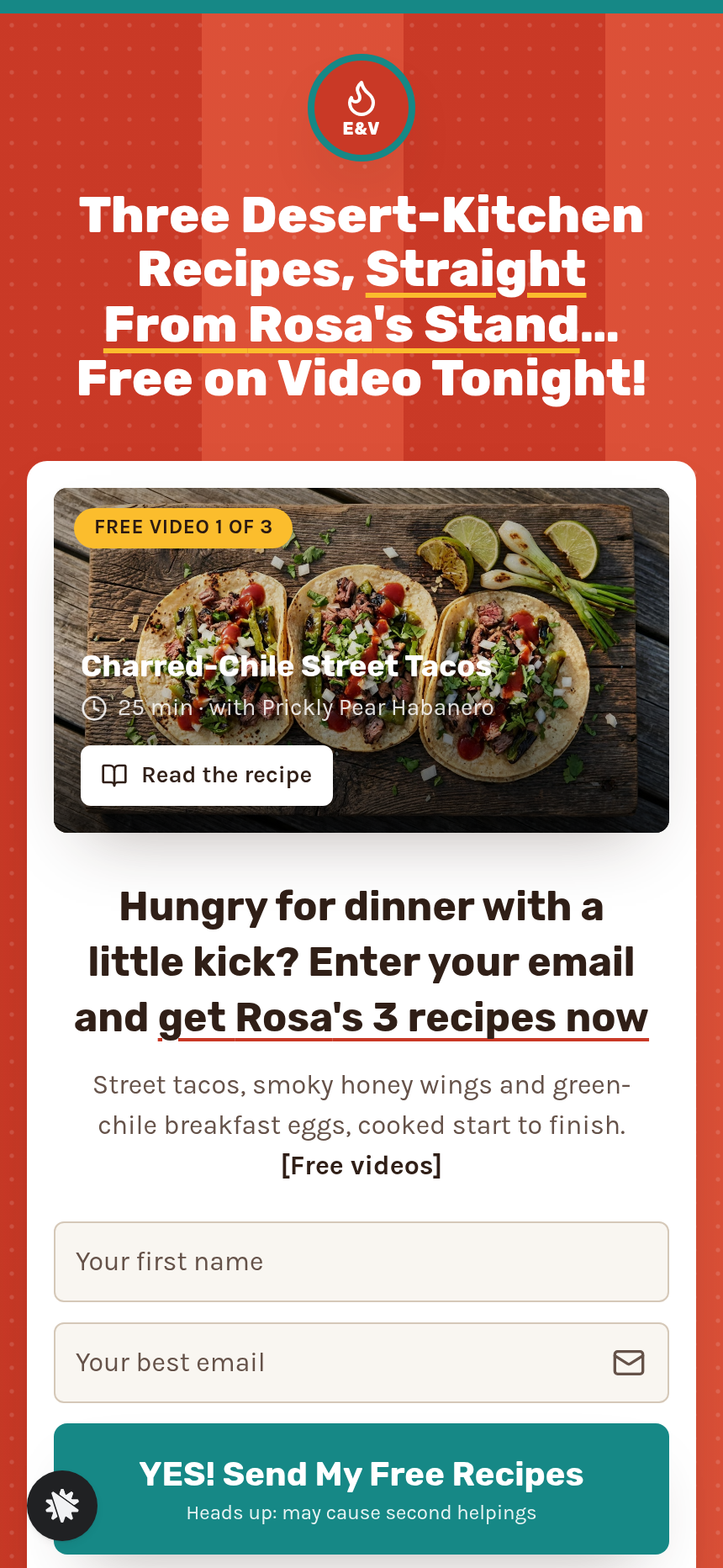
Ember & Vine's Gift-a-Friend Box Funnel is a four-step tripwire sequence designed for small-batch food and drink makers. A visitor lands on the opt-in page (/), trades their email for three free recipe videos, then moves immediately to the Taster Box offer (/taster-box) where a $49 price is struck through to $34 and the card checkout sits on the same screen. After paying, the funnel presents a one-time offer (/gift-a-friend) to send a second box to a friend for $24 — including a gift tag that writes itself as the buyer types. The sequence closes on a thank-you page (/thank-you) that shows the full order recap, computed ship date, the three recipe videos, and a Saturday Sauce Class card with its own checkout.
What you get
- Opt-in page (/) — candy-stripe header, headline, three recipe video previews (charred-chile street tacos, smoky honey wings, green-chile breakfast eggs), a single email field, and social share links.
- Taster Box offer (/taster-box) — five 5 oz sauces listed by name and heat level, a 12-card recipe deck and sticker as bonuses, struck-through retail price of $49 beside a $34 sale price, shipping address fields and a full card checkout on the page.
- Gift-a-friend OTO (/gift-a-friend) — split layout: box checklist and $24 price on one side, friend's name, street address, apartment field, and a 140-character gift note on the other; a live kraft-paper tag preview updates letter by letter; 'Yes' mounts a real card checkout; 'No thanks, it's all mine' skips the offer.
- Thank-you page (/thank-you) — order recap with friend's box details and gift tag copy, expected arrival date computed from today, all three recipe videos, and a Saturday Sauce Class booking card.
- Dashboard (/admin) — funnel-wide conversion rate, per-step page list in visitor order, and a contact table (everyone who opted in, newest first).
- 404 page — in-brand message with a link back to the opt-in.
How it works
- Visitor arrives at the opt-in page (/) and enters their email to unlock the three recipe videos.
- The funnel routes them directly to /taster-box, where the five-sauce box, bonuses, and struck-through price are displayed above the checkout form; entering card details and shipping address completes the $34 order.
- Post-purchase, the visitor lands on /gift-a-friend. The on-page order form charges the saved card for $24 only if the buyer completes the friend's details and taps the gift button; skipping routes to /thank-you without an additional charge.
- The thank-you page at /thank-you assembles the full recap — buyer order, any gift order, ship date, recipe videos, and the sauce class card — in a single view. Because opt-ins and orders are stored in the funnel's built-in database and surfaced in the /admin dashboard with CSV export, Rosa can see every contact and conversion without connecting an external CRM. After publishing, the owner describes layout or copy changes in plain language and the funnel updates those pages — for example, swapping a sauce name on /taster-box or adjusting the gift note character limit on /gift-a-friend — without touching code.
The signature step
The /gift-a-friend page is the funnel's defining screen. The left column shows a gift box checklist and the $24 price. The right column holds three fields — friend's name, street address, and a short gift note — feeding a kraft-paper gift tag that refreshes letter by letter as the buyer types. Accepting the offer mounts a live card checkout in the same view; the friend's name carries into the order summary label ("Gift Taster Box for [name]"). Declining skips to /thank-you with one click.
Who it's for
- Small-batch hot sauce, jam, or spice makers selling at farmers markets who want an online version of their Saturday table.
- Craft food subscription brands adding a gift-to-a-friend revenue line alongside their core box.
- Coffee roasters, chocolate makers, and candle shops whose repeat customers regularly buy for someone else.
- Any maker running seasonal gift campaigns (holidays, birthdays, teacher appreciation) where the gifting impulse is highest right after a buyer's own purchase.
Design
- Type pairing
- Rubik display Karla body
- Motion
- none; reduced-motion: static
- Signature screen
- Send-a-box-to-a-friend OTO with a live gift-tag preview
- References
-
- 3.21 candy shop recipe opt-in -> box tripwire -> share OTO
What can you use Ember & Vine — Gift-a-Friend Taster Box Funnel for?
- A Tucson hot sauce maker uses the funnel at their farmers market booth: a QR code sends shoppers to the opt-in page, and roughly one in four buyers who complete the Taster Box checkout also sends a gift box to a friend before leaving the thank-you page.
- A small-batch jam producer runs a holiday campaign where the gift OTO at `/gift-a-friend` is promoted as a stocking-stuffer offer; the live gift-tag preview reduces cart hesitation because buyers see exactly what their recipient will receive.
- A craft coffee roaster replaces the hot sauce lineup with three single-origin roasts and uses the same four-page flow to sell a $34 sampler box, then offers a $24 gifting add-on to co-workers during a corporate gifting push.
- A candle studio swaps the recipe videos for three scent-pairing tutorials, sells a five-candle discovery set at a struck-through price on `/taster-box`, and captures friend addresses through the gift form to build a prospect list for future campaigns.
- A chocolate maker running seasonal Valentine's Day promotions uses the `/gift-a-friend` page as the core of their campaign: the gift note field and live tag preview are the headline feature in their social ads, driving impulse purchases from existing customers.
- A bakery subscription brand A/B tests two price points ($29 vs. $34) on the Taster Box page by running duplicate versions of the funnel, using the `/admin` dashboard contact and conversion data to decide which price to keep before the next market season.
Frequently asked questions
What is the Gift-a-Friend Box Funnel?
Who is the Gift-a-Friend Box Funnel for?
What pages are included?
How do I customize the Gift-a-Friend Box Funnel in ClickFunnels AI?
Does it include a checkout or order form?
Can I use my own branding and domain?
How is it different from a classic ClickFunnels tripwire funnel?
What setup is required before sharing the funnel?
Related templates
 Product & E-com Funnels
Minute Works — Free Plus Shipping Product Funnel
The Free-Plus-Shipping Product Funnel is a physical-product launch funnel built in ClickFunnels AI that gives visitors a $0 item in exchange for $7.95 shipping, then walks them through an order bump, a bundle upsell, and a downsell before landing on a three-part thank-you. It's designed for small-product brands that want to build a buyer list fast without hiding a single charge.
 Product & E-com Funnels
Sill & Stem — Houseplant Window Match Product Funnel
What is the Houseplant Window Match Product Funnel? A plant shop template built in ClickFunnels AI, it opens with a window-light tool and then sells any three plants in a $59 box.
 Product & E-com Funnels
Little Tick — Set-the-Clock First Watch Funnel
Little Tick sells a children's analog watch from Lancaster, Pennsylvania, through a ClickFunnels AI product funnel. A draggable clock face on the landing page lets a child practice reading the time before the parent reaches a $34 checkout.
 Product & E-com Funnels
Cogwood Toys — Turn-the-Gears Product Funnel
The Turn-the-Gears Product Funnel is a checkout-flow template for physical toy and kit sellers, built in ClickFunnels AI, that lets visitors interact with an animated gear board before ordering a $39 wooden kit. It moves visitors from play to purchase across a landing page, two-step order page, one-click wall-frame offer, and thank-you receipt.
Make this template your starting point.
Inspect the preview, plan your changes, and test the workflow before you share it.
Use this template