Sill & Stem — Houseplant Window Match Product Funnel
What is the Houseplant Window Match Product Funnel? A plant shop template built in ClickFunnels AI, it opens with a window-light tool and then sells any three plants in a $59 box.
About this template
What is Sill & Stem — Houseplant Window Match Product Funnel?
Sill & Stem is a houseplant shop in Pittsburgh, Pennsylvania. It has sent 38,000 plants since 2018 and has 4.8 stars from 2,900 reviews. Its buyers worry most about fit: will a plant live in their own window? This ClickFunnels AI template answers that question first. The home page opens with a window-light tool, and the plant cards and the trio order button sit below it.
What you get
- Home (/): the headline, the window tool, twelve plant cards with Add buttons, the Window Trio box with an "Order my trio" button, packing details, three customer quotes and a FAQ. The Window Trio is any three plants in 4-inch pots for $59, shipping included.
- Order (/order): the three plants recapped, with shipping details saved as a lead. Then a card checkout for $59 with a $14 self-watering pot bump, which raises the pay button to $73.
- Care kit (/care-kit): a one-time $12 offer with snips, potting mix and a watering card. Yes charges it on that page, and No thanks sends them to the thank-you page.
- Thank-you (/thank-you): the plants in the order and the ship day, which is the next business day.
The 404 page is custom to this template.
How it works
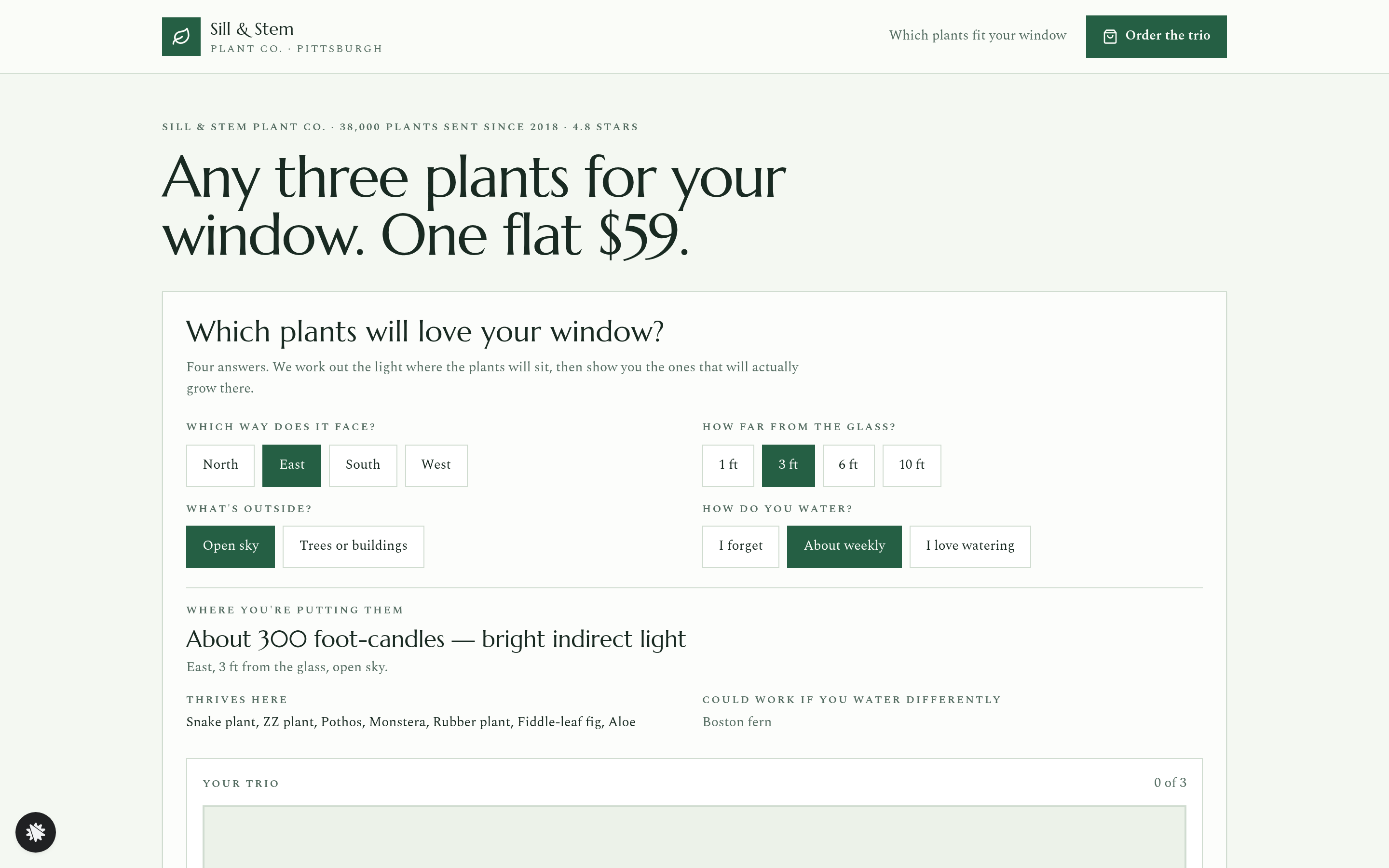
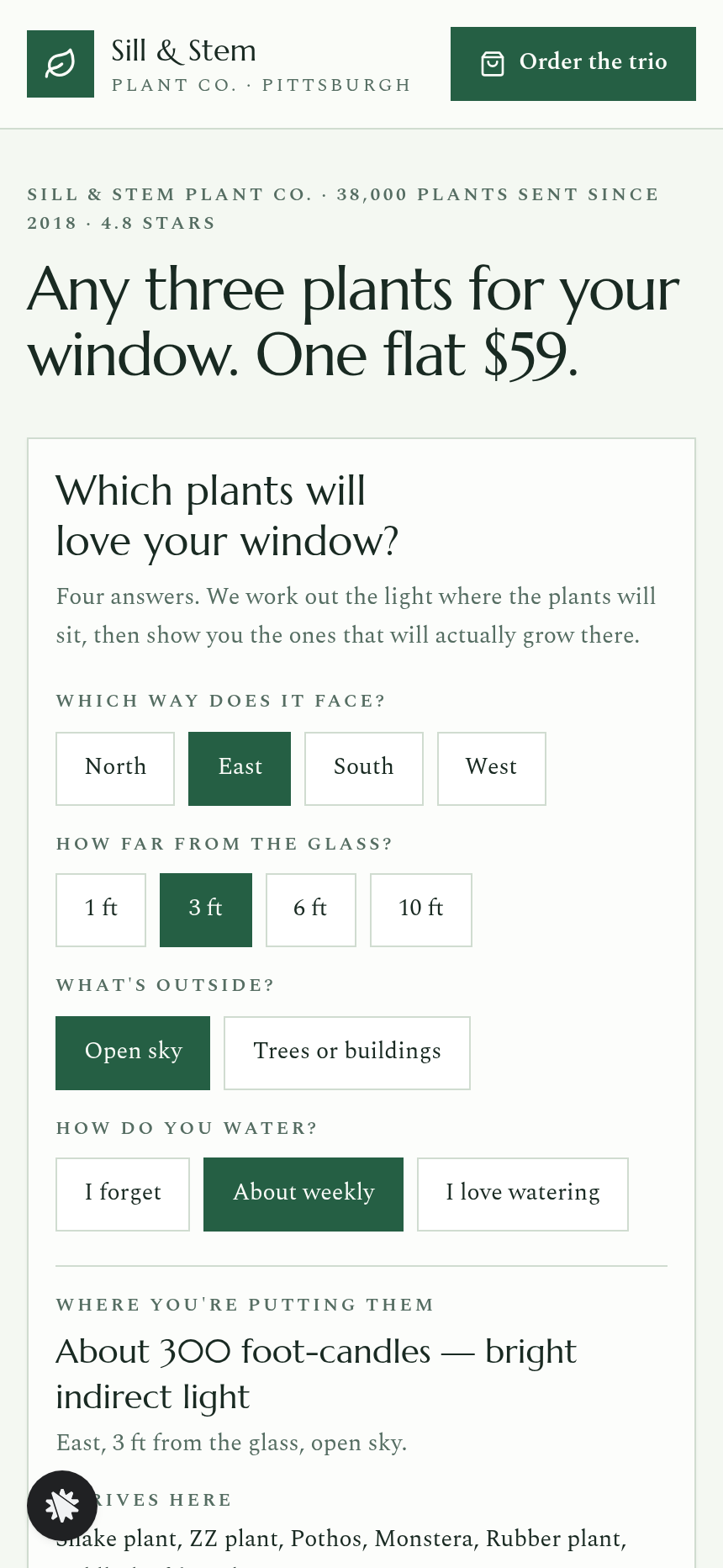
- The visitor reads the headline and taps a window direction, a distance from the glass, the view outside and a watering habit.
- The tool reads the light in foot-candles and names a band: Low, Medium, Bright indirect or Bright direct. The "Thrives here" and "Could work if you water differently" lists update at once.
- The visitor presses Add on the plants they like, then "Order my trio".
- On the order page they enter shipping details, which are saved as a lead in the built-in database. They pay $59 by card, or $73 if they add the self-watering pots.
- After payment, the care kit offer appears. Yes adds the kit for $12 on that page, and No thanks leads to the thank-you page.
- The thank-you page confirms the plants and the ship day.
The signature step
The window tool is what sets this shop apart from a plain product grid. Four rows of buttons describe the window and produce a foot-candle reading, which maps to a named light band. The Thrives here list shows plants that suit both the light and the watering habit. The Could work list shows plants that suit the light but need a different watering habit. The default reading, an east window 3 ft from the glass with open sky and weekly watering, gives about 300 foot-candles of bright indirect light, and its thriving list starts with Snake plant, ZZ plant and Pothos.
Who it's for
- Online plant shops and nurseries that sell curated boxes
- Garden centers adding a ship-to-door channel
- Florists who want to add houseplants to their offer
- Any product seller whose buyer needs a fit check before buying
Design
- Type pairing
- Marcellus display Spectral body
- Motion
- lists and trio update on tap
- Signature screen
- Window match: direction, distance, outside and watering buttons give foot-candles, a light band and Thrives / Could-work plant lists; pick three for the trio
What can you use Sill & Stem — Houseplant Window Match Product Funnel for?
- An online plant shop replaces a static product grid with this funnel so buyers can check their window before ordering.
- A nursery with a weekend market stand adds the funnel as a year-round ship-to-door channel at one flat $59 price.
- A florist expanding into houseplants uses the window tool in place of a phone consultation, so customers qualify themselves.
- A garden center tests a starter-box idea by swapping in its own twelve-plant catalogue and local delivery area.
- A plant subscription brand uses the funnel as a one-time introductory box, with the care kit as the first add-on.
Frequently asked questions
What is the Houseplant Window Match Product Funnel?
Who is it for?
What pages are included?
How do I customize the Houseplant Window Match Product Funnel in ClickFunnels AI?
Does it include a checkout or order bump?
Can I use my own branding and domain?
How is it different from a classic product funnel with an order bump and one-click upsell?
What setup is required before going live?
Related templates
 Product & E-com Funnels
Minute Works — Free Plus Shipping Product Funnel
The Free-Plus-Shipping Product Funnel is a physical-product launch funnel built in ClickFunnels AI that gives visitors a $0 item in exchange for $7.95 shipping, then walks them through an order bump, a bundle upsell, and a downsell before landing on a three-part thank-you. It's designed for small-product brands that want to build a buyer list fast without hiding a single charge.
 Product & E-com Funnels
Little Tick — Set-the-Clock First Watch Funnel
Little Tick sells a children's analog watch from Lancaster, Pennsylvania, through a ClickFunnels AI product funnel. A draggable clock face on the landing page lets a child practice reading the time before the parent reaches a $34 checkout.
 Product & E-com Funnels
Cogwood Toys — Turn-the-Gears Product Funnel
The Turn-the-Gears Product Funnel is a checkout-flow template for physical toy and kit sellers, built in ClickFunnels AI, that lets visitors interact with an animated gear board before ordering a $39 wooden kit. It moves visitors from play to purchase across a landing page, two-step order page, one-click wall-frame offer, and thank-you receipt.
 Product & E-com Funnels
Saltwind Chime Co. — Wind Chime Play-It Product Funnel
The Wind Chime Play-It Product Funnel is a single-product e-commerce funnel built in ClickFunnels AI for Saltwind Chime Co., letting visitors tap and hear a browser-playable Six-Tube Porch Chime before placing a $64 order. It follows the classic order-bump-and-add-on money path inside a cream-and-walnut design built around sound as the proof of purchase.
Make this template your starting point.
Inspect the preview, plan your changes, and test the workflow before you share it.
Use this template