Ledgerlight — Fit-the-Line Sales Forecast Course Funnel
Ledgerlight Fit-the-Line Sales Forecast Course Funnel is a course funnel for a $79 six-lesson sales forecasting class, built with ClickFunnels AI. Visitors drag a trend line through a café's twelve monthly sales, and their line carries through enrolment.
About this template
What is Ledgerlight — Fit-the-Line Sales Forecast Course Funnel?
The Ledgerlight Fit-the-Line Sales Forecast Course Funnel sells "Forecast Like a Shopkeeper", a six-lesson course from a course studio in Madison, Wisconsin. The course is $79. The landing page is a live chart in which the visitor fits a straight line through a café's twelve monthly sales before they see the price. Built on ClickFunnels AI, the course name, price, chart data and copy stay editable from the builder chat.
What you get
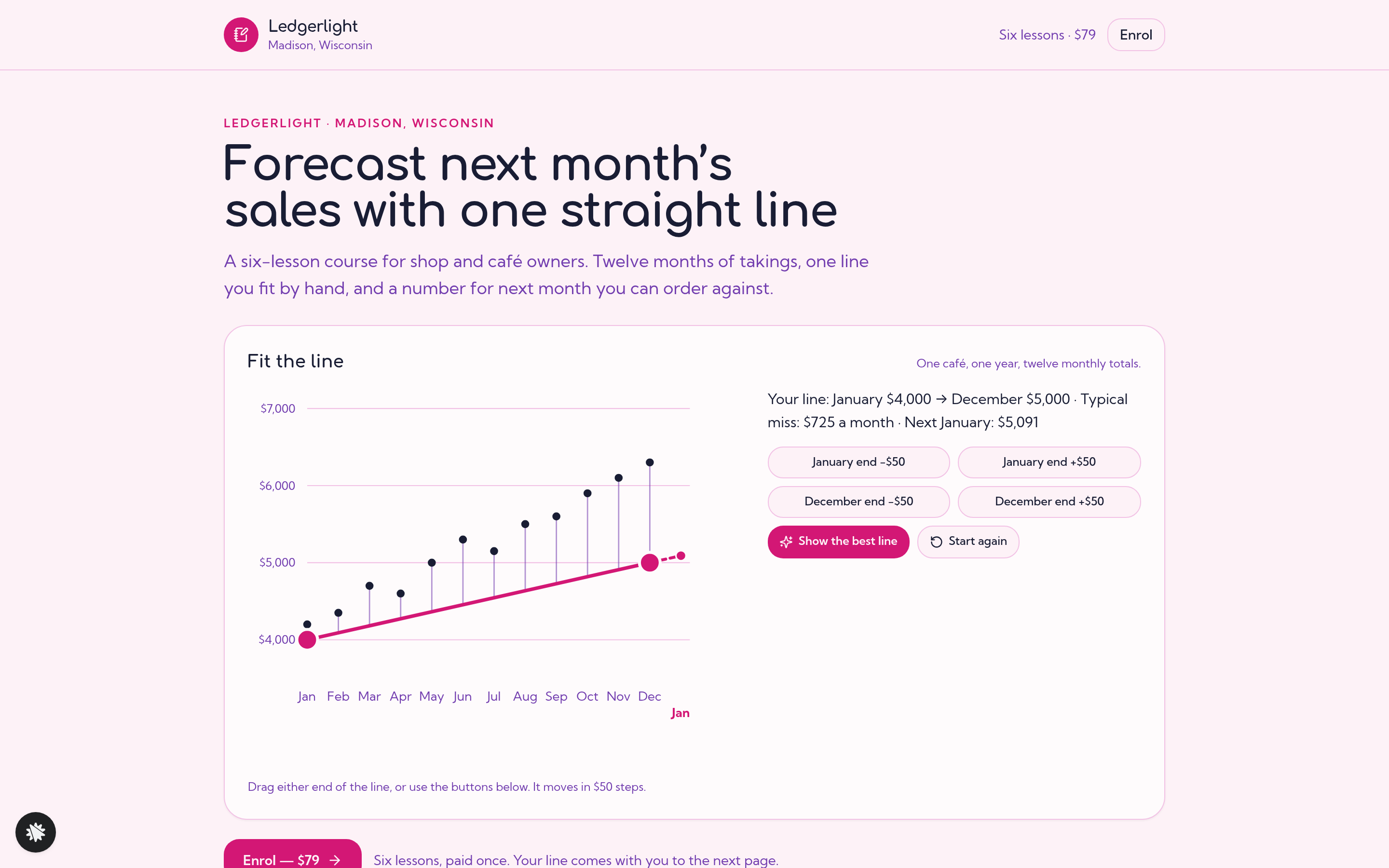
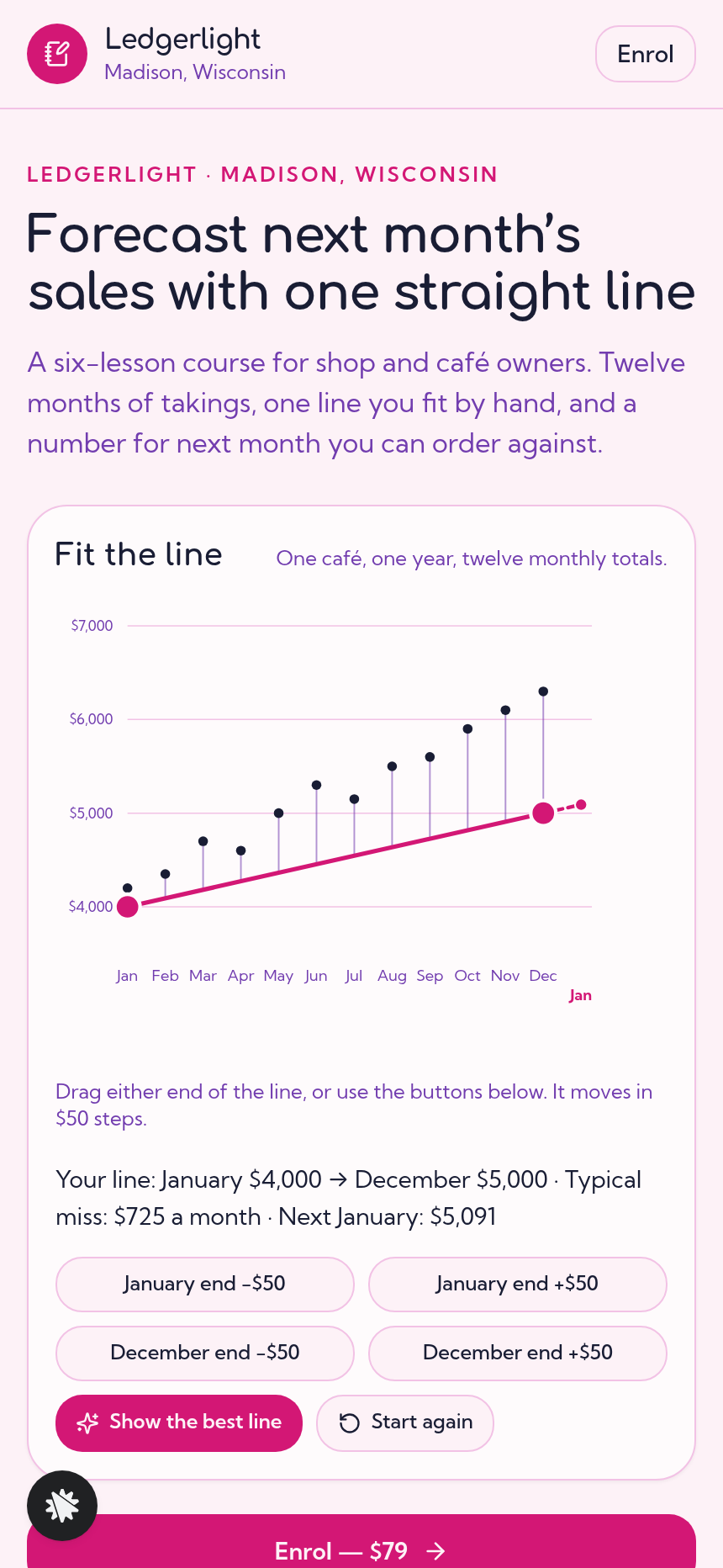
- Index (/): a "Fit the line" chart of twelve monthly café sales, from $4,200 in January up to $6,300 in December. It has two drag handles, four step buttons, a live readout, a "Show the best line" button and a "Start again" button. Below the chart are the six lesson summaries, a teacher section, quotes and an FAQ.
- Enrol (/enrol): the visitor's line recapped, then a name and email step that saves the visitor as a lead along with their line. The card step charges a flat $79 for the course, with a $19 bump for a forecasting spreadsheet pack.
- Review (/review): a $29 recorded review of the student's own twelve months. A yes answer leads to the enrol step, and "No thanks" goes to the welcome page.
- Welcome (/welcome): the student's saved line, and a note that lesson one opens on the first Monday after today.
How it works
The visitor drags the two handles, or uses the step buttons, until the readout shows a line they are happy with. The readout gives the January and December values, the typical monthly miss and the next January forecast. The Enrol link carries the January and December values in the address, so the order page starts with the same line the visitor drew. After checkout the review offer appears, and the welcome page shows the student's line, which is where lesson one starts.
The signature step
The "Fit the line" chart plots the café's twelve monthly totals as dots. A straight line runs between two handles, one at January and one at December, and each handle moves in $50 steps. The readout updates as the visitor moves them: "Your line: January $4,000 → December $5,000 · Typical miss: $725 a month · Next January: $5,091". "Show the best line" snaps the line to $4,200 → $6,300, which cuts the typical miss to $75 and forecasts $6,491 for next January. The visitor does the fitting and sees their own miss before they reach the price.
Who it's for
- Spreadsheet and finance teachers who want visitors to try the method before they buy.
- Bookkeepers and accounting coaches selling a first course to small business owners.
- Course creators in neighbouring subjects, such as stock planning or staffing, where a twelve-point chart can teach the core skill.
Design
- Type pairing
- Comfortaa display Kumbh Sans body
- Motion
- the line and its gap lines redraw as a handle is dragged
- Signature screen
- Fit-the-line chart: drag two handles through twelve months of sales; typical miss and next month's forecast
What can you use Ledgerlight — Fit-the-Line Sales Forecast Course Funnel for?
- A bookkeeper who teaches monthly workshops offers an on-demand version, where visitors fit the line to their own shop's figures and then enrol in the six-lesson course.
- A finance coach adds the $29 recorded review to the course, offering a walkthrough of each student's twelve months.
- A spreadsheet teacher uses the Fit-the-Line chart as a live exercise during a webinar, then sends attendees to the Index to try it and enrol.
- A data literacy educator swaps the café figures for retail inventory numbers and keeps the same drag-handle chart to sell a course on stock-level forecasting.
- A community college continuing-education office runs the course as a self-paced enrolment path and checks each student's line before the first Monday lesson.
- A course creator testing price points changes the course price and the spreadsheet bump in the builder chat, then republishes the funnel.
Frequently asked questions
What is the Ledgerlight Fit-the-Line Sales Forecast Course Funnel?
Who is this funnel for?
What pages are included?
How do I customize the Ledgerlight Fit-the-Line Sales Forecast Course Funnel in ClickFunnels AI?
Does it include a checkout and order form?
Can I use my own branding and domain?
How is this different from a classic ClickFunnels course funnel?
What setup is required?
Related templates
 Coaching & Courses
Even Keel — Debt Payoff Planner Workshop Funnel
The Debt Payoff Planner Workshop Funnel is a free workshop funnel built in ClickFunnels AI for a money coaching business. Visitors run a payoff planner on their own debts, save the plan with their email and then reach a $79 course checkout with a $19 bump.
 Coaching & Courses
Hollis Ink — Trace-the-Letter Brush Lettering Course Funnel
The Brush Lettering Trace-the-Letter Course Funnel is a course-sales template for Hollis Ink, an Asheville brush-lettering school, made with ClickFunnels AI. Its hero is an interactive tracing pad where visitors follow guided strokes before enrolling in a 21-day course for a flat $49.
 Coaching & Courses
Plain Tags — First Web Page Playground Course Funnel
The First Web Page Playground Course Funnel is a sales sequence made in ClickFunnels AI for Plain Tags, an evening web school in Wichita, Kansas. It puts a live HTML playground on the sales page so visitors write real code before they ever see a price.
 Coaching & Courses
Slow Shutter School — Photo Exposure Simulator Course Funnel
The Photo Exposure Simulator Course Funnel is a course-sales funnel built in ClickFunnels AI for a photography school that sells a beginner exposure course for a single payment of $69. It leads with a working in-browser simulator — aperture, shutter and ISO dials on a drawn lakeshore scene — before the visitor reaches the enrol page, order bump and one-click portfolio-review offer.
Make this template your starting point.
Inspect the preview, plan your changes, and test the workflow before you share it.
Use this template