Centered Wheel School — Post-Webinar Mini-Launch Funnel
The Post-Webinar Mini-Launch Funnel is a three-video follow-up sequence with a live 72-hour cart countdown, a stacked offer close, and a course checkout — built and customizable in ClickFunnels AI. It turns the momentum from a live workshop into a short open-cart window that closes cleanly into a waitlist.
About this template
What is Centered Wheel School — Post-Webinar Mini-Launch Funnel?
When a live workshop ends, the follow-up email has one job: send attendees somewhere that keeps the energy alive and closes the sale before the week is out. This funnel is that destination. Three video pages go out over three days, each built around the same offer at the same price, with a cart that counts down from 72 hours and locks into a waitlist when time runs out. No registration step, no second offer — just the replay, the proof, the Q&A, and a checkout.
What you get
Six pages wired together as a single post-webinar sequence:
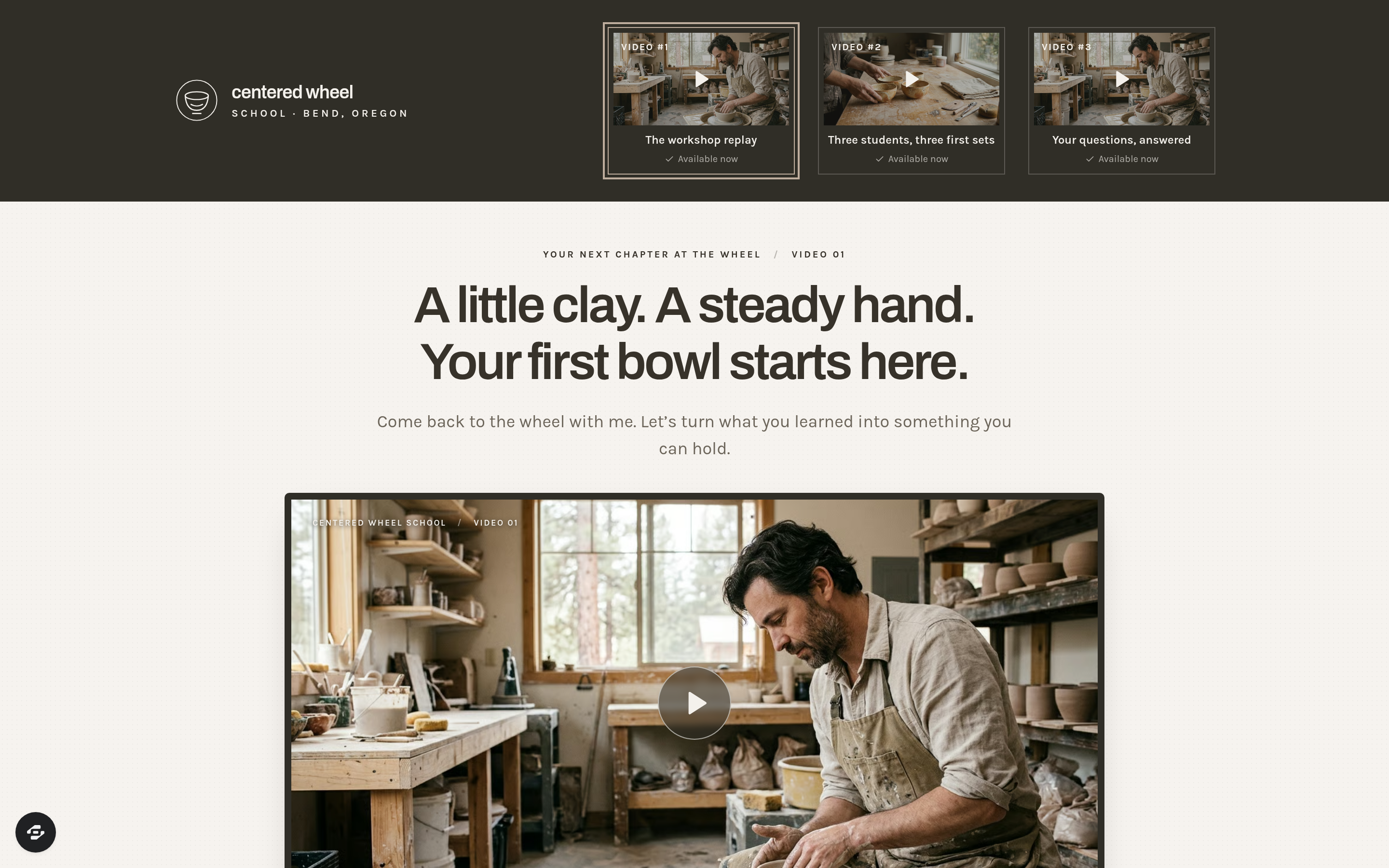
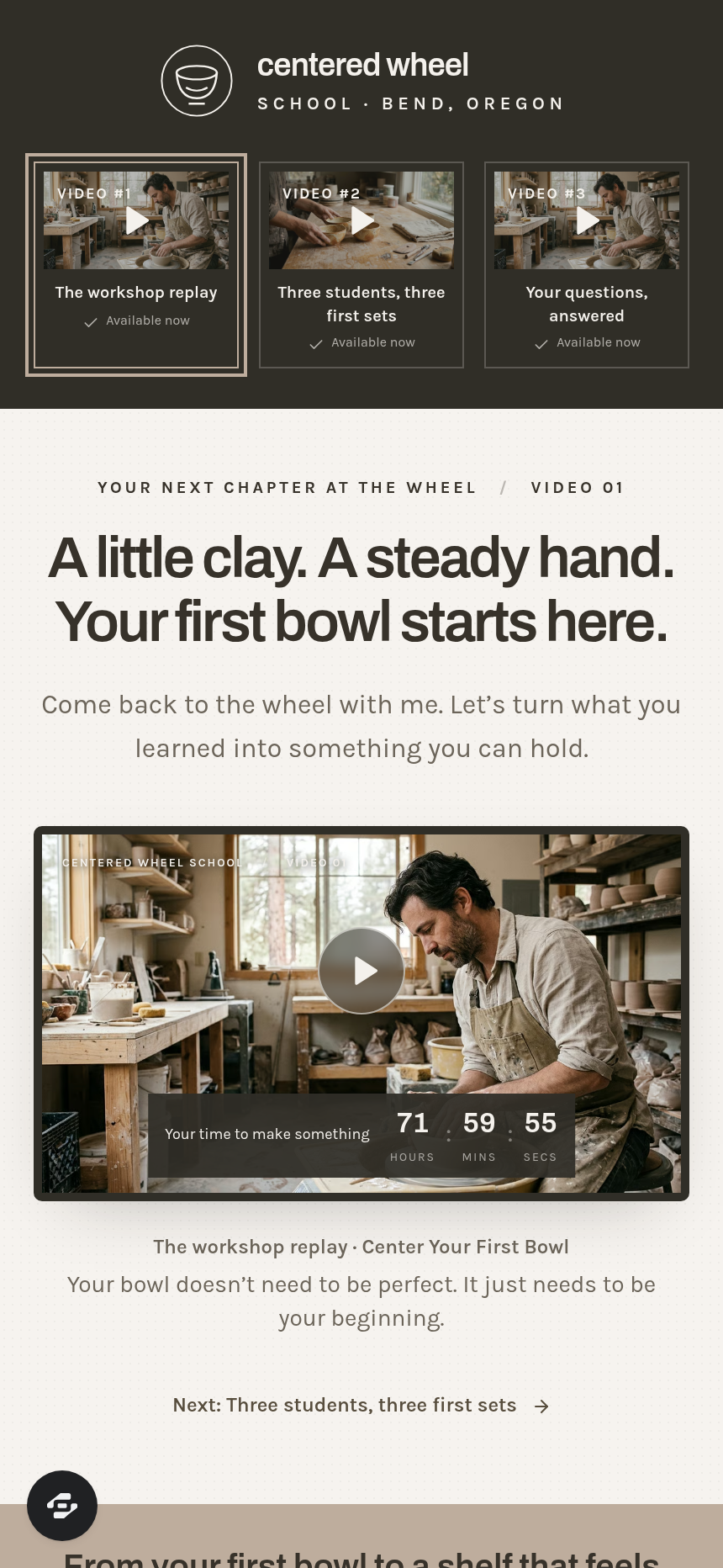
- Index (/) — "The Workshop Replay": dark header with the Centered Wheel School logo and three clickable video thumbnails (the current one outlined), a framed replay video with the cart-closes countdown overlaid, the full offer stack ($913 value, $397 price), and a CTA button.
- StudentStories (/student-stories) — "Three Students, Three First Sets": the same thumbnail strip and countdown, a case-study video, three named result cards (Priya, Marcus, Elena), the stack, and the enroll button.
- YourQuestions (/your-questions) — "Your Questions, Answered": Q&A video, FAQ component, stack, and enroll button — the final push before cart close.
- Order (/order) — Secure card checkout for the 8-week Home Wheel Course at $397 pay-in-full, with an optional $29 Glaze Recipe Cards order bump and a 30-day money-back guarantee.
- Welcome (/welcome) — Post-purchase page showing the student's computed first lesson date (the Monday after enrollment) and a before-the-first-bowl setup checklist.
- CartClosed (/cart-closed) — Waitlist form that captures name and email for the next course opening; writes a real lead to the funnel's built-in database.
An owner dashboard at /admin shows funnel-wide conversion, page-by-page steps, and a contacts table of everyone who opted in or joined the waitlist.
How it works
A visitor lands on Index from the workshop follow-up email and can jump to any of the three video pages using the thumbnail strip — no forced sequence. The 72-hour countdown is computed from the visitor's first visit and saved in the browser so it never resets on refresh. Every video page renders the full offer stack (each line item with its value, then the $397 total) so the close is visible whether someone arrives on day one or day three.
When the visitor clicks the enroll button, the Order page loads a secured checkout with the Glaze Recipe Cards bump — the order form, bump, and thank-you routing are the native money path ClickFunnels AI ships with checkout-type funnels, so no third-party cart is needed. After payment, the buyer lands on Welcome; after the countdown expires, every enroll button routes to CartClosed instead, and the waitlist submission stores a lead in the funnel's built-in database, visible from the admin dashboard without an external CRM.
The signature step
The video page layout is what makes this funnel work: a dark header anchoring the logo and three thumbnail boxes (the active one outlined in a highlight color), followed by a light textured band with the day's headline, the framed video with the countdown overlaid at the bottom edge, a caption, and then the full-width taupe offer band listing every stack item with its stated value before showing the $397 price and the enroll button. The same structure repeats on all three pages so returning visitors feel orientation, not repetition.
Who it's for
- Course creators and coaches who run a live workshop or webinar and sell the recorded program during a short open-cart window.
- Pottery teachers, craft instructors, and hands-on educators who want a replay sequence that feels personal rather than automated.
- Any operator whose post-event emails need a single destination that handles video delivery, the sales close, checkout, and waitlist in one place.
Design
- Type pairing
- Archivo display Karla body
- Motion
- none; reduced-motion: static
- Signature screen
- Three-video page with thumbnail strip and cart countdown
- References
-
- Post-webinar three-video mini launch
What can you use Centered Wheel School — Post-Webinar Mini-Launch Funnel for?
- A pottery teacher ends a sold-out live "Center Your First Bowl" session and immediately points the follow-up email to Index, letting attendees rewatch the replay and enroll in the full 8-week course before the 72-hour cart closes.
- A watercolor instructor runs a one-day live painting workshop, then uses the three video pages to deliver the replay on day one, student transformation stories on day two, and a live Q&A recording on day three, with the same checkout on every page.
- A sourdough baking coach hosts a free weekend class and routes participants into the mini-launch funnel to sell a 6-week at-home bread course, using the CartClosed waitlist to build the list for the next cohort from anyone who arrives after the cart expires.
- A yoga teacher wraps up a live anatomy workshop and sends follow-up emails linking to each of the three video pages in sequence, using the stacked offer close and countdown to sell a self-paced 8-week flexibility program.
- A ceramics studio owner records a glaze chemistry workshop and uses the funnel to sell an advanced studio course during a 72-hour post-event window, then automatically collects waitlist leads when the cart closes — all stored in the built-in dashboard without a separate CRM.
- A freelance cooking instructor finishes a live knife-skills class and points participants to the three-video follow-up funnel selling a 10-week home-cook course, using the student result cards on StudentStories to show real meal outcomes before the checkout.
Frequently asked questions
What is the Post-Webinar Mini-Launch Funnel?
Who is the Post-Webinar Mini-Launch Funnel for?
What pages are included?
How do I customize the Post-Webinar Mini-Launch Funnel in ClickFunnels AI?
Does it include a checkout and order bump?
Can I use my own branding and domain?
How is it different from a standard ClickFunnels replay funnel?
What setup is required before sharing the funnel?
Related templates
 Webinars & Challenges
Evergreen Webinar Funnel
The Evergreen Webinar Funnel is a just-in-time automated webinar template in ClickFunnels AI that lets registrants pick a session starting in 15 minutes or the next day, then walks them through a real-timeline room, a scheduled pitch reveal, and a checkout — all without fake live chat or inflated attendee counts.
 Webinars & Challenges
Brightsteps — Move-the-Tower Parent Q&A Funnel
The Brightsteps Move-the-Tower Masterclass Funnel is a survey-first webinar registration funnel built in ClickFunnels AI for a kids' logic club in Ann Arbor, Michigan. It opens with a playable three-peg tower puzzle, asks each parent's own question before a free live Q&A is booked, and leads families to a $49 four-week course.
 Webinars & Challenges
Loop & Toss — Juggling Pattern Seven-Day Challenge Funnel
The Loop & Toss Juggling Pattern Seven-Day Challenge Funnel is a seven-day paid challenge template built in ClickFunnels AI for skill teachers who want to prove their method before asking for a sale. It opens on a live pattern player instead of a video, then moves a visitor into a $17 checkout and seven dated lesson pages.
 Webinars & Challenges
The One-Word Workshop — Word Wall Paid Workshop Funnel
The One-Word Workshop Word Wall Funnel is a paid-workshop funnel built in ClickFunnels AI that opens on a live typographic wall of 36 words, lets each visitor claim or contribute their one word for the year, and carries it through to a $24 seat checkout.
Make this template your starting point.
Inspect the preview, plan your changes, and test the workflow before you share it.
Use this template