Paper Crane Design Desk — Design Subscription Request Board Site
Design Subscription Request Board Site is an agency funnel template for subscription design studios, built as a live request board visitors can interact with before they buy. ClickFunnels AI generates the full site — landing page, trial checkout, welcome board, work gallery and pricing page — wired together and ready to adapt to your studio's offer.
About this template
What is Paper Crane Design Desk — Design Subscription Request Board Site?
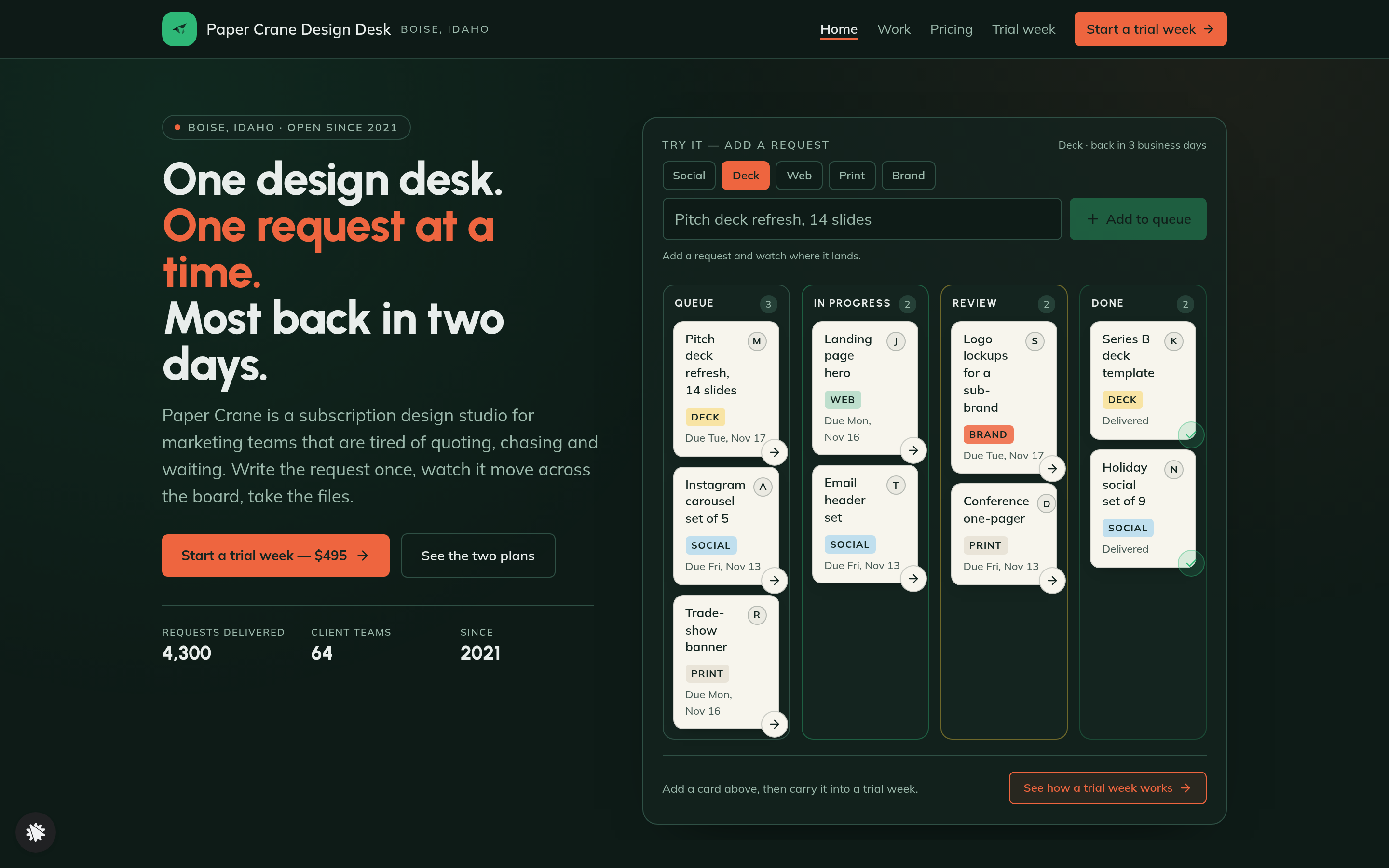
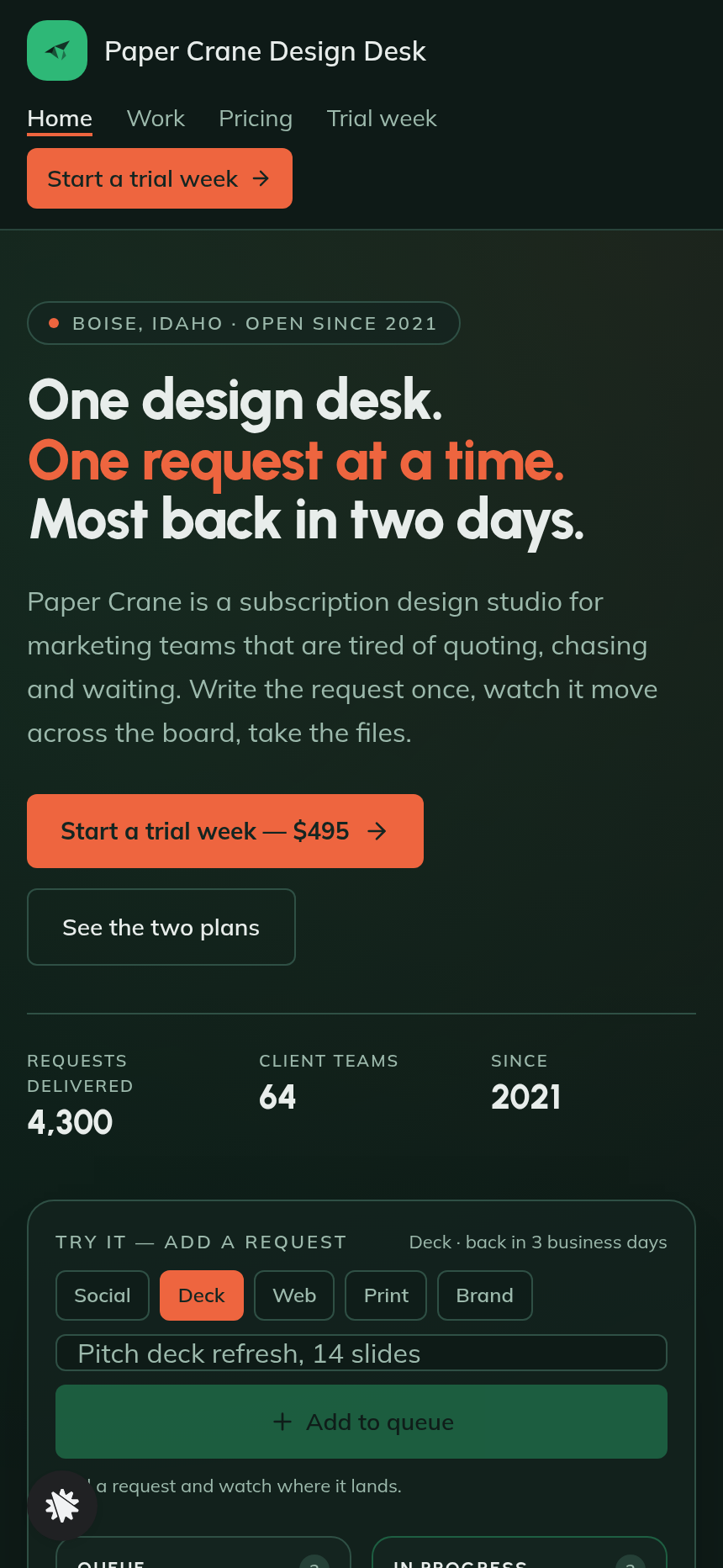
Paper Crane Design Desk is a subscription design studio template whose home page does something unusual: it puts the product — a four-column design request board — directly in the hero so visitors experience the workflow before they read a single line of copy. A visitor types a request, picks a type tile, and a card drops into Queue with a computed delivery date. That interaction carries into a $495 trial checkout, a welcome board and a post-purchase kickoff sequence. The result is a complete agency site that sells on proof of process rather than promises.
What you get
Home (/) — Split hero with three-line headline, two CTAs and three trust numbers (4,300 requests delivered, 64 client teams, open since 2021), followed by the interactive request board (Queue, In Progress, Review, Done columns seeded with nine example cards), a three-step how-it-works section, a turnaround strip, twelve drawn work thumbnails, two plan cards over a feature comparison table (Standard $2,400/month and Pro $3,900/month), six client quotes and an FAQ band ending in a trial CTA.
Trial (/trial) — The visitor's request carried in from the board, a recap of what the week includes, contact fields (name, work email, company), and a card checkout for the $495 trial week with an optional $95 brand-kit setup bump. One payment, no subscription.
Welcome (/welcome) — The buyer's board with their first request at the top of Queue, its delivery day written out in words, three kickoff steps (say hello in the channel, send brand files, add requests two and three) and instructions for sharing brand assets.
Work (/work) — Twelve recent pieces with the type, turnaround and what each one took, plus a trial CTA at the bottom.
Pricing (/pricing) — The two monthly plans over a feature table, the trial week positioned as the starting point, and a plain-language FAQ about the money.
Admin panel (/admin) — Owner dashboard showing visits, conversion, page-by-page funnel steps and a contacts list of everyone who opted in or checked out, with test traffic separated and labelled.
How it works
- Visitor lands on the home page and sees the request board already populated with nine example cards across four columns.
- They type a one-line request, pick a type tile (Social, Deck, Web, Print or Brand) and click Add to queue — their card appears at the top of Queue with a computed back-to-you-by date.
- They move cards forward with a small arrow to see how a request travels from Queue through In Progress and Review to Done.
- The "Start a trial week — $495" CTA carries the request title into the trial page URL so the checkout recap reflects exactly what they just added.
- On the trial page they fill in name, work email and company, then complete the card checkout for $495; the optional $95 brand-kit bump is presented inline.
- The welcome page loads with their board, their first request in Queue with its delivery day, and three steps to get the week moving.
Because every opt-in, checkout and request detail is stored in the funnel's built-in database and surfaced in the admin panel, the studio owner can see recent contacts and conversion at a glance without connecting an external CRM. After remixing this template, you describe the change you want — swap the studio name, update the turnaround promises, change the trial price — and ClickFunnels AI edits the page directly from the conversation. The template gallery lets you preview the board on desktop and mobile before you commit, then "Edit this design" opens the funnel for adaptation to your own studio's offer.
The signature step
The request board in the home hero is the template's defining moment. Nine pre-seeded cards show real request types (pitch deck refresh, Instagram carousel set, trade-show banner, landing page hero, email header set, logo lockups for a sub-brand) each with a type chip and a delivery day computed in business days from today. When a visitor adds their own request, the card animates into Queue with a "Back to you by [day, month date]" label — Social in one business day, Print in two, Deck and Web in three, Brand in four. That single interaction communicates turnaround, process transparency and low friction faster than any paragraph of copy.
Who it's for
- Subscription design studios selling flat monthly retainers with a one-request-at-a-time queue model
- Productized video, copywriting or development agencies whose fulfillment runs the same way
- Solo designers or small teams moving from project billing to subscription pricing
- Any service business that wants to show clients where their work stands rather than tell them
- Agencies testing a trial-week offer before committing visitors to a full monthly plan
Design
- Type pairing
- Urbanist display Mulish body
- Motion
- new card drops into Queue; cards step forward on arrow; reduced-motion: static
- Signature screen
- Four-column request board you can add a request to
What can you use Paper Crane Design Desk — Design Subscription Request Board Site for?
- A two-person brand studio in Austin replaces Paper Crane's details with their own, sets the trial price to $595 and publishes the board — new clients can queue a request and reach the checkout in under two minutes.
- A solo UX designer testing subscription pricing uses the template's Standard and Pro plan cards and feature table to compare their $1,800 and $3,200 tiers without writing a pricing page from scratch.
- A subscription copywriting agency adapts the five type tiles from Social/Deck/Web/Print/Brand to Blog/Email/Ad/Script/Thread, keeping the board's delivery-day logic so visitors see turnaround before they read anything else.
- A productized video studio uses the admin panel's contacts list and conversion view to track how many visitors who added a request on the board actually completed the trial checkout, then adjusts the trial page copy from the chat editor.
- A development retainer shop embeds the template's how-it-works three-step section and turnaround strip on their existing site's pricing page, driving traffic to the trial checkout for a $795 one-week sprint.
- A design agency offering both a solo-designer tier and a two-designer tier maps those to the Standard and Pro plan cards, updates the "Two at a time" feature row and publishes the pricing page as a standalone comparison tool for warm leads.
Frequently asked questions
What is the Design Subscription Request Board Site?
Who is this template for?
What pages are included?
How do I customize the Design Subscription Request Board Site in ClickFunnels AI?
Does it include a checkout or order form?
Can I use my own branding and domain?
How is this different from a classic ClickFunnels agency funnel?
What setup is required before I can share the site?
Related templates
 Agency Sites & Funnels
Second Ring — Answering Service Staffing Calculator Agency Site
Answering Service Staffing Calculator Site is an agency site built in ClickFunnels AI for a live call-answering service. Its Erlang C calculator shows how many phone agents a busiest hour needs, then visitors can start a two-week overflow trial for $149.
 Agency Sites & Funnels
Pickline — Program-the-Picker Warehouse Robotics Agency Site
Pickline Program-the-Picker Agency Site is a ClickFunnels AI template built for Pickline Automation, a Reno, Nevada robotics firm that fits picking robots into warehouses. It opens with a picking-robot tool and leads visitors to book a $450 on-site pick-path audit with a card checkout.
 Agency Sites & Funnels
Cue & Cable — Patch-the-Stage Event Sound Agency Site
Cue & Cable is a five-page agency site for an event sound company in Columbus, Ohio, built in ClickFunnels AI. Visitors patch a stage diagram, answer four questions about their event, pick a planning call, and pay a $150 site-visit deposit.
 Agency Sites & Funnels
Paper Compass — Custom Map Studio Pin-Your-Places Site
Custom Map Studio Pin-Your-Places Site is a studio-site-with-deposit-checkout template built in ClickFunnels AI for illustrated-map studios. Visitors pin places on a drawn town, watch the starting price update, then pay a $95 sketch deposit.
Make this template your starting point.
Inspect the preview, plan your changes, and test the workflow before you share it.
Use this template