Butter & Bay — One-Oven Holiday Dinner Planner Lead Page
Holiday Dinner One-Oven Planner Lead Page is a giveaway-style opt-in funnel made with ClickFunnels AI for Butter & Bay Cooking School in Raleigh, North Carolina. Visitors set their turkey weight, dinner time and sides, read a one-oven timeline, then submit the "Email me this plan" form to keep it.
About this template
What is Butter & Bay — One-Oven Holiday Dinner Planner Lead Page?
Butter & Bay Cooking School in Raleigh, North Carolina has taught since 2011, has 14,000 students, and holds a 4.9-star average from 1,100 reviews. This funnel puts a working one-oven dinner planner on the home page, so visitors solve their own timing problem first and then leave an email address to keep the plan.
What you get
Five pages a visitor can reach, along with a custom 404 page:
- Index (/): the headline, the One-Oven Plan tool, the "Email me this plan" form, student quotes and an FAQ.
- Plan (/plan): the visitor's choices, carried in the address, laid out as a plan to print, with an offer for the recorded class.
- Class (/class): "The one-oven holiday dinner," a 70-minute class with a card checkout at $24 and a $9 bump for printable shopping list and oven timer cards.
- Enrolled (/enrolled): the page after a class purchase.
- Tips (/tips): three free tips for visitors who say no thanks to the class.
How it works
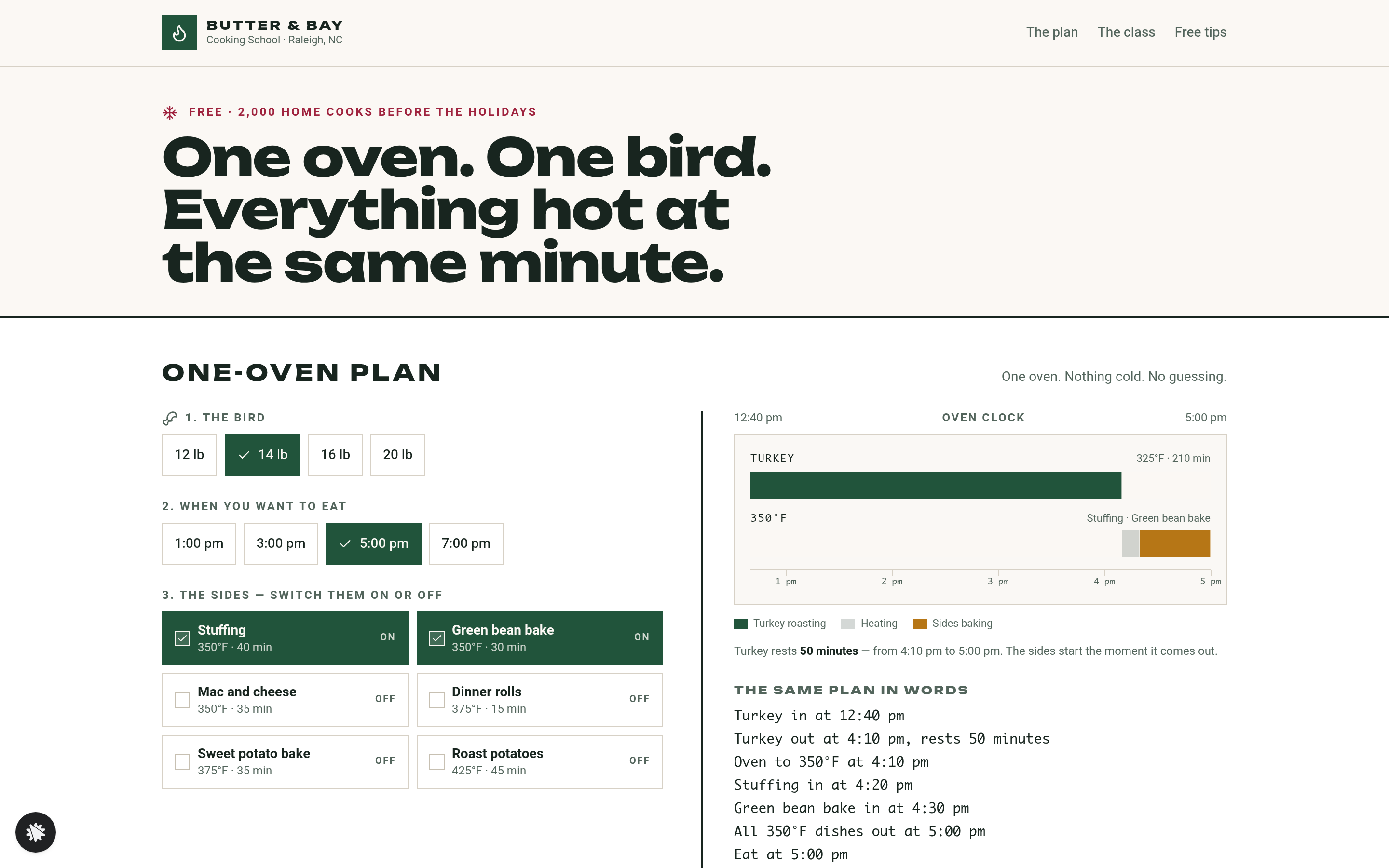
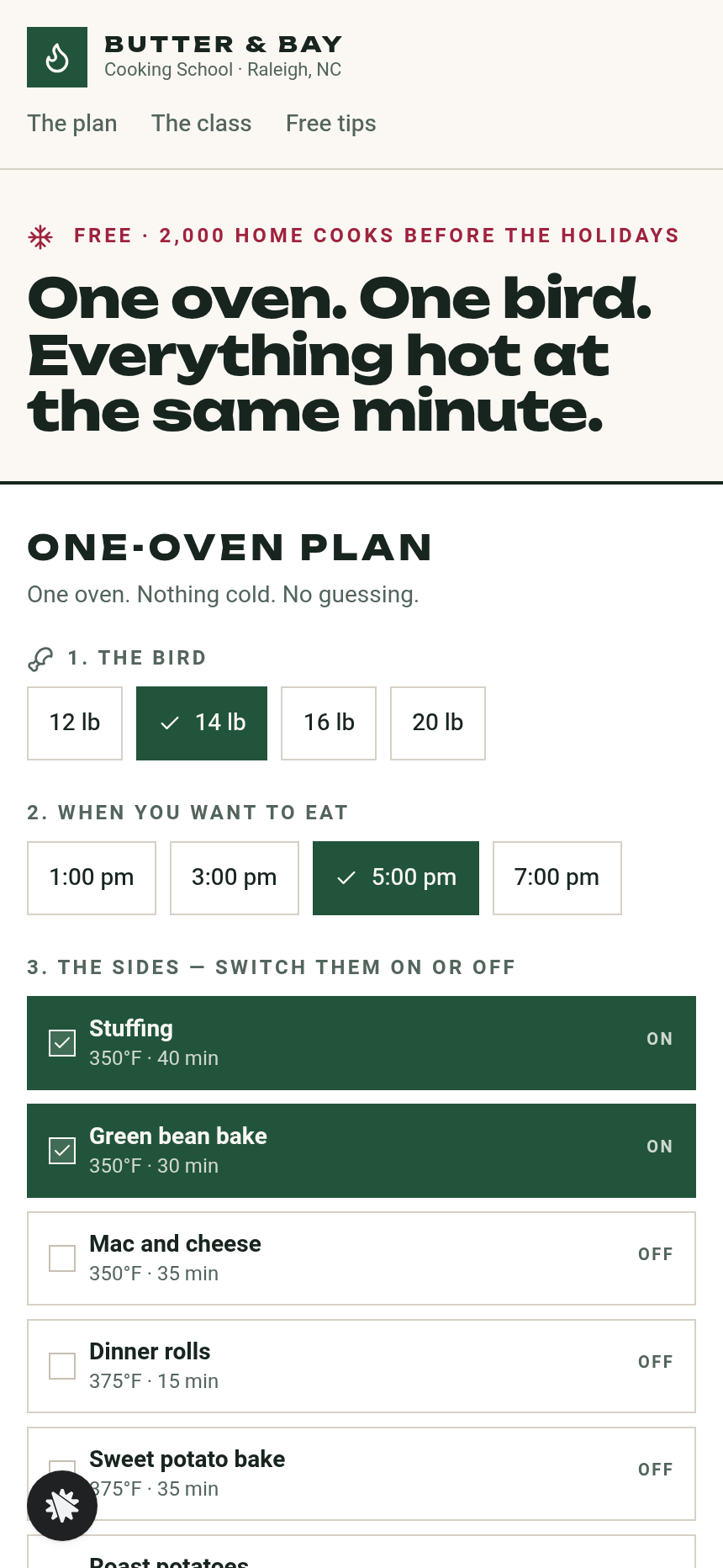
Visitors pick a turkey of 12, 14, 16 or 20 lb and a dinner time of 1:00, 3:00, 5:00 or 7:00 pm, then toggle any of six sides. Each side has its own oven temperature and bake time, from Stuffing at 350F for 40 minutes to Roast potatoes at 425F for 45 minutes. The turkey roasts at 325F for 15 minutes a pound and rests at least 30 minutes while the sides bake. The sides are grouped by temperature, lowest to highest, with 10 minutes to heat before each block, and the last block ends at dinner. If the sides need more than 75 minutes, the planner shows "Too much for one oven — over by N minutes" instead of a timeline.
Changing the school name, the class price or any wording is one request to the ClickFunnels AI chat panel, such as "make the class $29". When the page is ready, connect your own domain and publish.
The signature step
The default plan is a 14 lb turkey at 5:00 pm with Stuffing and Green bean bake. The turkey goes in at 12:40 pm and comes out at 4:10 pm, and the sides bake while it rests. The timeline redraws as the buttons change, so a visitor can see what Dinner rolls or Roast potatoes would do to the schedule before they commit. The Plan page then prints those same choices, and the Class page is one click away.
Who it's for
- Cooking schools and culinary instructors who want an email list before a seasonal class.
- Butchers, caterers and food bloggers who want a lead magnet that solves a real cooking problem on the page.
- Meal-kit and specialty food brands building a list before the holidays.
- Any operator whose readers would trade an email address for a plan that keeps dinner on time.
Design
- Type pairing
- Unbounded display Heebo body
- Motion
- timeline bars resize as the choices change
- Signature screen
- One-oven plan: bird, dinner time and six sides; the timeline is built backwards from dinner with one temperature at a time
What can you use Butter & Bay — One-Oven Holiday Dinner Planner Lead Page for?
- A cooking school in a mid-size city runs a pre-Thanksgiving email campaign that sends traffic to the Index page, where visitors build their own turkey timeline before they opt in.
- A specialty butcher shop links the planner in its November newsletter, so customers who plan a 20 lb bird can see when it needs to go in before they sign up.
- A food blogger points readers at the One-Oven Plan tool and then follows up with recipes for the sides each reader toggled on.
- A meal-kit brand asks the builder chat to swap the side dishes for its own products and uses the email list to pre-sell a holiday bundle.
- A culinary school running in-person Thanksgiving classes uses the Tips page as a soft landing for visitors who skip the $24 class.
- A caterer offering holiday dinner packages uses the planner to show its scheduling skill, then points home cooks who want help to the Class page.
Frequently asked questions
What is the Holiday Dinner One-Oven Planner Lead Page?
Who is this funnel for?
What pages are included?
How do I customize the Holiday Dinner One-Oven Planner Lead Page in ClickFunnels AI?
Does it include a checkout or order form?
Can I use my own branding and domain?
How is it different from a classic ClickFunnels lead-magnet funnel?
What setup is required before sharing the funnel?
Related templates
 Lead Pages & Opt-ins
Marin Pricing Ladder
Marin Pricing Ladder is an ebook lead magnet funnel template for ClickFunnels AI: a single opt-in page with a drawn book cover, five bullets and a two-field form, a delivery page that hands over the PDF, and a $17 workbook order page with a real card form.
 Lead Pages & Opt-ins
Fernbrook Studio — 5-Day Pricing Email Course Lead Page
The email-course lead page is an email-course squeeze funnel that captures freelancer opt-ins with a five-day pricing course, delivers day 1 instantly on a confirmation page, and bridges to a $29 template pack. ClickFunnels AI builds it from a single prompt and lets you edit every line of copy, the day-by-day outline, and the order form through a plain-language chat.
 Lead Pages & Opt-ins
Bluewater Move Quote
The multi-step quote lead page is a desktop inline stepper that walks visitors through three numbered steps — need, details, contact — and delivers a quote-ETA confirmation on a separate thank-you page. ClickFunnels AI builds and wires both pages from a single prompt, ready to adapt to any service business that needs several answers before a human can price a job.
 Lead Pages & Opt-ins
Little Ladder Press — Word Ladder Lead Page
Little Ladder Press Word Ladder Lead Page is a ClickFunnels AI lead page for puzzle publishers. Visitors climb a word ladder from COLD to WARM on the home page, then can claim a free mini book of ten ladders, with a $14 paperback offered after it.
Make this template your starting point.
Inspect the preview, plan your changes, and test the workflow before you share it.
Use this template