Riverside — Volunteer Shift Story Funnel
The Volunteer Shift Story Funnel is a mobile story funnel in ClickFunnels AI that signs up event volunteers from a live shift grid, three quick tap screens and a contact form, then hands each person a shift badge. It was built for a church's Community Thanksgiving Dinner and fits any nonprofit filling roles for one big day.
About this template
What is Riverside — Volunteer Shift Story Funnel?
Riverside Community Church in Spokane runs a Community Thanksgiving Dinner that served 650 neighbours last year with 140 volunteers across six roles and four time blocks. This funnel replaces a paper sign-up sheet with a phone-shaped story that opens on a live shift grid, routes the volunteer through three personalisation screens, collects contact details, and closes with a printed shift badge that tells them exactly when to arrive, what to wear, where to park, and who their coordinator is.
What you get
Seven visitor-facing screens and an admin dashboard:
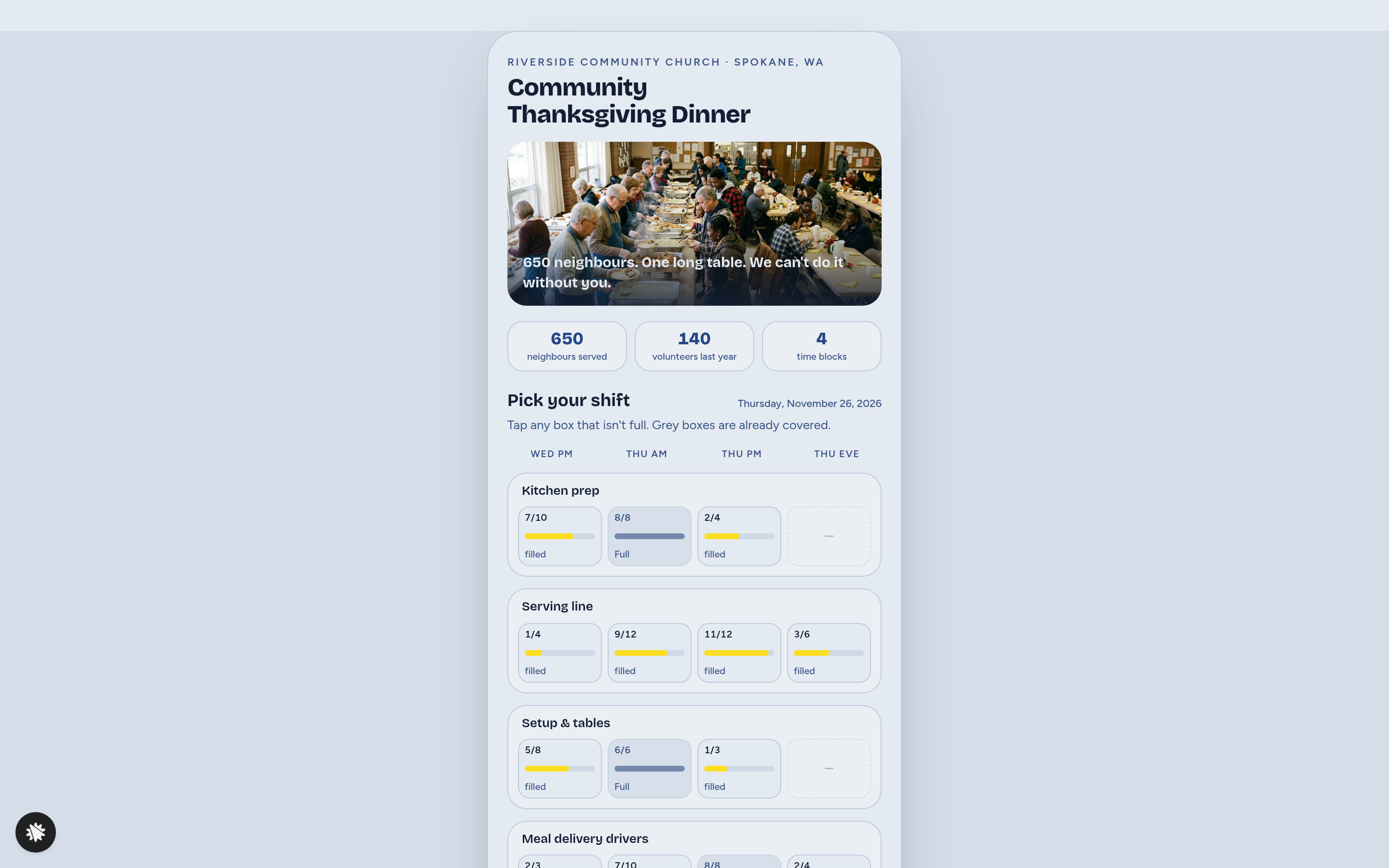
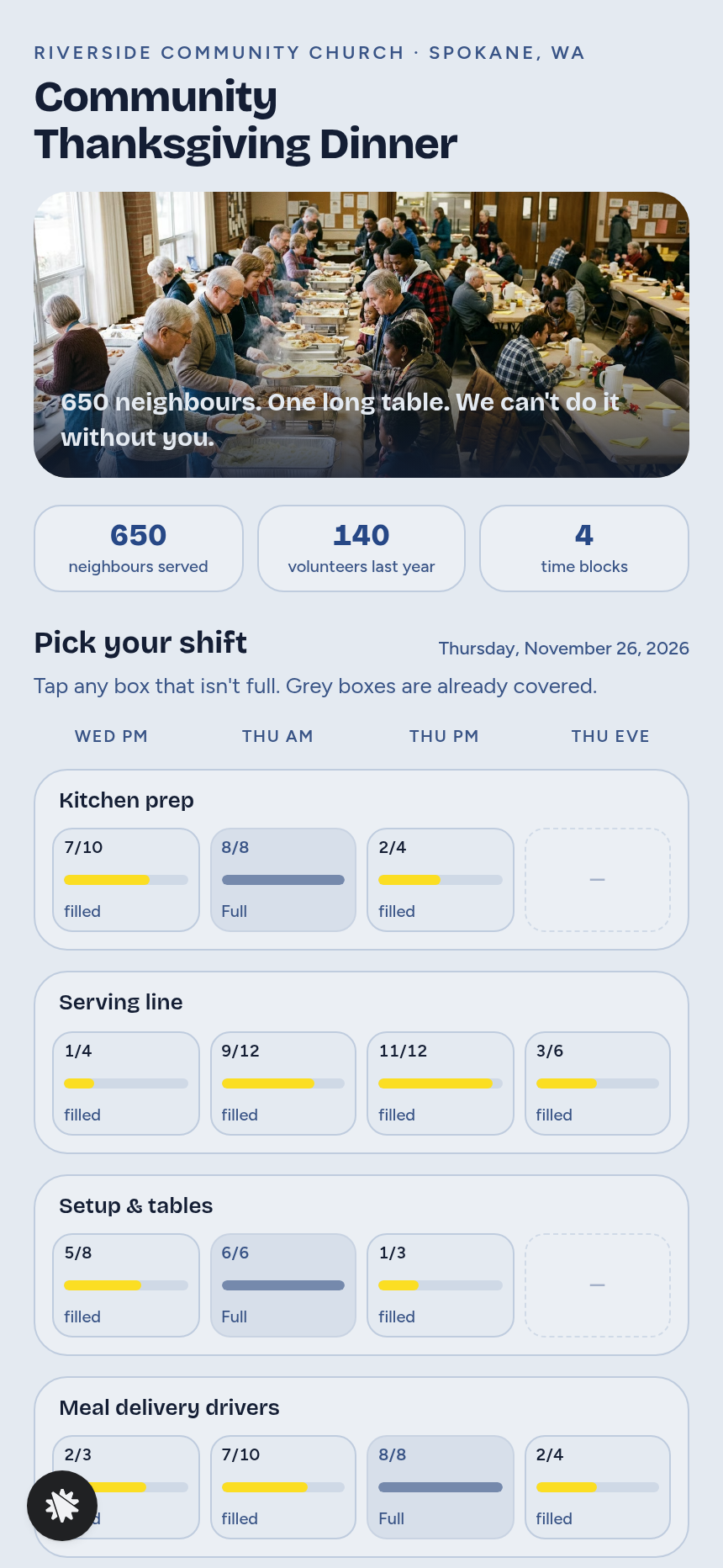
- Index (/) — church kicker, dinner headline, three stat tiles (650 neighbours served, 140 volunteers, four time blocks), and the shift grid: six role rows (kitchen prep, serving line, setup and tables, meal delivery drivers, kids' craft corner, cleanup) across four time columns (prep night plus three Thanksgiving-day blocks), each cell showing a fill bar such as "7 of 10 filled"; full cells are greyed and untappable.
- FirstTime (/first-time) — single tap tile: first Thanksgiving with Riverside or returning.
- Party (/party) — who's coming: just me, +1, family of 3–4, or youth group.
- Skills (/skills) — optional multi-select: food handler card, Spanish or another language, truck or van, first aid / CPR, or nothing special.
- Details (/details) — name, email and mobile; writes a real signup record.
- Badge (/badge) — shift badge card: role, day and time in plain words, arrive-early time, dress code, parking, coordinator Pastor Dana Whitfield's name and number, add-to-calendar (Apple / Outlook) and a bring-a-friend share button.
- ThankYou (/thank-you) — confirmation with a link back to the badge.
- Dashboard (/admin) — volunteer report: total sign-ups, shift totals, driver count flag, and a full sign-up table; visible to admins only.
How it works
- A visitor lands on Index (/) and reads the dinner headline and stats.
- They tap any open cell on the shift grid to claim a role and time block.
- A progress bar appears and they move through FirstTime (/first-time), Party (/party), and Skills (/skills) one screen at a time, each requiring a single tap or a skip.
- Details (/details) collects name, email, and mobile; the record is stored in the funnel's built-in database and surfaces immediately in the Dashboard (/admin) volunteer report — no external spreadsheet needed.
- The visitor reaches Badge (/badge) with their personalised shift card and share options.
- ThankYou (/thank-you) confirms their place and links back to the badge.
When you open this template and describe a change — swap Riverside's name for your organisation, rename a role, adjust cell capacities, or recolour the fill bars — ClickFunnels AI edits the page directly from that instruction. The Dashboard (/admin) automatically reflects every sign-up stored through Details (/details), giving the event coordinator a live headcount without any setup beyond sharing the funnel URL.
The signature step
The shift grid on Index (/) is what makes this funnel work. Every cell is a live fill bar: roles run down the rows, time blocks run across the columns, and a volunteer sees at a glance which spots are open and which are covered. Tapping a full (greyed) cell does nothing; tapping an open cell starts the story. No volunteer has to guess where they are needed.
Who it's for
- Churches running a single-day community meal or service project
- Food banks staffing a holiday distribution shift
- Schools and PTAs coordinating event-day volunteers
- Race organisers filling aid-station and finish-line roles
- Festivals and fairs that assign volunteers to specific time windows
- Any nonprofit that needs a grid of open shifts filled before a fixed date
Design
- Type pairing
- Bricolage Grotesque display Figtree body
- Motion
- none; reduced-motion: static
- Signature screen
- Role-by-time shift grid with fill bars
- References
-
- Volunteer shift signup
What can you use Riverside — Volunteer Shift Story Funnel for?
- A church fills 140 volunteer slots across six roles and four Thanksgiving-day time blocks without printing or distributing paper sign-up sheets.
- A food bank staffing a holiday box-distribution day uses the shift grid to cap each station at a safe headcount and greys out full cells automatically as volunteers sign up.
- A school PTA running a spring fair assigns parent volunteers to booth shifts and collects skill flags (Spanish-speaking, truck owner) in the Skills screen to match helpers to roles.
- A 5K race director fills aid-station, finish-line, and parking-marshal slots for race morning and gives every volunteer a badge with their station, arrival time, and the race director's mobile number.
- A nonprofit event coordinator monitors sign-up progress in real time through the Dashboard (`/admin`) volunteer report and shares the funnel link in a single text message to the congregation.
- A youth ministry leader books an entire youth group into a single time block using the Party (`/party`) screen's youth-group option and receives one contact record covering the whole group.
Frequently asked questions
What is the church-volunteer-shift-story-funnel?
Who is this funnel for?
What pages are included?
How do I customize the church-volunteer-shift-story-funnel in ClickFunnels AI?
Does it include a checkout or order form?
Can I use my own branding and domain?
How is it different from a classic ClickFunnels opt-in funnel?
What setup is required before sharing the funnel?
Related templates
 Mobile Story Funnels
Willow Doula — Due-Date Wheel Mobile Story Funnel
Doula Due-Date Wheel Mobile Story Funnel is a tap-through story funnel built in ClickFunnels AI for a doula collective's birth-prep classes. Visitors enter a period date and cycle length, see a live due-date wheel with four class Saturdays, then pay $129 for the series.
 Mobile Story Funnels
Third Move — Move-One-Match Puzzle Night Story Funnel
The Third Move Move-One-Match Puzzle Night Story Funnel is a ClickFunnels AI quiz-story template for Third Move Board Game Café in Providence, Rhode Island. It opens with a matchstick puzzle and walks visitors through difficulty, party size, Thursday and results to a card checkout for a $12 seat.
 Mobile Story Funnels
Saltmarsh — Pour-the-Layers Unity Sand Story Funnel
Saltmarsh Pour-the-Layers Unity Sand Story Funnel is a four-screen, phone-style ClickFunnels AI funnel for a $39 unity sand ceremony set. Couples pick two colours, pour their layers into a drawn vase, and check out by card.
 Mobile Story Funnels
Plaza Verde — Match-the-Pairs Spanish Class Story Funnel
The Spanish Class Match-the-Pairs Story Funnel is a mobile-first, interactive booking funnel built with ClickFunnels AI that walks visitors through a twelve-card word-and-picture matching game before converting them into paying trial-class students at $25 a seat.
Make this template your starting point.
Inspect the preview, plan your changes, and test the workflow before you share it.
Use this template