Ines Calloway — Photographer Print Shop with Wall Preview
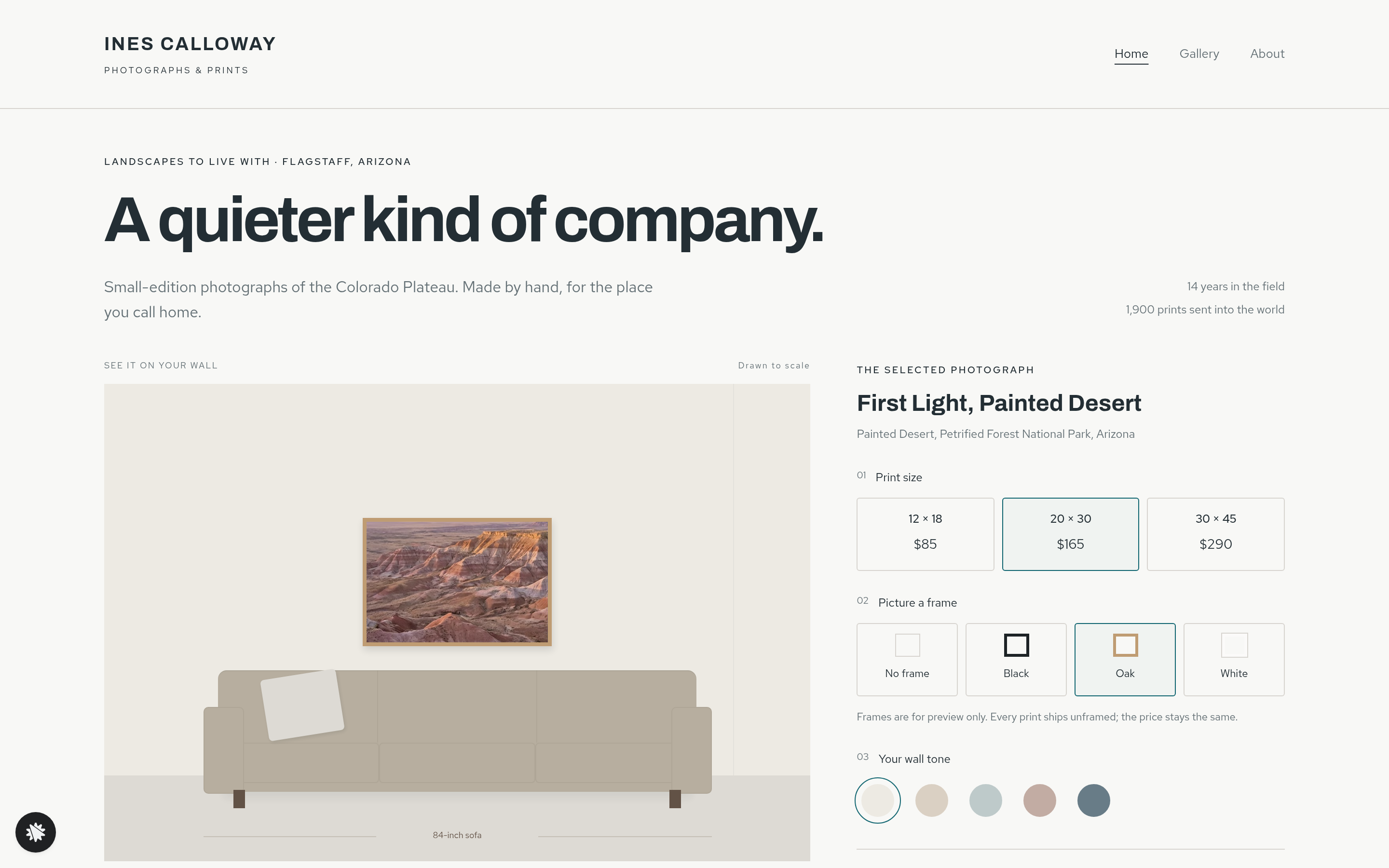
Photographer Print Wall Preview Site is a personal print shop built in ClickFunnels AI, where visitors hang any of nine landscape photographs on a drawn living-room wall scaled to an 84-inch sofa. After the preview comes an order form in two steps, with a postcard-set bump you can leave out.
About this template
What is Ines Calloway — Photographer Print Shop with Wall Preview?
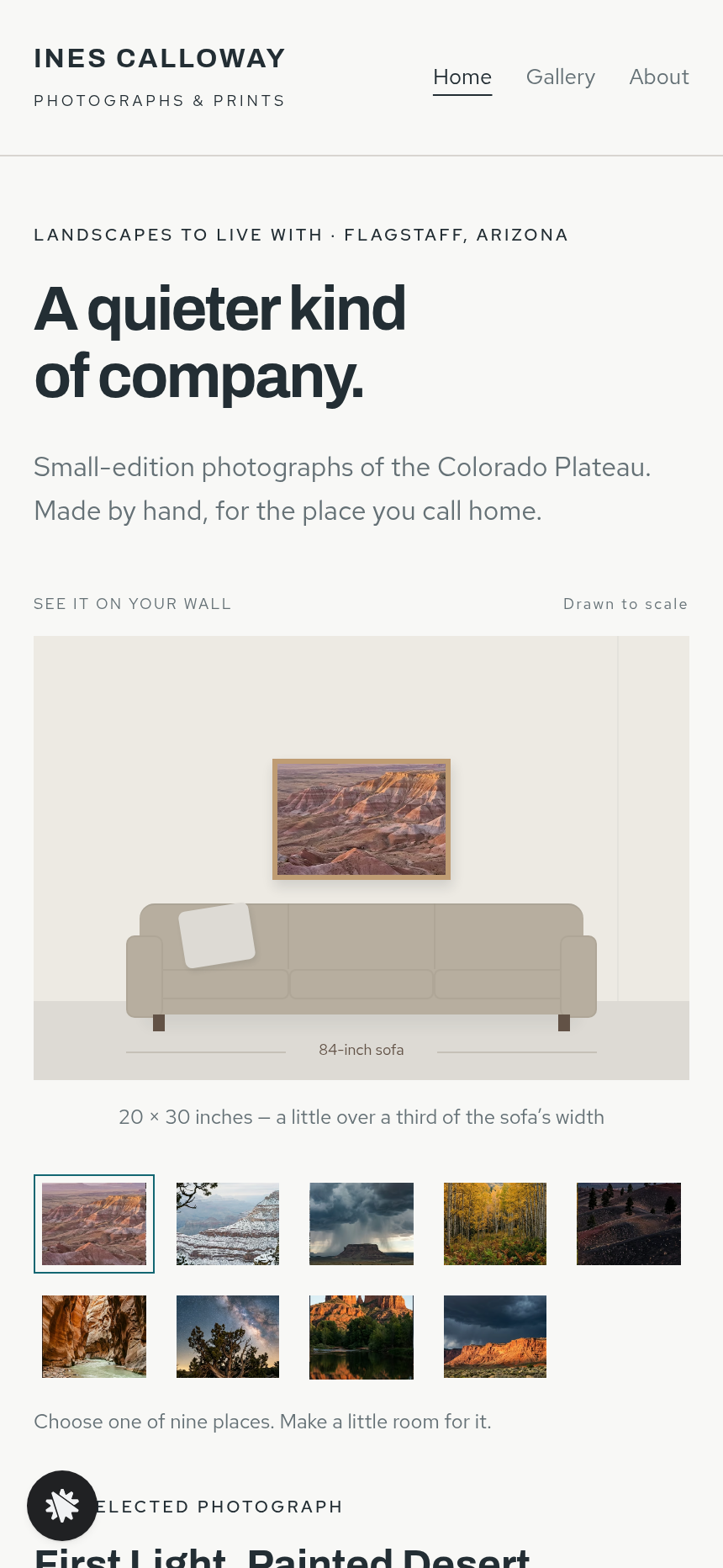
This funnel is the personal print shop of Ines Calloway, a landscape photographer based in Flagstaff, Arizona, who has spent fourteen years photographing the Colorado Plateau and has shipped more than 1,900 signed, numbered cotton-rag prints from her own studio. The structural centrepiece is a "See it on your wall" preview: a code-drawn living-room wall with a three-seat sofa 84 inches wide, on which the chosen photograph hangs at its true relative size. Everything else in the funnel — the letter, the order page, the thank-you — radiates from that one moment of spatial clarity.
What you get
- Landing page (/) — the full wall-preview hero with nine photograph thumbnails (First Light Painted Desert; Snow on the Rim; Monsoon over the Mesa; Aspens Inner Basin; Cinder Hills at Dusk; The Narrows; Juniper and Stars; Red Rock Crossing; Storm Light Vermilion Cliffs), three size tiles ($85 for 12×18 in, $165 for 20×30 in, $290 for 30×45 in), four frame tiles (No Frame, Black, Oak, White — preview only, price unchanged), five wall-tone swatches, and a plain-words size caption beneath the wall. Below the preview: a studio letter from Ines with her portrait, a four-step explanation of how each print is made, three short collector notes, and a practical FAQ covering framing, editions, posting time, paper type, and care.
- Order page (/order) — the chosen photograph and size arrive via URL. A small wall-recap image confirms the selection. Step 01 collects name, email, and shipping address (the lead is saved before any payment). Step 02 is a secured card checkout for the fixed size price, with an $18 one-time bump for a set of six Colorado Plateau postcards.
- Thank-you page (/thank-you) — shows the photograph, the size, an edition number, a posting estimate computed five business days forward (Monday–Friday), and a short set of handling and hanging tips.
- Gallery (/gallery) — all nine photographs with links back to the wall preview.
- About (/about) — Ines's story, fourteen years on the Plateau, 1,900 prints shipped.
- Admin dashboard (/admin) — funnel conversion metrics, opt-in contacts list with test-traffic labelling, and CSV-ready contact records.
How it works
- A visitor lands on / and sees the wall preview open in its default state: First Light Painted Desert at 20×30 inches, oak frame, lightest wall tone.
- They tap a thumbnail to swap the photograph; a size tile to resize it against the sofa; a frame tile to visualise a surround (a one-line note confirms frames are for preview only and not included); a wall-tone swatch to match their room.
- The caption beneath the wall updates to plain words: '20×30 inches — a little over a third of the sofa's width.'
- They click "Order this print" and land on /order with the photograph title and size pre-loaded in the URL.
- On /order, Step 01 saves their name, email, and shipping address to the funnel's built-in contact store — the lead is captured before the card is ever shown — and those contacts surface in the admin dashboard at /admin with test traffic separated from live visitors.
- Step 02 presents the fixed price for their chosen size, the $18 postcard bump, and a secured card form; tax is calculated at payment.
- On completion, /thank-you shows the edition number, a posting date, and care instructions.
For a new opening photograph, a different size price or a reworded studio letter, make the request in chat. ClickFunnels AI edits the wall preview, size tiles or letter text directly. Buyer records from /order and /thank-you are kept in the built-in store and show on the /admin dashboard, with no external CRM to set up.
The signature step
The wall preview on / is the reason this funnel converts. Rather than showing a print on a white gallery background, it draws a living-room wall and sofa in code, then positions the chosen photograph on the wall at a scale calculated from the sofa's known 84-inch width. A 12×18-inch print reads small and intimate next to the sofa; a 30×45-inch print reads commanding. The visitor sees the size argument made visually before they read a word of copy. That moment — photograph chosen, size picked, wall tone matched — is what moves them to "Order this print."
Who it's for
- Fine-art photographers selling signed editions in a small number of fixed sizes.
- Landscape and nature photographers whose work is primarily meant for wall display.
- Illustrators, painters, and poster artists who sell unframed prints and want to help buyers visualise scale.
- Map makers and typographic print sellers with a fixed size range and a need to show relative proportions.
- Any solo artist or studio that sells wall art direct-to-collector without a gallery intermediary.
Design
- Type pairing
- Archivo display Red Hat Text body
- Motion
- print resizes and reframes on tile tap; wall tone crossfades; reduced-motion: instant
- Signature screen
- See-it-on-your-wall preview that hangs the print to scale above a sofa
What can you use Ines Calloway — Photographer Print Shop with Wall Preview for?
- A landscape photographer with an existing body of work swaps in nine of their own images, sets their real print prices, and replaces the studio letter with their own story — going live with a shop that shows every print to scale on a wall before the buyer commits.
- A nature photographer who sells at art fairs uses the funnel's URL-parameter order flow to let fair visitors scan a QR code for a specific print size and land directly on a pre-loaded order page.
- An illustrator selling botanical art prints in three fixed sizes adapts the wall-preview tiles to their own dimensions and uses the postcard bump slot to offer a matching greeting-card set.
- A map-print studio with five signature designs uses the nine thumbnail slots to show each map, the size tiles to demonstrate how a 30×45-inch map fills a hallway wall versus a 12×18-inch desk piece, and the admin dashboard to track which design converts best.
- A photographer offering limited signed editions uses the thank-you page's edition-number field and five-business-day posting estimate to communicate scarcity and fulfilment timeline without a separate email tool.
- A fine-art print framer adds this funnel alongside a physical framing service, using the four frame-tile preview (Black, Oak, White, No Frame) to show clients how each option looks before they visit the shop, then collects their contact details via the two-step order form.
Frequently asked questions
What is Photographer Print Wall Preview Site?
Who is it for?
What pages are included?
How do I customize Photographer Print Wall Preview Site in ClickFunnels AI?
Does it include a checkout or order form?
Can I use my own branding and domain?
How is it different from a standard digital-product shop funnel?
What setup is required before going live?
Related templates
 Personal Brand
Hollis Reed — Family Historian Fan Chart Site
The Family Historian Fan Chart Site is a four-page service funnel built in ClickFunnels AI for a genealogy researcher. The home page draws an interactive fan chart from a birth year, two intake steps gather the research details, and a $350 card checkout closes the sale with an optional $45 framed-chart bump.
 Personal Brand
Maren Holt — Line-Up-the-Layers Printmaker Site
Maren Holt — Line-Up-the-Layers Printmaker Site is a ClickFunnels AI product-sales template for a screen printmaker in Duluth, Minnesota. Visitors line up a two-colour print with an interactive registration tool before buying a numbered edition of 50 for a flat $65.
 Personal Brand
Margo Pell — Monday Mini Crossword Personal Site
Margo Pell Monday Mini Crossword Personal Site is a lead-magnet-with-product-sale funnel built in ClickFunnels AI for a crossword maker's personal site. It opens on a playable four-by-four mini, converts solvers into Monday-email subscribers, and sells a $24 book of 52 full-size puzzles.
 Personal Brand
Wren Ashby — Wedding Planner Seating Chart Site
Wedding Planner Seating Chart Site is a lead-capture service funnel built with ClickFunnels AI for wedding planners who sell a flat-rate seating plan — couples arrange 24 guests across three tables, see conflicts in plain language, then pay $85 for the finished chart, place-card list, and drawn table map.
Make this template your starting point.
Inspect the preview, plan your changes, and test the workflow before you share it.
Use this template