Keys After Forty — Deep-Dive Survey Funnel
The Deep-Dive Survey Funnel is a survey-segmentation lead funnel that opens a three-step popup survey behind a free download, buckets each visitor by the challenge they describe, and routes them to a training page that sells the matching course. ClickFunnels AI builds the landing page, the survey, four bucket training pages, order pages and thank-you pages.

About this template
What is Keys After Forty — Deep-Dive Survey Funnel?
The Deep-Dive Survey Funnel turns a single lead magnet into a segmented selling machine. A visitor lands on the Keys After Forty page, downloads the free 15-Minute Practice Plan, and is immediately walked through a three-step popup survey. Their open-text answer to "What's the single biggest challenge you're facing with the piano right now?" is stored, they pick a bucket that describes their level, they give their name and email, and the funnel routes them to the one training page built for people exactly like them. That training page quotes their own words back, delivers a short lesson, and sells the course priced for their stage — $67, $97, $127, or $147.
What you get
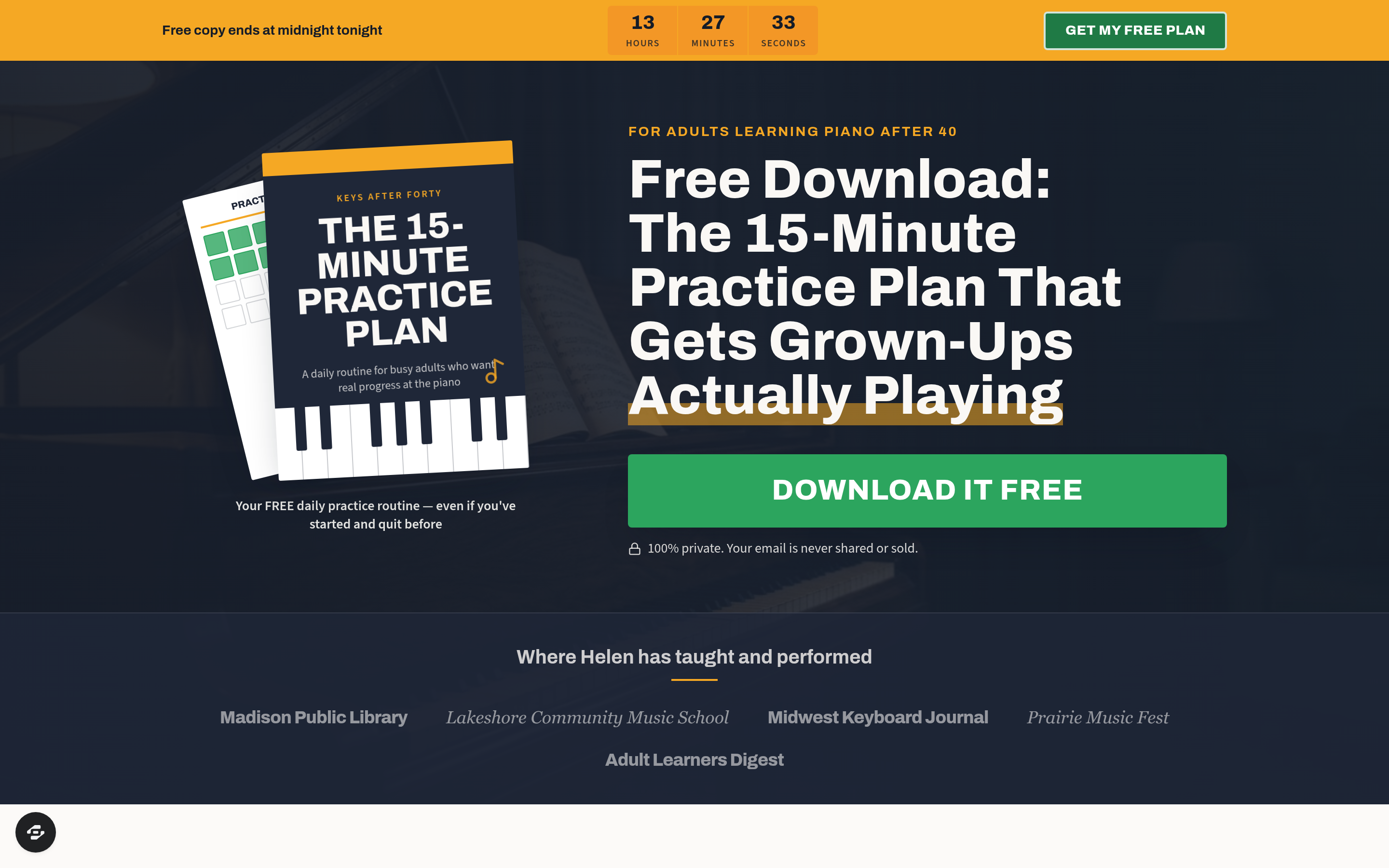
- Landing page (/) — an amber countdown strip counting down to midnight, a dark hero with the guide-cover mockup and a large green download button, a venue row ("Where Helen has taught and performed"), a Meet Helen portrait section, a blue CTA band, a dark checklist of what's inside the plan, a repeat CTA band, and a site footer with the "Built with ClickFunnels AI" credit.
- Three-step popup survey — Step 1: a large open text box requiring at least 20 characters ("single biggest challenge"). Step 2: four radio-button bucket answers describing the visitor's current stage. Step 3: first name and email collection, which writes a real lead record including bucket and challenge text.
- Success screen — confirms the plan is on its way and auto-advances to the matching training page in three seconds.
- Four bucket training pages (/training/first-keys, /training/back-to-the-bench, /training/unstuck, /training/by-ear) — each opens with the visitor's own challenge quoted under a personalized headline, delivers a five-part Lesson with Helen, and presents the one course that fits that bucket.
- Order pages (/order/<bucket>) — secure card checkout, course price summary, and a one-time offer for a printed sheet-music pack ($19 order bump).
- Thank-you pages (/thank-you, /thank-you/<bucket>) — receipt, course price, what-happens-next instructions, and a link back to the free plan.
- Admin dashboard (/admin, /dashboard) — funnel conversion overview, page-by-page step report, and a contacts table (name, email, bucket, challenge text, newest first) with CSV export.
- Custom 404 — sends lost visitors back to the opt-in page.
How it works
- Visitor arrives at / and sees the countdown strip; urgency is real — the timer is computed in their local time zone.
- They click "Download it free"; the popup opens immediately without leaving the page.
- Survey Step 1 collects their open challenge (required, 20-character minimum).
- Survey Step 2 collects their bucket (First Keys, Back to the Bench, Unstuck, or By Ear).
- Survey Step 3 collects name and email; the lead record — including bucket label and raw challenge text — is written to the funnel's built-in database, so every opt-in, survey answer, and eventual order is visible in the owner dashboard without connecting an external CRM.
- The success screen displays and auto-redirects to /training/<bucket> in three seconds.
- The training page opens with the visitor's own words quoted back and a five-part lesson matched to their stage.
- The "One payment · lifetime access" CTA sends them to /order/<bucket>, where they complete a card checkout with an optional $19 printed sheet-music pack bump.
- Successful payment routes to /thank-you/<bucket> with a receipt and next-step instructions.
When you open this template in ClickFunnels AI, you can describe the change you want in plain language — for example, "change the Step 2 bucket labels" or "update the order bump price to $29" — and ClickFunnels AI edits the relevant page without you touching code.
The signature step
The bucket training page is the moment the funnel earns its segmentation work. The headline addresses the visitor by stage ("Lane, this one's made for you"), the paragraph directly below quotes their raw challenge answer back at them, and the five-part Lesson with Helen is specific to that bucket. Because the visitor sees their own words reflected back and a lesson that matches what they said, the transition from free content to paid course feels like a natural next step rather than a cold pitch.
Who it's for
- Course creators with two or more offers aimed at different experience levels who want to sell each person the right product rather than a generic pitch.
- Coaches and educators who collect a lead magnet opt-in and want survey data before the sales page, not a one-size-fits-all email sequence.
- Info-product sellers who have noticed that a single sales page underperforms because half the audience feels the offer is not for them.
- Adult-education teachers (music, art, fitness, language) who can bucket students by experience or goal and have distinct courses for each bucket.
Design
- Type pairing
- Archivo display Source Sans 3 body
- Motion
- none; reduced-motion: static
- Signature screen
- Bucket training page quoting the visitor's own challenge
- References
-
- Deep-dive survey segmentation funnel
What can you use Keys After Forty — Deep-Dive Survey Funnel for?
- An adult piano teacher with four courses (beginner, returning, intermediate plateau, ear-training focus) uses the funnel to route every free-plan download to the course that matches the student's stated level, increasing average order value by reducing the wrong-offer drop-off.
- A fitness coach offering separate programs for weight loss, strength building, mobility, and marathon prep uses the open-text challenge question to collect qualitative copy research on 500 leads while simultaneously routing each to the matching sales page.
- A language school with beginner, conversational, business, and exam-prep tracks uses the bucket training pages to let prospective students self-select their path before seeing a price, cutting sales-page bounce rate.
- A creativity coach with watercolor, drawing, pottery, and journaling courses uses the survey to find out which creative block each visitor is hitting, then quotes that block back on the training page to open the matching course offer.
- A nutrition educator selling separate programs for weight management, energy, gut health, and sports performance uses the admin dashboard's challenge-text column to read 200 raw answers and identify the language real customers use before writing new ad copy.
- A small online music school with a team of teachers uses the funnel's built-in contacts table — which captures bucket, challenge text, name, and email without an external CRM — to assign each new lead to the instructor who teaches that level before the first email goes out.
Frequently asked questions
What is the Deep-Dive Survey Funnel?
Who is the Deep-Dive Survey Funnel for?
What pages are included in the Deep-Dive Survey Funnel?
How do I customize the Deep-Dive Survey Funnel in ClickFunnels AI?
Does the Deep-Dive Survey Funnel include a checkout or order form?
Can I use my own branding and domain?
How is the Deep-Dive Survey Funnel different from a classic ClickFunnels lead-magnet funnel?
What setup is required before the funnel goes live?
Related templates
 Classic Funnels
Ridgeback Tactical — Coupon Registration Cart Funnel
The coupon-registration cart funnel is a coupon-gate cart that captures an email address before revealing a 70%-off discount code, then walks the buyer through an order form, two one-click add-ons, and a thank-you receipt — built and customizable in ClickFunnels AI.
 Classic Funnels
Live Demo Funnel
The Appointment Story Funnel is a mobile tap-through booking funnel built in ClickFunnels AI that walks a visitor from service selection to a confirmed appointment in four tile steps. It is designed for local service businesses running social ads to a phone-first booking page.
 Classic Funnels
Second Light — Photo Restoration Before-and-After Tripwire Funnel
The Photo Restoration Before-and-After Tripwire Funnel is a four-page sales sequence built in ClickFunnels AI for a photo restoration studio. Visitors drag a divider across a faded print or run the fix on their own photo, then order one restoration for $9 with a $12 print bump and a $69 ten-photo offer.
 Classic Funnels
Rootline — Turn-the-Pipes Free Drip Kit Funnel
Rootline gives away a Drip Starter Kit from a garden supply shop in Fort Collins, Colorado, for one flat $7.95 shipping charge. The offer page uses a pipe puzzle to set it up, and the funnel is built in ClickFunnels AI.
Make this template your starting point.
Inspect the preview, plan your changes, and test the workflow before you share it.
Use this template