Copperline Radio Club — Morse Code Name Translator Lead Page
The Morse Code Name Translator Lead Page is a lead-magnet funnel built in ClickFunnels AI for Copperline Radio Club, an amateur radio club in Astoria, Oregon. It converts curious visitors into email subscribers by letting them translate their own name into Morse code before the sign-up form ever appears.
About this template
What is Copperline Radio Club — Morse Code Name Translator Lead Page?
Copperline Radio Club has been on the air since 1958 and meets Tuesday evenings above the old net loft in Astoria, Oregon. This funnel adds beginners to the club's email list by giving away a free course called Morse in a Week: a printable one-page chart and seven short emails, one per day. The hook is an interactive Morse translator that works the moment the page loads — no sign-in, no paywall, no friction before the value.
What you get
The funnel ships five routes:
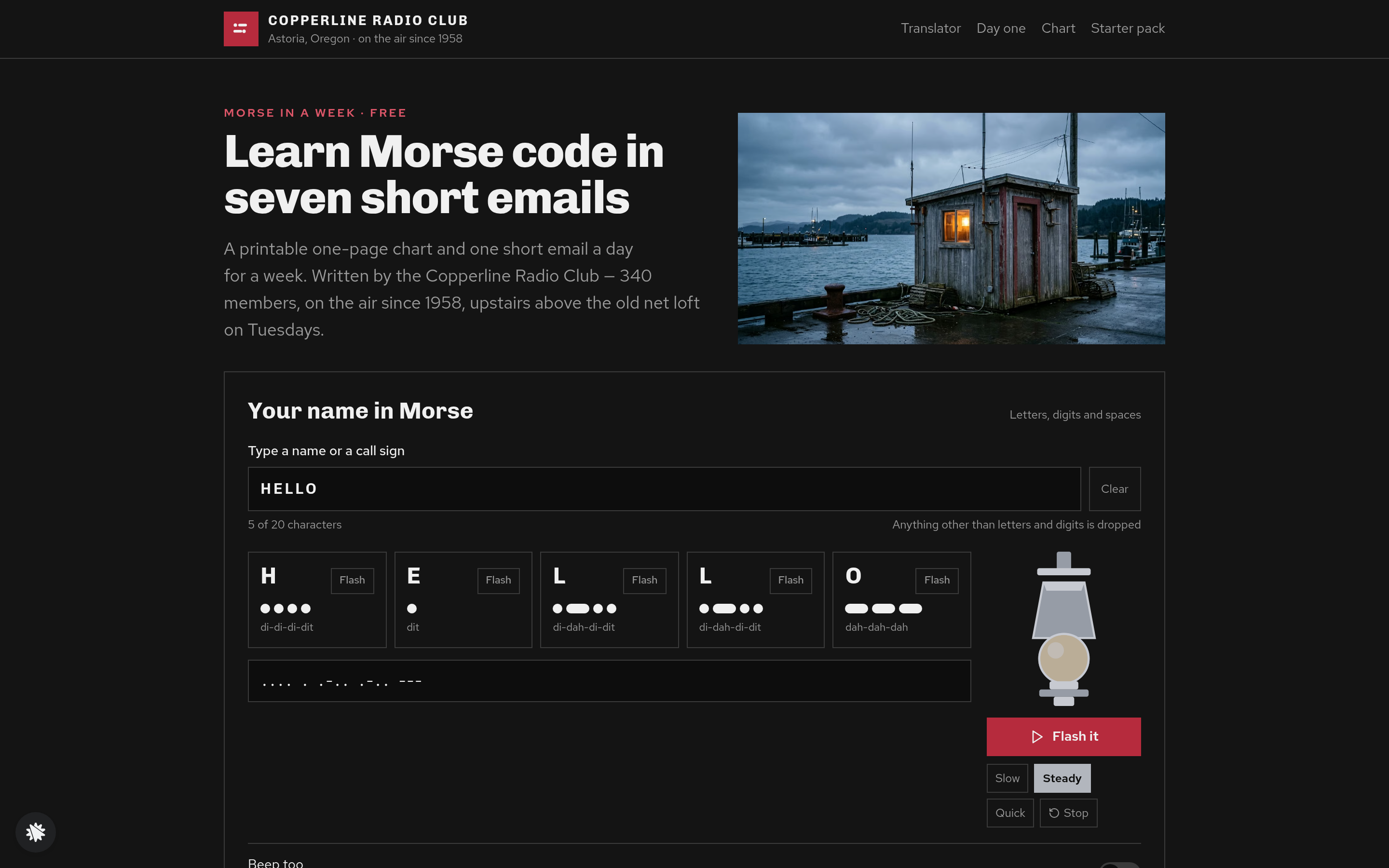
- Index (/) — the main lead page. Opens with HELLO already translated into dot-and-dash tiles. Includes the signal-lamp animation with Flash it, three speed settings (Slow, Steady, Quick), a Stop button, and an optional Beep too switch. Below the translator sits the 36-character chart grid, the seven-day course outline, three first-name member quotes, and the sign-up form (first name and email).
- Day One (/day-one) — the first email destination. Shows the visitor's own name in Morse again, then focuses on the first four letters (E, T, A, N) each with its own Flash button and a link to the Starter Pack.
- Chart (/chart) — a full printable page of all 36 characters with their sounds, optimised for a single printed sheet.
- Starter Pack (/starter-pack) — a $12 flat-fee order page for the physical chart on card, 36 practice cards, and a club sticker, with a $6 second-deck order bump.
- Pack on Its Way (/pack-on-its-way) — the receipt page with the posting date and directions to the Tuesday net.
- Dashboard (/admin) — the owner view showing visits, opt-ins, conversion rate, and recent sales.
How it works
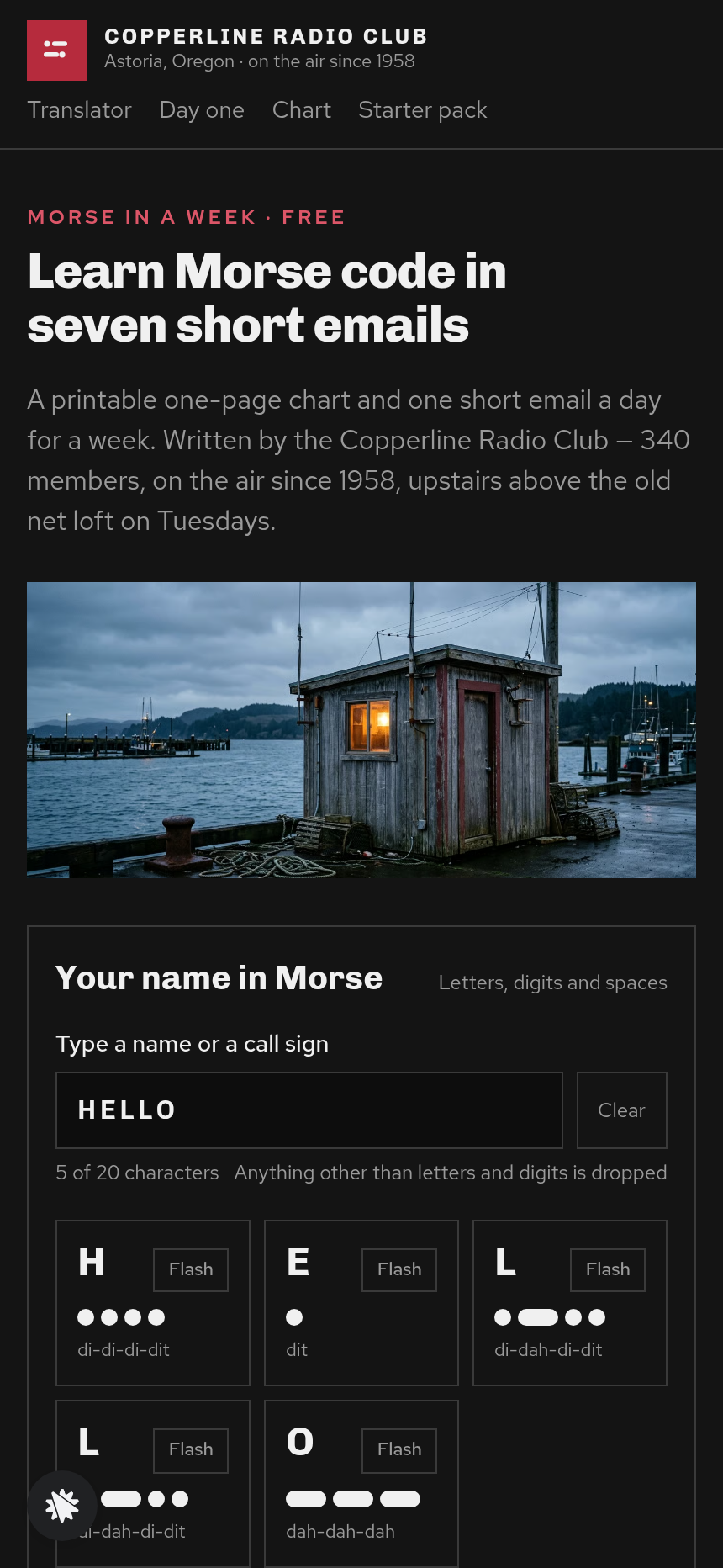
A visitor lands on Index (/), sees HELLO spelled out in Morse tiles, and types their own name. Every keystroke redraws the tiles instantly — the big letter, the dot-and-dash pattern drawn as round dots and long bars, the spoken rhythm (such as "di-di-di-dit"), and a plain-text line showing the full message. Pressing Flash it lights the drawn signal lamp with correct timing while the active tile highlights. The visitor scrolls past the 36-character chart and reads the seven-day outline, then fills in the sign-up form. Each signup, with the name typed alongside it, is kept in the funnel's records and reviewed by the Copperline officers in the admin view at /admin, where the list can be exported as a file. The seven follow-up emails go out one per day, starting with Day One, and each links back to /day-one where the subscriber sees their own name in Morse tiles again alongside the first four letters. After submitting their email, visitors also see a path to the physical Starter Pack at /starter-pack.
The signature step
The Morse translator on Index (/) is the reason the page converts. The field accepts letters, digits, and spaces up to 20 characters; anything else is silently dropped. The field opens pre-filled with HELLO, so the page never looks blank. Each character gets its own tile: a large letter, the code rendered as drawn dots and bars, and its phonetic rhythm. A plain-text line beneath the tiles shows the full message in standard notation — dots, dashes, spaces between letters, slashes between words. The lamp animation uses exact ITU timing: one unit of light for a dot, three for a dash, one dark unit between marks, three between letters, seven between words. Beep too is off by default and sets up no audio until the visitor chooses to enable it.
Who it's for
Amateur radio clubs, scout groups, museums with radio exhibits, teachers of coded alphabets, and hobby schools who want their first lesson to happen on the sign-up page. Any operator who needs a free-offer lead funnel where the demo is the product — not a video or a PDF preview — will find this structure directly applicable.
Design
- Type pairing
- Chivo display Red Hat Text body
- Motion
- the lamp flashes the message in dots and dashes while the tile being sent lights up; reduced-motion: the tiles still step, the lamp holds steady
- Signature screen
- Morse translator that turns a typed name into dot-and-dash tiles and flashes it on a drawn signal lamp
What can you use Copperline Radio Club — Morse Code Name Translator Lead Page for?
- An amateur radio club replaces Copperline's details with its own name, meeting time, and city, then shares the Index link at a hamfest to collect beginner email addresses.
- A scouting council adapts the seven-day sequence to cover radio merit badge prerequisites and uses the translator as an interactive badge-night activity before the sign-up.
- A museum with a telegraph exhibit embeds the funnel URL on a kiosk card so visitors can translate their name, then join a weekly history newsletter.
- A Morse code tutoring service removes the club branding, raises the Starter Pack price to $24 for a premium card set, and uses the Day One page as the first lesson in a paid mini-course upsell.
- A podcast about amateur radio history runs the lead page as a landing destination for a listener challenge — type your call sign in Morse — and grows its list between episode drops.
- A hobby school teaching semaphore or other visual codes swaps the Morse codes for its own character set and reuses the tile-and-lamp layout to demonstrate the notation before asking for an email.
Frequently asked questions
What is the Morse Code Name Translator Lead Page?
Who is this funnel for?
What pages are included?
How do I customize the Morse Code Name Translator Lead Page in ClickFunnels AI?
Does it include a checkout or order form?
Can I use my own branding and domain?
How is it different from a classic ClickFunnels opt-in funnel?
What setup is required before sharing the funnel?
Related templates
 Lead Pages & Opt-ins
Marin Pricing Ladder
Marin Pricing Ladder is an ebook lead magnet funnel template for ClickFunnels AI: a single opt-in page with a drawn book cover, five bullets and a two-field form, a delivery page that hands over the PDF, and a $17 workbook order page with a real card form.
 Lead Pages & Opt-ins
Butter & Bay — One-Oven Holiday Dinner Planner Lead Page
Holiday Dinner One-Oven Planner Lead Page is a giveaway-style opt-in funnel made with ClickFunnels AI for Butter & Bay Cooking School in Raleigh, North Carolina. Visitors set their turkey weight, dinner time and sides, read a one-oven timeline, then submit the "Email me this plan" form to keep it.
 Lead Pages & Opt-ins
Fernbrook Studio — 5-Day Pricing Email Course Lead Page
The email-course lead page is an email-course squeeze funnel that captures freelancer opt-ins with a five-day pricing course, delivers day 1 instantly on a confirmation page, and bridges to a $29 template pack. ClickFunnels AI builds it from a single prompt and lets you edit every line of copy, the day-by-day outline, and the order form through a plain-language chat.
 Lead Pages & Opt-ins
Bluewater Move Quote
The multi-step quote lead page is a desktop inline stepper that walks visitors through three numbered steps — need, details, contact — and delivers a quote-ETA confirmation on a separate thank-you page. ClickFunnels AI builds and wires both pages from a single prompt, ready to adapt to any service business that needs several answers before a human can price a job.
Make this template your starting point.
Inspect the preview, plan your changes, and test the workflow before you share it.
Use this template