The Larkspur Line — Touring Band Booking Site
The Larkspur Line is a touring-band booking site built in ClickFunnels AI that turns a folk duo's spring tour route into a live funnel — nine cities, booked or open nights, a tap-to-request form, a house-concert host application, and a signed-vinyl pre-order with checkout, all wired together on four pages.
About this template
What is The Larkspur Line — Touring Band Booking Site?
The Larkspur Line booking site is a funnel built for a two-piece folk duo (fiddle and guitar, three albums, 220 shows) trying to fill 30 spring nights with house concerts and small-venue dates across the Mountain West and Midwest. The design is built around one idea: show every night on the route and let venues and hosts claim the open ones. That means the funnel has a job before anyone pulls out a card — routing strangers from "I heard about these two" to "I want that open Wednesday in Billings" to a signed-vinyl pre-order that ships in four weeks.
What you get
The funnel ships as four visitor-facing pages and one admin view:
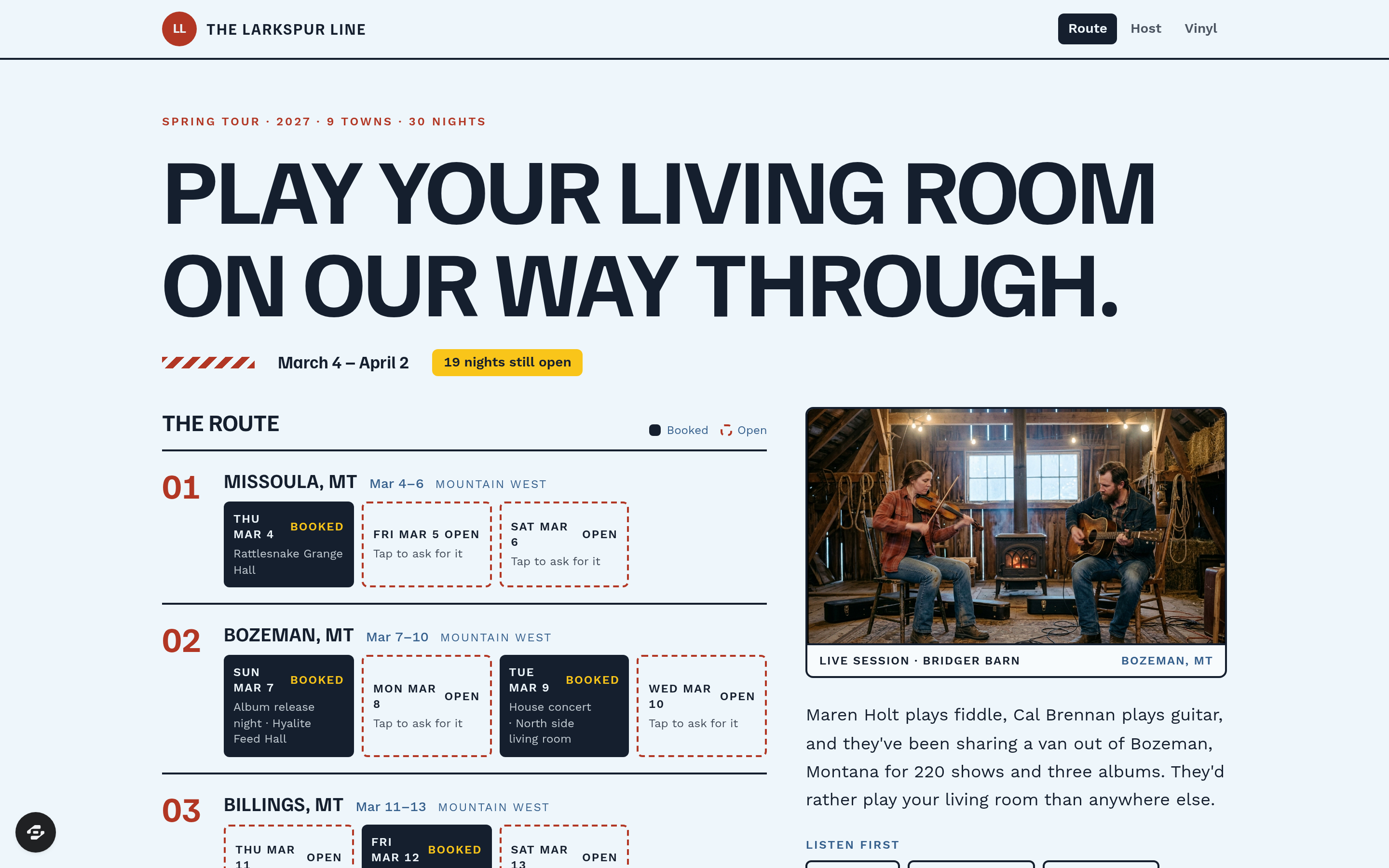
- Home (/) — a condensed headline and date strip above a city-by-city route list of booked and open nights, a live-session photo and short bio, streaming links, and four press quotes from regional papers and radio shows.
- House Concerts (/house-concerts) — a four-step explainer ($20 suggested donation at the door, no one turned away), a printable host checklist, and a host application form (closest tour stop, town, capacity, any notes) that writes a real lead.
- Merch (/merch) — a signed-vinyl pre-order for the new album at $32 with a computed ship date four weeks out, a real card checkout, and an $8 tote-bag order bump.
- Order Thank-You (/order-thank-you) — confirms the order, shows the ship date, and surfaces the tour route and house-concert links for cold visitors who land here without buying.
- Dashboard (/admin) — the owner view: conversion summary, all pages in visitor order, and every lead (booking requests and host applications) with CSV-ready contact records.
How it works
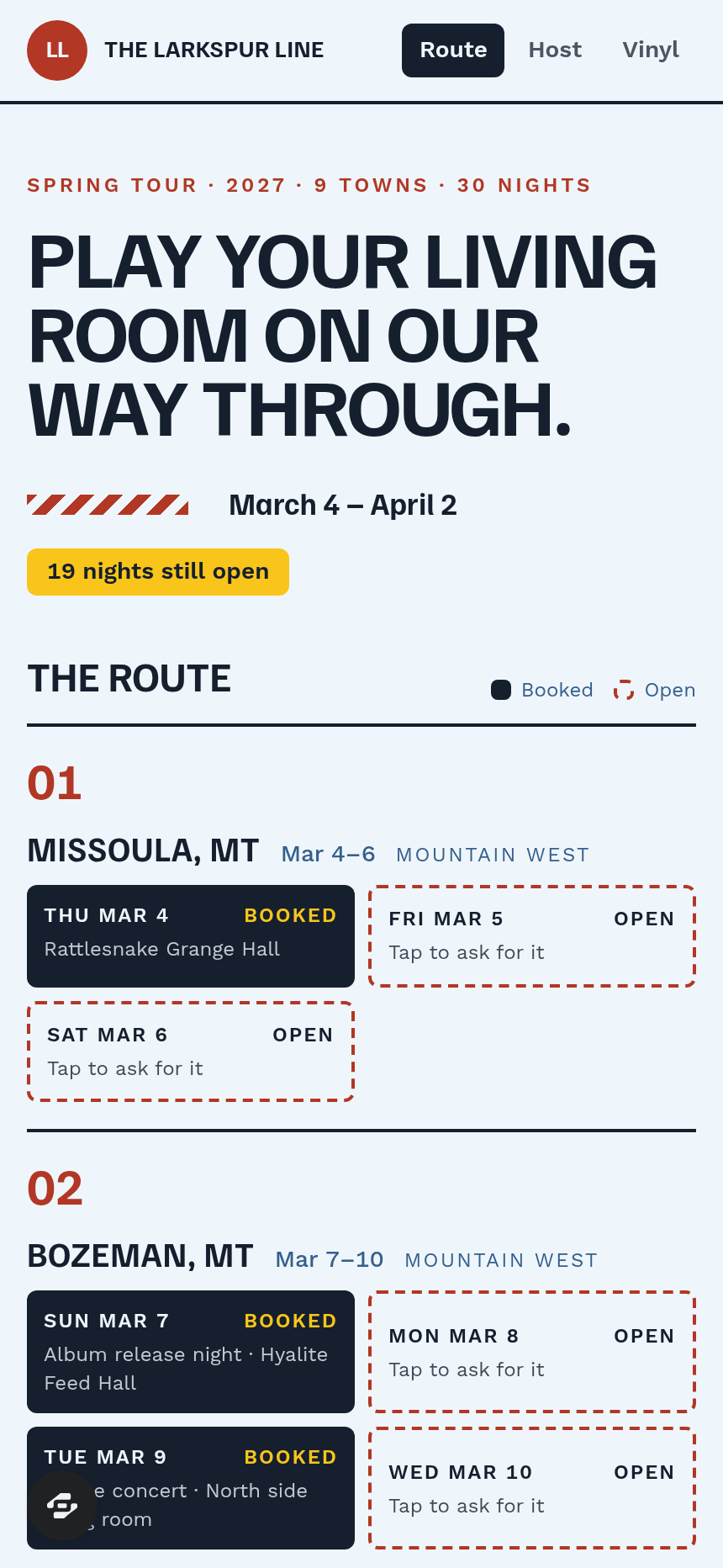
- A visitor lands on the home page and sees the route calendar — nine cities, each night either "booked" (venue named) or "open" (dashed, tap to request).
- Tapping an open night opens the Night Request dialog: venue or host name, type of night (house concert or venue), capacity, and payment preference (fee or door donation), plus name and email. Submitting flips that tile to "asked" and writes the lead to the built-in contact database, where every booking request and host application is stored and surfaced in the owner dashboard — no external CRM needed to start collecting them.
- Visitors who want to host a house concert follow the /house-concerts path: read the four-step explainer, tick through the host checklist, and submit the host application form, which also writes a real lead.
- The vinyl card on the home page routes to /merch, where ClickFunnels AI wires together the order form, an optional $8 tote-bag bump charged at the same time, and the order thank-you page — the full money path in one checkout flow.
- The /order-thank-you page confirms the ship date and loops every visitor — buyer or not — back to the route and house-concert pages.
The signature step
The route calendar is what makes this funnel different from a band's standard bio page. Each city row shows a strip of date tiles: dark filled tiles name the venue and read "booked"; dashed red tiles read "tap to ask for it." Tapping one opens the Night Request dialog inline — the visitor never leaves the page. After submitting, the tile text updates to reflect the pending request, and Maren or Cal (the duo) writes back within two days. Nothing is held until both sides say yes, which the confirmation copy states plainly.
Who it's for
That contact record — name, night requested, room type, capacity, payment preference — arrives in the dashboard with no extra integration, so owners can describe the change they want and the page updates to match. When you describe a change to a city, a price, or a form field in plain language, the edit applies across the pages that reference it.
This funnel works for any touring act, comedian, speaker, or author routing a multi-city tour and needing hosts or small venues to self-select into open nights — without managing a separate booking inbox or spreadsheet from day one.
Design
- Type pairing
- Familjen Grotesk display Work Sans body
- Motion
- none; reduced-motion: static
- Signature screen
- Route calendar of booked and open nights
- References
-
- Tour routing pages
What can you use The Larkspur Line — Touring Band Booking Site for?
- A folk duo routing a 30-night spring tour publishes the route calendar on day one and collects venue and house-concert requests before booking a single night.
- A comedian doing a regional run sets each city night to booked or open and lets small venues and house hosts claim dates directly through the tap-to-request form.
- A touring author uses the house-concert host application at `/house-concerts` to find readers willing to host an intimate reading in their home, with the host checklist reducing back-and-forth emails.
- A band uses the `/merch` pre-order to fund pressing costs before the tour starts, offering a signed copy at $32 with a tote-bag bump, and tracking every order in the admin dashboard.
- A speaker doing a mountain-state circuit embeds the route calendar on their home page so event organizers can see which dates are still open and request one without sending a cold email.
- A solo musician opens the admin dashboard after each week on the road to review all pending night requests — venue name, capacity, payment preference — and responds from the same contact record.
Frequently asked questions
What is the Touring Band Booking Site?
Who is it for?
What pages are included?
How do I customize the Touring Band Booking Site in ClickFunnels AI?
Does it include a checkout or order form?
Can I use my own branding and domain?
How is it different from a classic ClickFunnels booking funnel?
What setup is required?
Related templates
 Personal Brand
Hollis Reed — Family Historian Fan Chart Site
The Family Historian Fan Chart Site is a four-page service funnel built in ClickFunnels AI for a genealogy researcher. The home page draws an interactive fan chart from a birth year, two intake steps gather the research details, and a $350 card checkout closes the sale with an optional $45 framed-chart bump.
 Personal Brand
Maren Holt — Line-Up-the-Layers Printmaker Site
Maren Holt — Line-Up-the-Layers Printmaker Site is a ClickFunnels AI product-sales template for a screen printmaker in Duluth, Minnesota. Visitors line up a two-colour print with an interactive registration tool before buying a numbered edition of 50 for a flat $65.
 Personal Brand
Margo Pell — Monday Mini Crossword Personal Site
Margo Pell Monday Mini Crossword Personal Site is a lead-magnet-with-product-sale funnel built in ClickFunnels AI for a crossword maker's personal site. It opens on a playable four-by-four mini, converts solvers into Monday-email subscribers, and sells a $24 book of 52 full-size puzzles.
 Personal Brand
Wren Ashby — Wedding Planner Seating Chart Site
Wedding Planner Seating Chart Site is a lead-capture service funnel built with ClickFunnels AI for wedding planners who sell a flat-rate seating plan — couples arrange 24 guests across three tables, see conflicts in plain language, then pay $85 for the finished chart, place-card list, and drawn table map.
Make this template your starting point.
Inspect the preview, plan your changes, and test the workflow before you share it.
Use this template