Thistle & Wren Press — Colouring Book Sample Page Funnel
The Colouring Book Sample Page Funnel is a book-sales funnel template in ClickFunnels AI that lets a visitor colour an actual page from the product before it asks them to buy. It combines an interactive harbour drawing with a two-step order card, a one-time pencil offer, and a personalised thank-you page that shows the reader's own coloured page back to them.
About this template
What is Thistle & Wren Press — Colouring Book Sample Page Funnel?
Thistle & Wren Press sells Small Harbours, a 48-page colouring book for grown-ups, for one flat $16 posted from Port Townsend, Washington. This funnel template turns that single product into a four-page selling sequence anchored by an interactive colouring experience: the visitor colours a real harbour drawing before they ever see a price. The result is a sample-first funnel suited to any physical or printable book that is better tried than described.
What you get
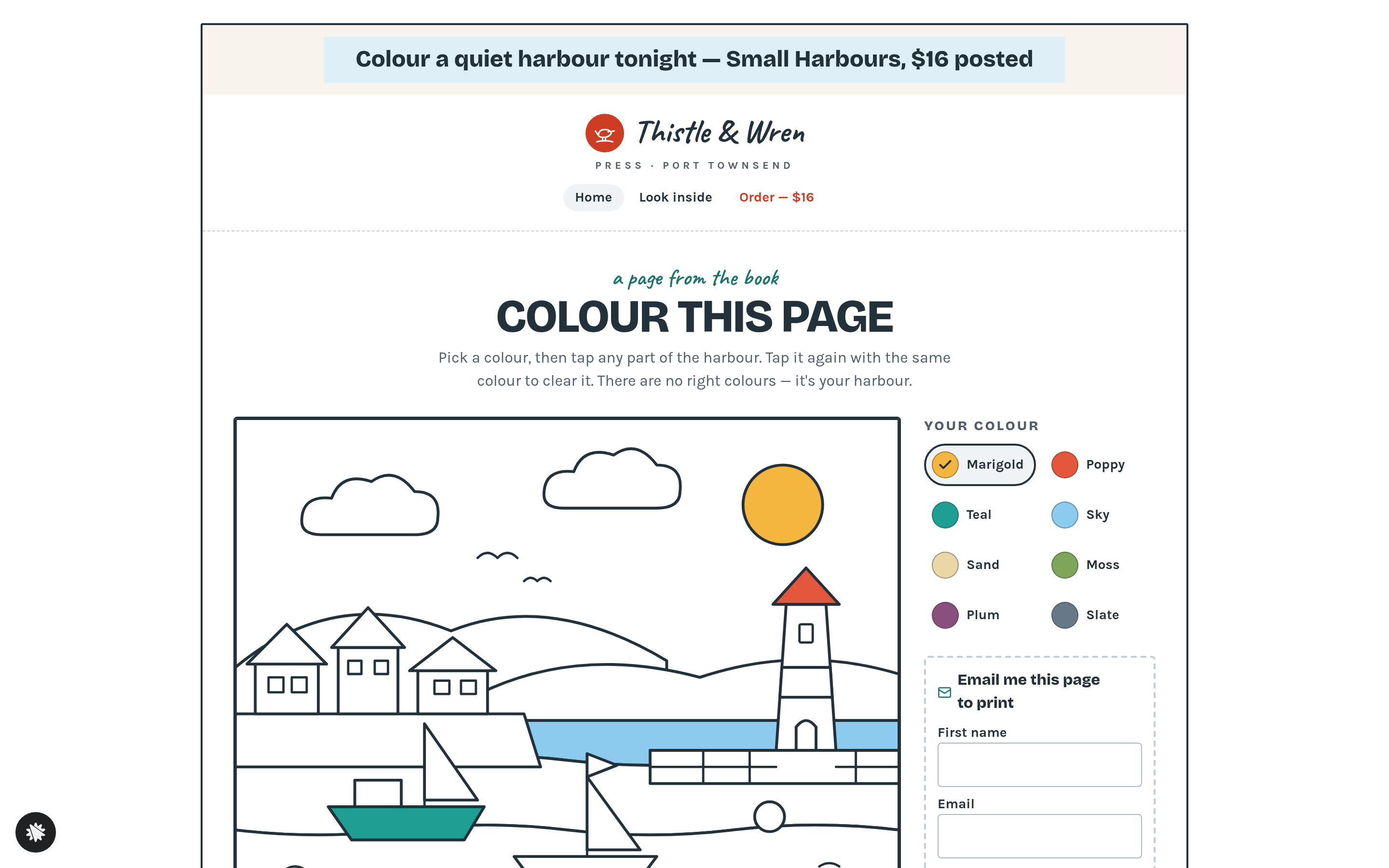
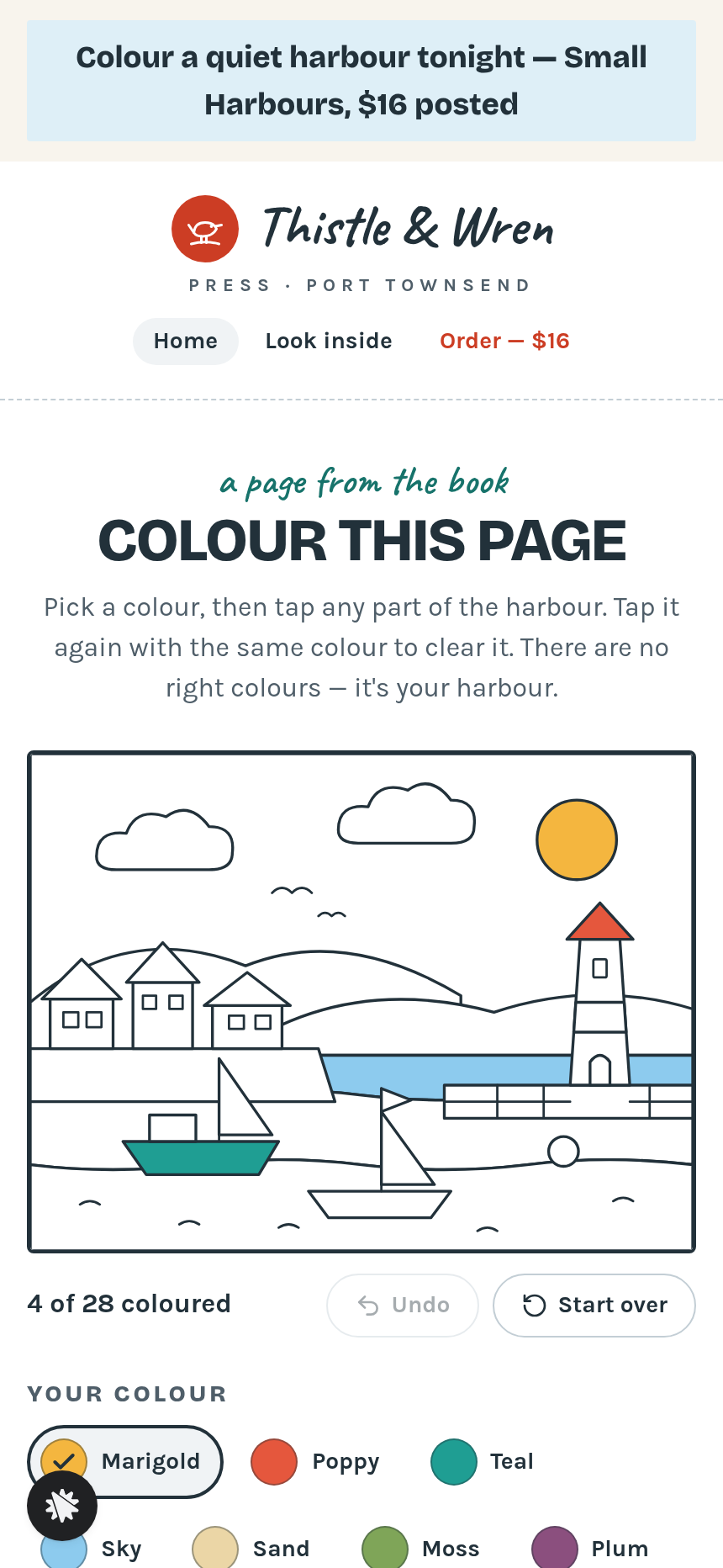
- Sales Page (/) — one scrolling selling page. Directly under the logo sits the "Colour this page" interaction: a harbour line drawing divided into 28 named parts, eight colour buttons, an Undo control, a Start over control, and an "Email me this page to print" form. Below that, four chapter bands (Shorebirds, Lighthouses, Marguerite, and a wide dusk-light page) each pair a tick list with a fan of sample drawn pages. Reader quotes and the two-step order card follow, with a dashed bonus-pack add-on box ($6 ten-page printable pack) and a single wide checkout button for the $16 book.
- One-Time Offer (/one-time-offer) — a tin of 24 colouring pencils for $14, charged in one click to the card just used, with a plain "No thanks, I have pencils" decline link.
- Thank-You (/thank-you) — receipt, dispatch date, the reader's own coloured harbour page drawn again, a "Print your page" link to /print, and a peek at the pages waiting inside the book.
- Look Inside (/look-inside) — twelve sample pages, three from each chapter, with a note that every page is printed on one side only on heavy cream paper.
- Print (/print) — the reader's coloured harbour page formatted for one-sheet printing.
- Admin Dashboard (/admin) — funnel conversion rate, recent contacts with test-traffic labelling, recent sales, and a breakdown of each step in the order visitors reach them.
How it works
- A visitor lands on / and is invited to colour a harbour before anything else is asked of them.
- They pick a colour and tap parts of the 28-part drawing.
- Scrolling down brings four chapter bands and reader quotes before the order card.
- Step 1 of the order card collects a shipping address; Step 2 opens the card-payment panel with the optional $6 Bonus Pack add-on.
- After payment, the funnel routes them to /one-time-offer, where a one-click pencil-tin offer charges the saved card. The full money path runs / → /one-time-offer → /thank-you.
- The thank-you page shows their receipt, the posting date, and their own coloured page, with a link to print it.
It ships as a finished design (fonts Bricolage Grotesque, Karla and Caveat; palette ink navy, pale sky blue, deep plum and harbour teal), so you start from a working funnel rather than a blank canvas.
The signature step
"Colour this page" is the first interactive element a visitor encounters on /. The harbour drawing opens with four parts already filled; the visitor taps any of the eight named colours and then any of the 28 named harbour parts to fill it. Tapping the same part again clears it. The finished page travels through the funnel, appearing again on /thank-you and sendable to /print, so the sample the reader made becomes part of their receipt.
Who it's for
- Illustrators and small presses selling a physical colouring or activity book at a single flat price
- Anyone running a book funnel who wants a post-purchase pencil or supply upsell already built in
Design
- Type pairing
- Bricolage Grotesque display Karla body
- Motion
- a tapped part fills with a quick wash of colour and the counter ticks; reduced-motion: the fill appears at once
- Signature screen
- Colour-this-page sample: a 28-part harbour drawing filled by tapping, remembered through to the thank-you page
- References
-
- 0.102 membership offer page (bordered column, alternating feature bands with collages, two-tab order card)
What can you use Thistle & Wren Press — Colouring Book Sample Page Funnel for?
- A small press in a coastal town sells a hand-illustrated harbour colouring book and uses the funnel's interactive drawing to let buyers sample one real page before they order, cutting bounce rate on a product that is hard to describe in words.
- A self-publishing illustrator adds a one-click pencil-tin upsell at `/one-time-offer` to raise average order value without building a separate product page or changing the checkout flow.
- A stationery brand running a limited print run uses the Look Inside page at `/look-inside` and the Print page at `/print` as proof-of-quality assets, linking to them from social posts to warm cold traffic before they hit the order card.
- An activity-book author replaces the harbour drawing with a botanical line drawing from their own book, updates the eight colour names and 28 part labels in the brief, and launches a sample-first funnel for a nature-themed colouring title.
- A puzzle-book publisher watches conversion from the Sales Page to the One-Time Offer on `/admin`, checking whether buyers who colour more parts convert better than those who skip the drawing.
- An art-supply shop pairs the colouring funnel with a physical book bundle, using the dashed Bonus Pack add-on box on the order card to offer a downloadable companion pack alongside the posted book, keeping the checkout to a single page.
Frequently asked questions
What is the Colouring Book Sample Page Funnel?
Who is this funnel for?
What pages are included?
How do I customize the Colouring Book Sample Page Funnel in ClickFunnels AI?
Does it include a checkout or order form?
Can I use my own branding and domain?
How is it different from a classic ClickFunnels book funnel?
What setup is required before going live?
Related templates
 Books & Applications
Keel & Compass — 9-Question Fit Check Application Funnel
The Quiz-Style Application Funnel is a nine-question, one-per-screen fit check that scores every applicant and routes qualified leads to a calendar booking while sending everyone else to a resource — built and customizable in ClickFunnels AI.
 Books & Applications
Weeknight Pantry — What Can I Cook Free-Plus-Shipping Cookbook Funnel
What is the Pantry Cookbook Free-Plus-Shipping Funnel? Built with ClickFunnels AI, it ships a printed cookbook for shipping fees only and opens with a live ingredient matcher.
 Books & Applications
Highfield — Steer-by-Height Balloon Pilot Application Funnel
Highfield Steer-by-Height Balloon Pilot Application Funnel is an application funnel for a hot-air balloon flight school in Indianola, Iowa. It opens with a playable steering puzzle, then takes applicants through questions, an interview booking and a refundable $50 application fee.
 Books & Applications
Fifty Detours — States Visited Road-Trip Book Funnel
The States Visited Road-Trip Book Funnel is a book template in ClickFunnels AI built for Odometer Press, with an interactive tile map where readers tick each state they have visited. The map drives the two-step order for the paperback Fifty Detours, so the reader's own travel history becomes the reason to buy.
Make this template your starting point.
Inspect the preview, plan your changes, and test the workflow before you share it.
Use this template